
Introduction
This manual provides detailed instructions for the use and maintenance of your Strong SRT 7404 HD remote control. This remote is designed as an original replacement for the Strong SRT 7404 HD FRANSAT receiver, ensuring full compatibility and functionality.
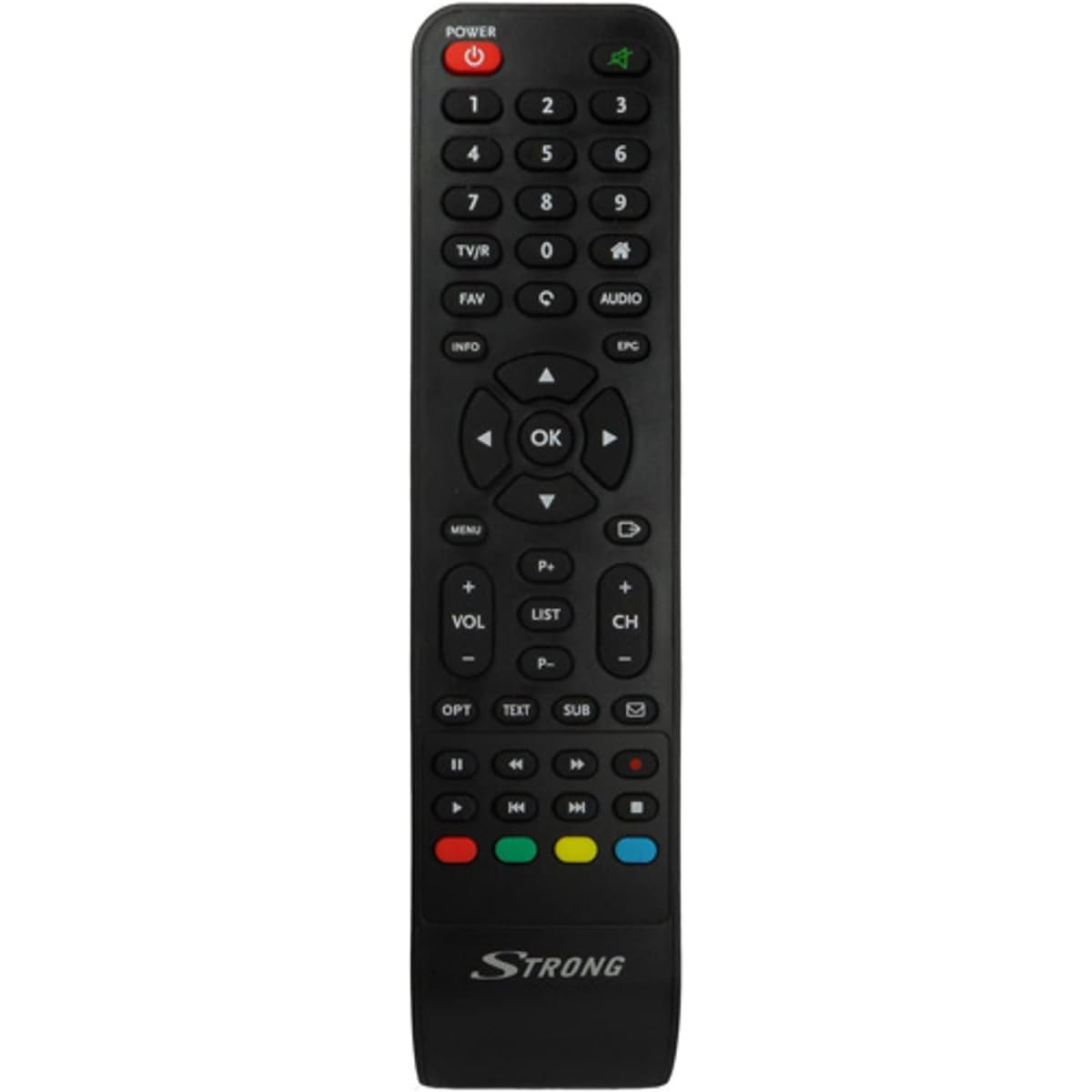
Image: The Strong SRT 7404 HD remote control, black in color, featuring various control buttons for television and receiver functions.
Setup
1. Battery Installation
- Locate the battery compartment on the back of the remote control.
- Slide the battery cover downwards or in the direction indicated by an arrow to open it.
- Insert two AAA alkaline batteries (not included), ensuring the positive (+) and negative (-) terminals align correctly with the markings inside the compartment.
- Replace the battery cover by sliding it back into position until it clicks securely.
Note: Always use new alkaline batteries for optimal performance. Do not mix old and new batteries, or different types of batteries.
2. Initial Use
The Strong SRT 7404 HD remote control is an original replacement and is pre-programmed for the Strong SRT 7404 HD FRANSAT receiver. No additional setup or pairing is typically required. Simply install the batteries and point the remote control towards your receiver to begin operation.
Operating Instructions
This section outlines the basic functions of the remote control buttons.
- Power Button: Turns the receiver on or off.
- Channel Up/Down: Navigates through television channels.
- Volume Up/Down: Adjusts the audio volume.
- Mute Button: Silences or restores the audio.
- Number Buttons (0-9): Directly selects channels or enters numerical data.
- Menu Button: Accesses the receiver's main menu.
- Navigation Buttons (Up, Down, Left, Right, OK): Used to navigate menus and confirm selections.
- Exit/Back Button: Returns to the previous screen or exits a menu.
- Info Button: Displays program information.
- Color Buttons (Red, Green, Yellow, Blue): Functions vary depending on the on-screen menu or application.
Refer to your Strong SRT 7404 HD FRANSAT receiver's manual for specific functions related to its menu system and advanced features.
Maintenance
Cleaning
To clean the remote control, gently wipe its surface with a soft, dry cloth. For stubborn dirt, slightly dampen the cloth with water. Avoid using abrasive cleaners, solvents, or alcohol, as these can damage the remote's finish or internal components.
Battery Replacement
Replace batteries when the remote control becomes unresponsive or its range decreases significantly. Follow the battery installation steps outlined in the "Setup" section. Dispose of used batteries according to local regulations.
Storage
When not in use for extended periods, remove the batteries to prevent leakage, which can damage the remote control. Store the remote in a cool, dry place away from direct sunlight and extreme temperatures.
Troubleshooting
- Remote Control Not Responding:
- Check if the batteries are correctly inserted with the correct polarity (+/-).
- Replace old batteries with new alkaline batteries.
- Ensure there are no obstructions between the remote control and the receiver's infrared sensor.
- Make sure you are within the effective operating range (up to 10 meters).
- Point the remote directly at the receiver.
- Specific Buttons Not Working:
- Clean the remote control surface, especially around the unresponsive buttons, to remove any dirt or debris that might be preventing proper contact.
- If cleaning and battery replacement do not resolve the issue, the button or remote may be faulty.
Specifications
| Feature | Detail |
|---|---|
| Brand | STRONG |
| Model Name | 7404 |
| Special Feature | Lightweight |
| Color | Black |
| Max Supported Devices | 1 |
| Compatible Devices | TV Decoder (Strong SRT 7404 HD FRANSAT Receiver) |
| Connectivity Technology | Radio Frequency |
| Number of Buttons | 5 |
| Controller Type | Remote Control |
| Maximum Range | 10 Meters |
| Battery Type | Alkaline (AAA, not included) |
| Country of Origin | China |
Warranty and Support
Warranty Information
This Strong SRT 7404 HD remote control comes with a 2-year warranty from the date of purchase. This warranty covers manufacturing defects under normal use. Please retain your proof of purchase for warranty claims.
Customer Support
For further assistance, technical support, or warranty inquiries, please contact Strong customer service. Contact details can typically be found on the official Strong website or through your product retailer.
You can visit the official Strong brand store for more information: Strong Brand Store


