1. Introduction
The Golvery J205 Bluetooth 5.4 Audio Receiver is designed to convert traditional wired audio systems into wireless Bluetooth-enabled systems. This device allows you to stream audio wirelessly from your smartphone, tablet, or other Bluetooth-enabled devices to your home stereo, car stereo, wired speakers, or wired headphones. It features Bluetooth 5.4 technology for stable connectivity and high-quality audio transmission.
2. Package Contents
Please check the package for the following items:
- 1x Golvery J205 Bluetooth Receiver with 3.5mm cable
- 1x USB-C Charging Cable
- 1x RCA Audio Cable (3.5mm to 2RCA adapter)
- 1x User Manual

Image: Contents of the Golvery J205 package, including the receiver, USB-C charging cable, RCA audio cable, and user manual.
3. Product Overview
The Golvery J205 features a compact design with essential controls and ports for easy operation.

Image: Front view of the Golvery J205 Bluetooth receiver, showing the integrated 3.5mm audio jack, play/pause button, and included RCA adapter cable.
Device Components:
- Power ON/OFF Slider: Located on the side of the device to turn it on or off.
- Play/Pause Button: Central button for controlling audio playback.
- 3.5mm Audio Jack: Integrated cable for connecting to audio input ports.
- USB-C Charging Port: For charging the internal battery.
- LED Indicator: Provides status information (pairing, connected, charging).
4. Setup and Connection
4.1 Charging the Device
Before first use, fully charge the Golvery J205. Connect the included USB-C charging cable to the receiver's USB-C port and the other end to a USB power source (e.g., wall adapter, computer USB port). The LED indicator will show charging status and turn off when fully charged. A full charge takes approximately 2 hours and provides up to 20 hours of playtime.
4.2 Connecting to Your Audio System
The J205 can connect to various audio systems using its 3.5mm audio jack or the included RCA adapter.
- For 3.5mm AUX Input: Plug the integrated 3.5mm audio jack of the J205 directly into the 3.5mm AUX input port of your car stereo, home stereo, wired speaker, or wired headphones.
- For RCA Input: If your audio system has RCA (red and white) input ports, connect the included 3.5mm to 2RCA audio cable to the J205's 3.5mm jack, then connect the red and white RCA plugs to the corresponding input ports on your audio system.

Image: A diagram illustrating how the Golvery J205 Bluetooth receiver connects to different audio sources like phones, tablets, computers, and outputs to home stereos, wired speakers, car stereos, and wired headphones.

Image: The Golvery J205 Bluetooth receiver placed on top of a home stereo receiver, connected via its audio cable, enabling wireless audio streaming.

Image: The Golvery J205 Bluetooth receiver plugged into the AUX input of a car stereo, with a smartphone displaying music playback, indicating wireless audio streaming in a vehicle.
4.3 Pairing with a Bluetooth Device
- Power On: Slide the ON/OFF switch to the "ON" position. The LED indicator will flash, indicating it is in pairing mode.
- Activate Bluetooth: On your smartphone, tablet, or other Bluetooth device, enable Bluetooth.
- Select Device: Search for "J205" in the list of available Bluetooth devices and select it to connect.
- Confirmation: Once connected, the LED indicator will stop flashing and remain solid, and you may hear an audible confirmation.
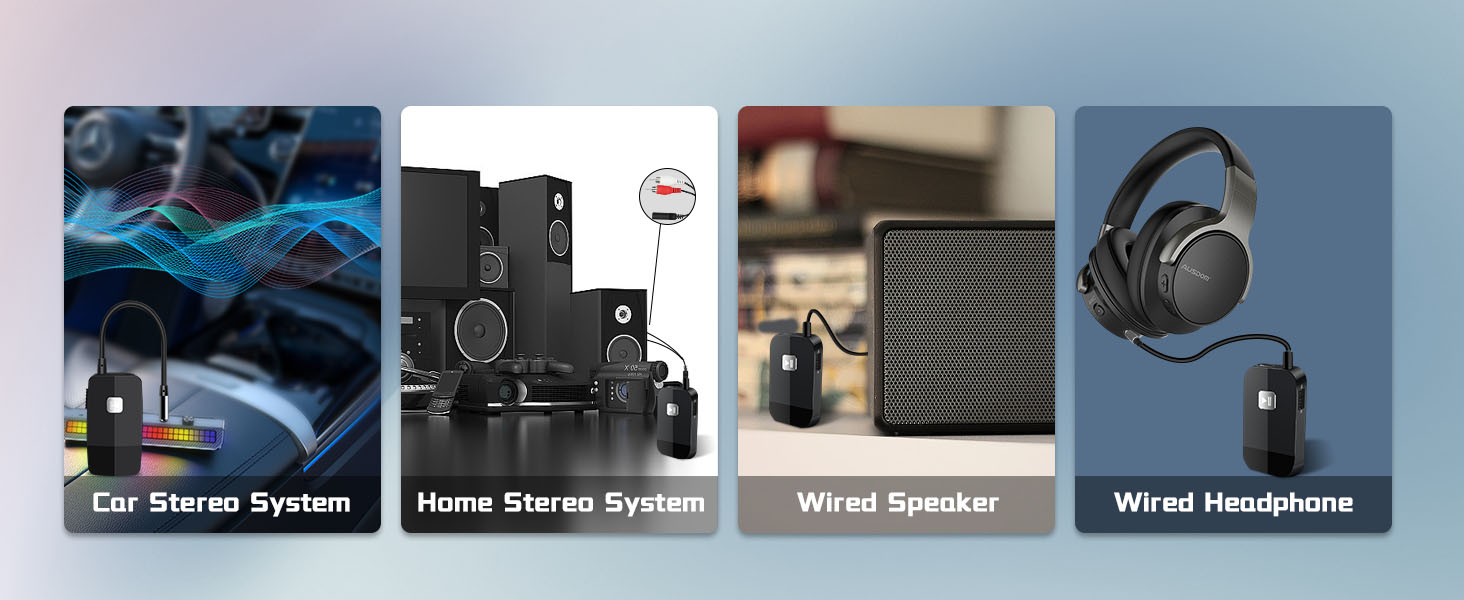
Image: A visual guide showing four steps: 1. Sliding the ON/OFF switch, 2. Plugging in the device, 3. Pairing with a smartphone, and 4. Enjoying music playback.
4.4 Dual Device Connection
The Golvery J205 supports connecting to two Bluetooth devices simultaneously. This allows you to switch between audio sources without re-pairing.
- Pair the first device (e.g., Smartphone A) with the J205 as described in Section 4.3.
- After Smartphone A is connected, disable Bluetooth on Smartphone A. The J205 will re-enter pairing mode.
- Pair the second device (e.g., Tablet B) with the J205.
- Enable Bluetooth on Smartphone A again. Both devices should now be connected to the J205.
- To switch between devices, pause playback on the currently active device and start playback on the other.

Image: The Golvery J205 Bluetooth receiver shown connected to both a tablet and a smartphone, illustrating its dual connection capability.
5. Operation
5.1 Power On/Off
- Power On: Slide the ON/OFF switch to the "ON" position. The device will automatically attempt to reconnect to the last paired device.
- Power Off: Slide the ON/OFF switch to the "OFF" position.
5.2 Music Playback
- Play/Pause: Press the central Play/Pause button once to play or pause music.
- All other music controls (volume, track skip) must be managed directly from your connected Bluetooth device (smartphone, tablet, etc.).
6. Important Notes and Safety Information
- The Golvery J205 is a Bluetooth receiver only; it is NOT a Bluetooth transmitter. It cannot transmit audio from non-Bluetooth devices (like a TV or PC) to Bluetooth headphones or speakers.
- This device does NOT have a built-in microphone and therefore does not support hands-free calling.
- Avoid placing the device near other electronic devices that may cause interference.
- Handle the internal battery with care. Do not expose to extreme temperatures, direct sunlight, or high humidity.
- Do not attempt to disassemble or modify the device, as this will void the warranty and may cause damage.
- Keep out of reach of children.
7. Troubleshooting
| Problem | Possible Solution |
|---|---|
| Device does not power on. | Ensure the ON/OFF slider is in the "ON" position. Charge the device using the USB-C cable. |
| Cannot pair with my Bluetooth device. |
|
| No sound or low sound output. |
|
| Audio cuts out or is unstable. |
|
8. Specifications
| Model | J205 |
| Bluetooth Version | 5.4 |
| Bluetooth Profile | A2DP |
| Connectivity | 3.5mm Audio Jack, RCA (via adapter) |
| Battery Capacity | 240mAh Lithium Polymer |
| Charging Time | Approx. 2 hours |
| Playtime | Up to 20 hours |
| Standby Time | Up to 400 hours |
| Dimensions (L x W x H) | 1.97 x 1.06 x 0.31 inches (50 x 27 x 8 mm) |
| Weight | 0.459 ounces (13 grams) |
| Material | Plastic |
9. Warranty and Support
Golvery products come with a standard manufacturer's warranty. For specific warranty details, technical support, or customer service inquiries, please refer to the contact information provided in the physical user manual included with your product or visit the official Golvery website. Please retain your proof of purchase for warranty claims.

