
Life Fitness E1TC-XX00-0105
Life Fitness E1 Cross Trainer Elliptical Exercise Machine with Track Connect Console User Manual
Model: E1TC-XX00-0105
Introduction
This manual provides essential information for the safe and effective use of your Life Fitness E1 Cross Trainer Elliptical Exercise Machine with Track Connect Console. Please read this manual thoroughly before assembly, operation, or maintenance.
The E1 cross-trainer offers an effective low-impact, total-body workout for home exercisers of all fitness levels. Years of Life Fitness innovation and research have resulted in an inviting cross-trainer that combines a comfortable, natural feel with outstanding durability and quiet operation.
Important Safety Information
Always consult with a physician before beginning any exercise program. If you experience any pain, faintness, or dizziness, stop exercising immediately and consult your physician.
WARNING: Read and follow all instructions and warnings. Improper use could result in serious injury. Keep children away from this equipment.
CAUTION: Before exercising, if you feel pain, faint, dizzy or short of breath, stop immediately and consult your physician.
- Ensure all parts are properly assembled and tightened before use.
- Place the equipment on a flat, stable surface.
- Keep hands and feet clear of moving parts.
- Maximum user weight: 400 pounds.
- Only one person should use the equipment at a time.
- Do not allow children or pets near the equipment during operation.
Setup and Assembly
Your Life Fitness E1 Cross Trainer comes with the necessary components for assembly. Please ensure you have all included components before beginning:
- Cross-trainer frame
- Console
- Chest strap
- Power cord
- Manual (this document)
For detailed assembly instructions, refer to the separate assembly guide provided with your product. Ensure all connections are secure and stable before first use.
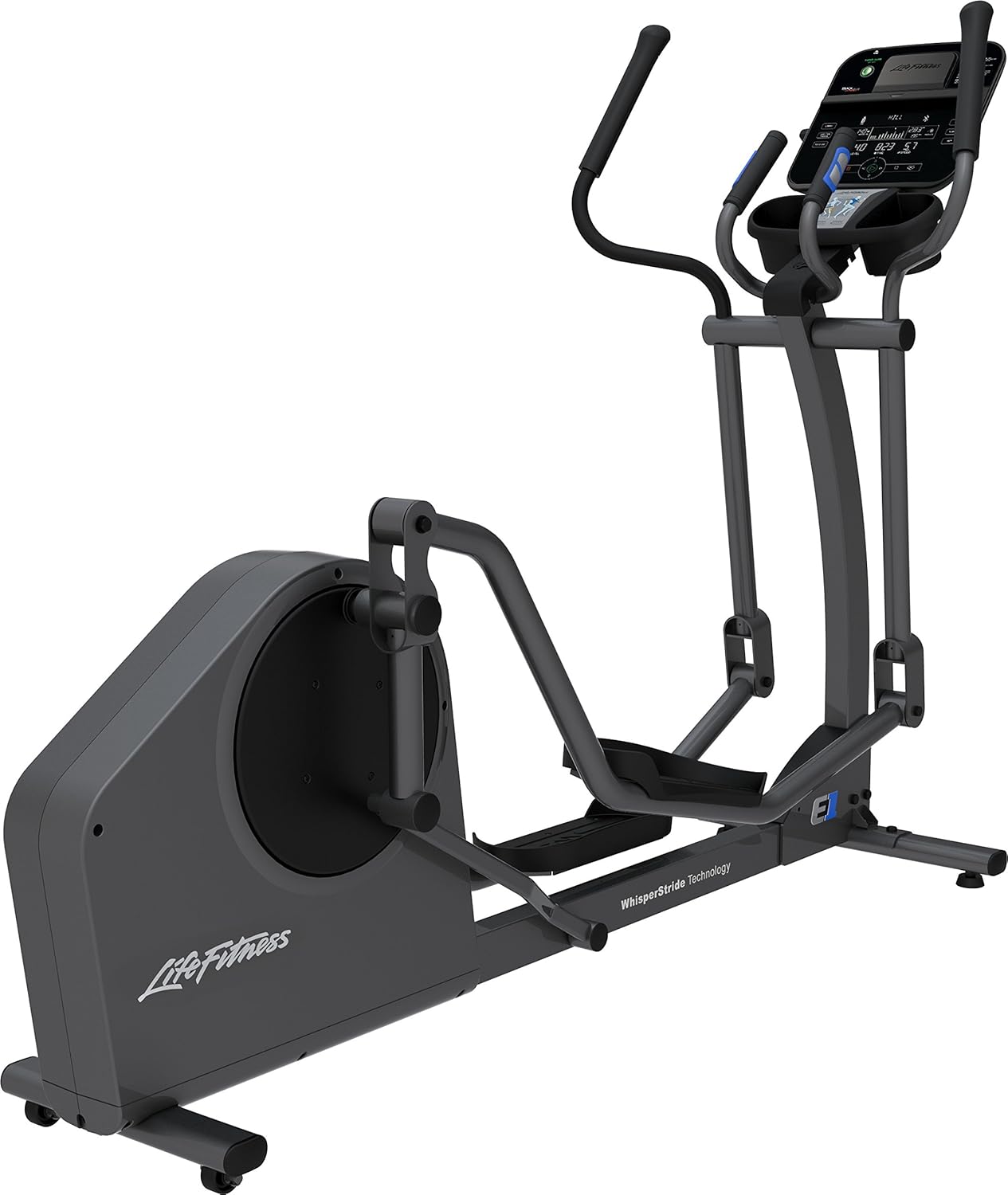
Image: The Life Fitness E1 Cross Trainer Elliptical Machine, showing its full assembled form with the console and moving handlebars.
Operating Instructions
Console Features: Track Connect Console

Image: Close-up of the Life Fitness Track Connect Console, displaying various workout metrics, buttons for program selection, and a tablet/phone holder.
The Track Connect Console is designed for an engaging and intuitive workout experience. It features a dual-zone design:
- Entertainment Zone: Placed at eye level for an ideal viewing experience. The compression rack securely holds all smartphones and tablets, even those with a protective case.
- Workout Zone: The lower half of the console offers convenient workout setup and in-workout control. It features capacitive touch keys that illuminate when usable and dim when not in use.
Getting Started
- Power On: Connect the power cord to the elliptical and a suitable power outlet. The console will power on.
- User Profiles: The console supports up to 4 user profiles. Select or create a profile to track your progress.
- Workout Selection: Choose from 16 pre-programmed workouts or create up to 12 custom workouts.
- Resistance Adjustment: The elliptical features 20 electro-magnetic resistance levels. Adjust resistance using the console controls to match your fitness level.
- Start Workout: Begin pedaling. The console will display your workout metrics such as time, speed, distance, and heart rate (if using the chest strap).
Connected Experience
Enable Bluetooth on your mobile device to push data to a growing list of partner apps. Sync with many fitness devices by enabling proximity login on the LFconnect app. You can also connect to interactive apps for an engaging workout experience.
Maintenance
Regular maintenance ensures the longevity and optimal performance of your Life Fitness E1 Cross Trainer.
- Cleaning: Wipe down the console and machine surfaces with a damp cloth after each use. Avoid abrasive cleaners.
- WhisperStride Technology: The maintenance-free ball bearings reduce friction and ensure nearly silent operation. No lubrication is required for these components.
- Inspections: Periodically check all bolts and connections to ensure they are tight and secure.
- Power Cord: Inspect the power cord for any damage. If damaged, contact customer support for a replacement.

Image: A close-up view of the Life Fitness E1 Elliptical's lower frame, highlighting the "WhisperStride Technology" label, indicating its quiet operation.
Troubleshooting
| Problem | Possible Cause | Solution |
|---|---|---|
| Console does not power on. | Power cord not connected or outlet issue. | Ensure power cord is securely plugged into the elliptical and a working electrical outlet. |
| Unusual noises during operation. | Loose components or worn parts. | Check all assembly bolts and connections for tightness. If noise persists, contact customer support. |
| Resistance not changing. | Console malfunction or internal issue. | Restart the machine. If the problem continues, contact customer support. |
| Heart rate monitor not working. | Chest strap not worn correctly or battery low. | Ensure the chest strap is positioned correctly and has good contact with the skin. Check or replace the chest strap battery. |
Product Specifications
| Feature | Detail |
|---|---|
| Model Name | E1TC-XX00-0106 |
| Brand | Life Fitness |
| Color | Titanium |
| Product Dimensions (LxWxH) | 82"D x 30"W x 58"H (82 x 30 x 59 inches) |
| Material | Alloy Steel, Aluminum, Plastic |
| Resistance Mechanism | Magnetic |
| Maximum Weight Recommendation | 400 Pounds |
| Maximum Stride Length | 20 Inches |
| Screen Size | 7.2 Inches |
| Item Weight | 211 Pounds |
| Number of Resistance Levels | 20 |
| Included Components | Cross-trainer, console, chest strap, power cord, manual |
| UPC | 790716008703 |
Warranty and Support
Your Life Fitness E1 Cross Trainer is covered by the following warranty:
- Frame: Lifetime warranty
- Parts: 5-year warranty
- Console: 3-year warranty
- Labor: 1-year warranty (outside U.S. may vary)
For customer support, service requests, or to inquire about parts, please visit the official Life Fitness website or refer to the contact information provided in your product packaging.
You can also visit the Life Fitness Store on Amazon for more information.
Ask a question about this manual
Ask about setup, troubleshooting, compatibility, parts, safety, or missing instructions. Manuals+ will review the question and use this page’s manual context to help answer it.