
1. Introduction and Overview
This manual provides essential information for the installation, operation, and maintenance of your Okin Refined-R JLDQ-11 & JLDQ-1A JLDQ 11.156.333K Recliner Motor Actuator Replacement. This motor is designed for use in electric sofas, massage chairs, and similar reclining furniture. Please read this manual thoroughly before proceeding with installation or troubleshooting to ensure proper function and safety.

Figure 1: Okin Refined-R JLDQ-11.156.333K Recliner Motor Actuator
2. Safety Information
Adherence to the following safety guidelines is crucial for preventing injury and damage to the product:
- This product has a maximum weight capacity of 150 kg (approximately 330 lbs). Do not exceed this limit.
- Be cautious when using the reclining mechanism. Ensure no body parts or objects are in the path of moving components.
- Ensure the furniture is placed on a hard, stable surface to prevent tipping or instability during operation.
- Disconnect power before performing any installation, maintenance, or troubleshooting.
- Only use the motor with compatible power supplies and controls.
- Keep children and pets away from the reclining mechanism during operation.
3. Product Features
- Designed as a direct replacement motor for electric sofas, massage chairs, and similar furniture.
- Compatible with Okin Refined Power Recliner Motor Actuator Models JLDQ-11 & JLDQ-1A, specifically Part # JLDQ.11.156.333K.
- Stroke length: 333mm.
- Features a slide block for smooth movement.
- Minimum installation dimension (shrink): 156mm.
- Maximum installation dimension (stretch): 333mm + 156mm.
4. Compatibility Verification
Before purchasing or installing, it is critical to verify the compatibility of this replacement motor with your existing unit. Locate the label on your old motor and match its model number to the compatibility chart below. This motor comes with three wires. If your old motor has only one or two wires, simply tuck away safely the wire(s) you do not need. This will not affect functionality.
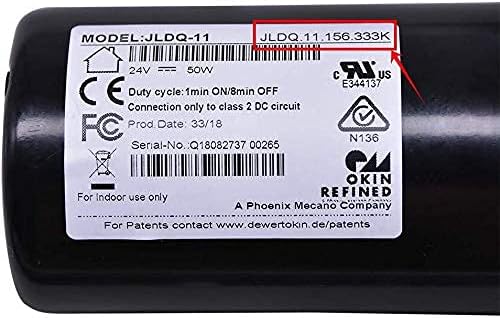
Figure 2: Example of a motor label for model verification.
Compatible Devices:
- Okin JLDQ 11 11.156.333 K
- Okin JLDQ 11 156.333 A/E/F/I/M/P/Q/R/S/U/V/Z
- Okin JLDQ 11 11.156.333
- Okin JLDQ 11 11.156.333 D
- Okin JLDQ 1A 11.156.333
- Limoss 450626
If your Model Number is not Listed Above, it is NOT COMPATIBLE.
5. Installation and Setup
Installation of the Okin recliner motor requires careful attention to detail. It is recommended to watch the official installation video for a visual guide. Always ensure the power is disconnected from the furniture before beginning any installation work.
Installation Steps Overview:
- Disconnect Power: Unplug the recliner from the wall outlet.
- Access Motor: Carefully turn the furniture over or access the underside to locate the existing motor.
- Disconnect Wires: Detach all wires connected to the old motor. Note the configuration of the connectors.
- Remove Old Motor: Unbolt or unclip the old motor from its mounting points on the recliner frame.
- Install New Motor: Secure the new Okin motor in the same position as the old one. Ensure all mounting points are firmly attached.
- Connect Wires: Reconnect the power and control wires to the new motor. This motor comes with three wires; if your original motor used fewer, safely secure any unused wires.
- Test Functionality: Once installed, carefully plug in the recliner and test the motor's operation before fully reassembling or returning the furniture to its upright position.
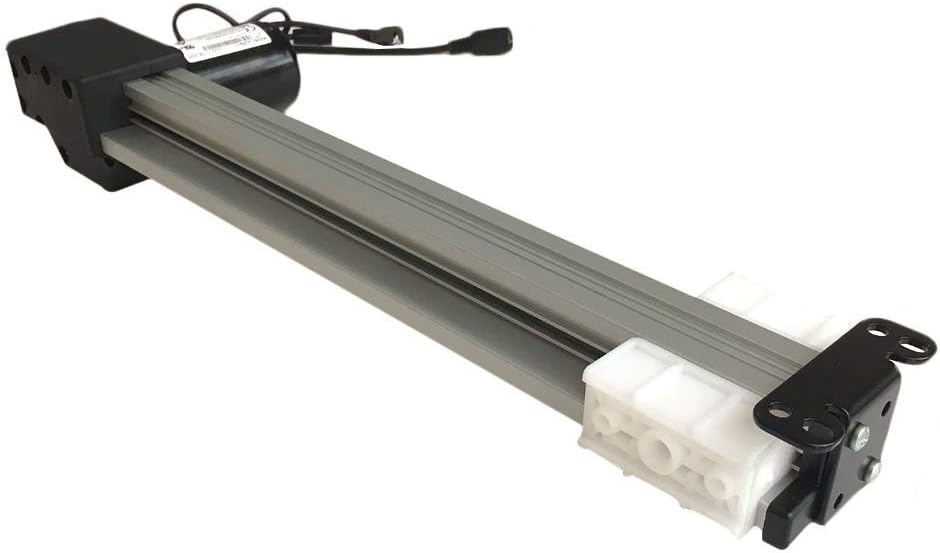
Figure 3: Okin motor showing mounting points.
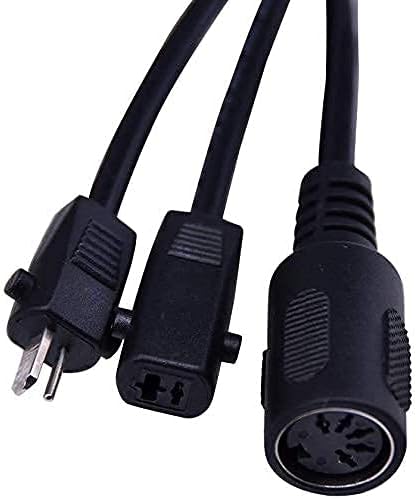
Figure 4: Various connectors on the Okin motor.
Official Installation Video:
Video 1: Okin JLDQ-11 & JLDQ-1A JLDQ 11.156.333 Recliner Motor Replacement Guide. This video provides a visual walkthrough of the motor replacement process, including troubleshooting tips for common issues with switches and power supplies, and details on wire compatibility.
6. Operating Instructions
Once the motor is correctly installed and connected, the recliner's original control mechanism (e.g., hand remote, side button) will operate the motor. Ensure the power supply is connected and functioning correctly. The motor will extend or retract the reclining mechanism based on the input from the control.
- Press and hold the appropriate button on your recliner's control to extend or retract the footrest and backrest.
- Release the button to stop the movement at the desired position.
- Avoid continuous operation for extended periods to prevent motor overheating. Allow brief rest periods between adjustments.
7. Maintenance
Proper maintenance can extend the lifespan of your recliner motor:
- Cleaning: Wipe clean the motor and surrounding areas with a dry cloth. Avoid using liquid cleaners directly on the motor or electrical components.
- Lubrication: Periodically check the moving parts of the reclining mechanism (not the motor itself) for smooth operation. Apply a silicone-based lubricant if necessary, avoiding contact with electrical components.
- Cable Management: Ensure all cables are neatly routed and secured to prevent pinching, fraying, or entanglement with moving parts.
- Regular Inspection: Routinely inspect the motor and its connections for any signs of wear, damage, or loose fittings. Address any issues promptly.
8. Troubleshooting
If your recliner motor is not functioning correctly, perform the following troubleshooting steps. The switch and power supply are the most common causes of problems, so it is important to troubleshoot these components first before considering a motor replacement.
- No Movement:
- Check if the recliner is properly plugged into a working electrical outlet.
- Verify that the power supply unit (transformer) is receiving power and its indicator light (if present) is on.
- Inspect all cable connections between the power supply, control switch, and motor for looseness or damage.
- Test the control switch/remote. If possible, try a known working switch or power supply to isolate the issue.
- Intermittent Operation:
- Check for loose connections at any point in the electrical circuit.
- Ensure the power supply is providing consistent voltage.
- The motor may be overheating. Allow it to cool down for 10-15 minutes before attempting operation again.
- Unusual Noises:
- Inspect the reclining mechanism for obstructions or misaligned parts.
- Check if the motor's mounting bolts are secure.
- Ensure the furniture frame is not binding or rubbing against the motor or mechanism.
If these steps do not resolve the issue, or if you have any doubts, it is recommended to contact the manufacturer or a qualified technician for assistance. Contacting us before buying a new motor can help avoid unnecessary returns.

Figure 5: Important advice: Troubleshoot switch and power supply first.
9. Specifications
| Attribute | Detail |
|---|---|
| Brand | Okin |
| Model Number | JLDQ 11.156.333K |
| Part Number | JLDQ.11.156.333K |
| Color | Silver |
| Item Weight | 5 pounds |
| Product Dimensions | 24 x 8 x 6 inches |
| Stroke | 333mm |
| Minimum Install Dimension (shrink) | 156mm |
| Maximum Install Dimension (stretch) | 333mm + 156mm |
| UPC | 764966649818 |
10. Warranty and Support
For warranty information or technical support, please refer to the documentation provided with your purchase or contact the seller directly. It is always recommended to retain your proof of purchase for warranty claims.
For further assistance, you may visit the Okin Store on Amazon: Okin Store