
1. Introduction
This manual provides essential information for the safe and efficient installation, operation, and maintenance of your KING GATES Dy Kit 24/600 Sliding Gate Automation System. Please read all instructions carefully before beginning installation or operation. Keep this manual for future reference.
2. Important Safety Information
Failure to follow these safety instructions may result in serious injury or property damage. Only qualified personnel should perform installation and maintenance.
- Disconnect power before performing any maintenance or service.
- Ensure all electrical connections comply with local regulations and standards.
- Do not allow children to play near the gate or with the remote controls.
- Install safety devices such as photocells and safety edges to prevent entrapment.
- Regularly inspect the gate and automation system for signs of wear or damage.
- Keep hands and clothing clear of moving parts.
3. Package Contents
Please verify that all components listed below are present in your package. If any items are missing or damaged, contact your supplier immediately.
- 1x Dy Kit 24/600 Motor Unit
- 1x Control Unit (integrated or separate)
- 2x Remote Controls
- 1x Set of Mounting Hardware (screws, anchors, base plate)
- 1x Pair of Photocell Sensors
- 1x Warning Light
- 1x User Manual (this document)
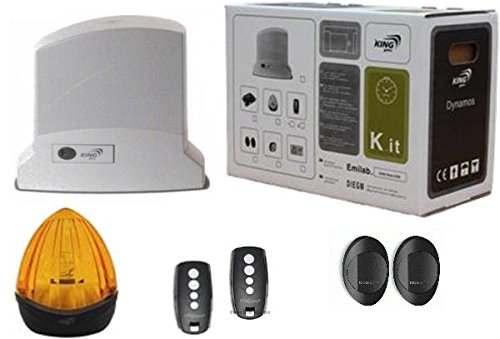
Image: Overview of the KING GATES Dy Kit 24/600 Sliding Gate Automation System components, including the motor unit, control board, and accessories.
4. Setup and Installation
This section outlines the steps for installing the Dy Kit 24/600 system. Professional installation is recommended.
4.1. Mounting the Motor Unit
- Prepare a stable, level concrete base next to the gate opening.
- Position the motor unit base plate, ensuring correct alignment with the gate rack.
- Secure the base plate to the concrete using appropriate anchors and bolts.
- Mount the motor unit onto the base plate.
4.2. Electrical Connections
- Ensure the main power supply is disconnected at the circuit breaker.
- Connect the main power cable (230V AC) to the control unit terminals, observing live, neutral, and earth connections.
- Connect the motor power cables to the designated terminals on the control unit.
- Wire the photocell sensors and warning light to the control unit as per the wiring diagram.
4.3. Limit Switch Adjustment
- Manually move the gate to its fully open and fully closed positions.
- Adjust the mechanical or magnetic limit switches on the motor unit to correspond with these positions.
- Ensure the gate stops precisely at the desired open and closed points.
4.4. Remote Control Programming
- Press and hold the programming button on the control unit (refer to the control unit's specific manual for exact location).
- While holding the programming button, press the desired button on the remote control.
- Release both buttons. The remote control should now be programmed.
- Test the remote control to ensure proper operation of the gate.
5. Operating Instructions
Once installed and configured, operating your KING GATES Dy Kit 24/600 is straightforward.
5.1. Basic Operation
- Open: Press the programmed button on your remote control once. The gate will open completely.
- Close: If the gate is open, press the programmed button again. The gate will close completely.
- Stop: During opening or closing, press the programmed button to stop the gate at any position. Pressing again will resume motion in the opposite direction (if configured).
5.2. Manual Release
In case of a power failure or system malfunction, the gate can be operated manually.
- Locate the manual release mechanism on the motor unit (usually a key-operated lever).
- Insert the provided key and turn it to disengage the motor.
- The gate can now be pushed open or closed by hand.
- To re-engage, reverse the process and ensure the mechanism locks securely.
6. Maintenance
Regular maintenance ensures the longevity and reliable operation of your gate automation system.
- Monthly: Inspect the gate's movement for any obstructions or unusual noises. Clean the photocell lenses with a soft, dry cloth.
- Every 6 Months: Check all mounting bolts and screws for tightness. Lubricate the gate's moving parts (hinges, wheels, rack) with appropriate grease or lubricant.
- Annually: Have a qualified technician inspect the electrical connections, motor, and control unit for wear or damage. Test all safety features (photocells, obstacle detection).
7. Troubleshooting
This section addresses common issues you might encounter. For problems not listed here, contact technical support.
| Problem | Possible Cause | Solution |
|---|---|---|
| Gate does not move. | No power supply; Remote control battery flat; Photocell beam obstructed; Manual release engaged. | Check power connection; Replace remote battery; Clear photocell path; Disengage manual release. |
| Gate opens but does not close. | Photocell beam obstructed; Limit switch misaligned. | Clear photocell path; Adjust closing limit switch. |
| Remote control not working. | Flat battery; Not programmed; Out of range. | Replace battery; Reprogram remote; Move closer to the gate. |
| Gate stops unexpectedly. | Obstacle detected; Safety device triggered. | Remove obstruction; Check safety devices for faults. |
8. Technical Specifications
The following are the technical specifications for the KING GATES Dy Kit 24/600 system.
| Feature | Specification |
|---|---|
| Manufacturer | KING GATES |
| Item Quantity | 1 |
| Batteries Included | No |
| Batteries Required | No |
| Spare Parts Availability | Information unavailable on spare parts |
| ASIN | B01MUGJ2UX |
| Date First Available on Amazon.com.be | April 24, 2022 |
| Discontinued by Manufacturer | No |
9. Warranty and Technical Support
Your KING GATES Dy Kit 24/600 system is covered by a manufacturer's warranty against defects in materials and workmanship. For specific warranty terms and conditions, please refer to the documentation provided with your purchase or contact your retailer.
For technical assistance, troubleshooting beyond this manual, or to inquire about spare parts, please contact your authorized KING GATES dealer or the customer support provided by your point of purchase. When contacting support, please have your product model (Dy Kit 24/600) and ASIN (B01MUGJ2UX) ready.


