
LGIDTECH FUT037
LGIDTECH FUT037 Miboxer RGB LED Strip Light Controller User Manual
Model: FUT037
Introduction
This manual provides detailed instructions for the installation, operation, maintenance, and troubleshooting of the LGIDTECH FUT037 Miboxer RGB LED Strip Light 2.4GHz RF Wireless 4-Zone Controller Receiver Box. Please read this manual thoroughly before using the product to ensure proper function and safety.
The FUT037 controller is designed to work with RGB LED strip lights that utilize 4 wires. It offers versatile control options including remote control (purchased separately), smartphone app control via the WL-Box1 Gateway (also purchased separately), and compatibility with voice assistants like Alexa and Google Home Assistant when used with the gateway.
Product Overview
The LGIDTECH FUT037 is a compact and efficient controller for RGB LED strip lights. It features a 2.4GHz RF wireless communication protocol, allowing for a control distance of up to 30 meters (98 feet) with high wall-through ability.

Figure 1: Front view of the LGIDTECH FUT037 Miboxer RGB LED Strip Light Controller, showing input/output voltage, max current, and model number.
Key Features:
- Compatible with RGB LED strip lights (4-wire).
- 2.4GHz RF Wireless control.
- Max. 6A/Channel output, Total Max. 10A.
- DC 12-24V input voltage.
- Supports remote control (FUT096, B3, etc., sold separately).
- Smartphone APP control via WL-Box1 Gateway (sold separately).
- Compatible with Alexa and Google Home Assistant via WL-Box1 Gateway.
- Flame retardant PC material construction.
Safety Precautions
- Ensure the input voltage (DC 12-24V) matches the working voltage of your LED strip lights.
- Do not connect wires with power on. Always switch off power before making any connections.
- Avoid installing the controller in areas with strong electromagnetic waves, as this may affect the wireless control distance.
- This product is designed for indoor use only and is not water resistant.
- Power supply is not included in the package. Use a compatible DC 12-24V power supply.
Setup and Installation
1. Power Input Connection:
The FUT037 controller supports two input methods for DC 12-24V power:
- DC5.5*2.1mm male connector.
- Bare wires (V+ and V- terminals).
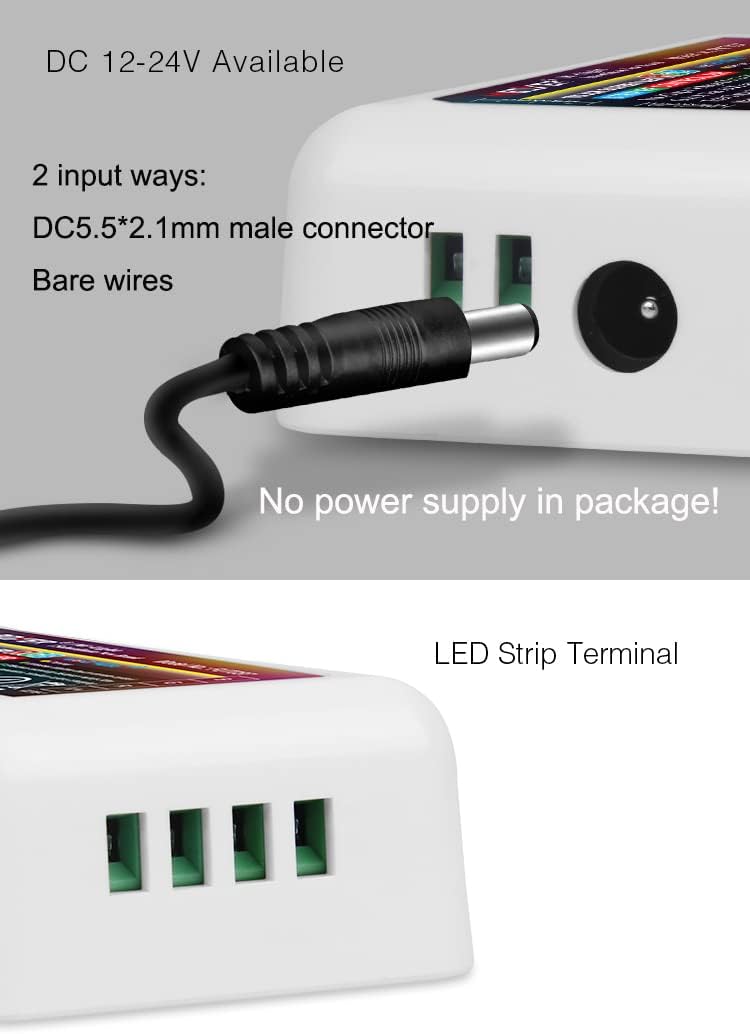
Figure 2: Illustration of the two power input options: DC 5.5*2.1mm male connector and bare wire terminals.
2. LED Strip Connection:
Connect your RGB LED strip light to the output terminals of the FUT037 controller. Ensure correct polarity and channel assignment (R, G, B, V+).
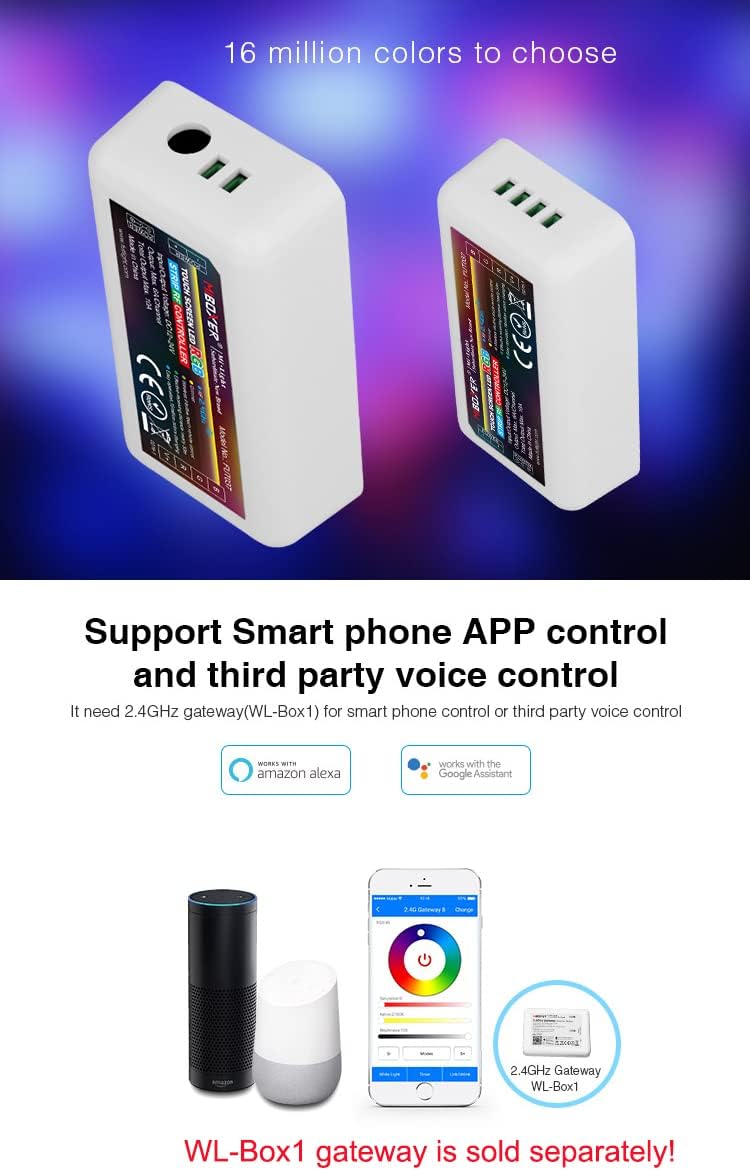
Figure 3: Diagram showing how to connect RGB and RGBW LED strips to the controller. The RGB strip connects to R, G, B, and V+ terminals, while the RGBW strip connects to R, G, B, W, and V+ terminals.
The output connection uses a common anode configuration.
3. Linking/Unlinking with Remote Control:
To control the LED strip with a compatible remote (e.g., FUT096, B3), you need to link the controller to the remote.
- Linking:
- Switch off the power to the LED strip and controller.
- Switch on the power.
- Within 3 seconds of powering on, short press the "I" button (or the linking button on your specific remote) 3 times.
- The LED strip lights will blink 3 times slowly, indicating successful linking.
- Unlinking:
- Switch off the power to the LED strip and controller.
- Switch on the power.
- Within 3 seconds of powering on, short press the "I" button (or the unlinking button on your specific remote) 5 times.
- The LED strip lights will blink 10 times quickly, indicating successful unlinking.

Figure 4: Step-by-step guide for unlinking the controller from a remote. Power off, then on, then press the "I" button 5 times within 3 seconds. Lights blink 10 times for success.
Note: If unlinking fails and the light does not blink quickly, please repeat the steps. If the light has not been linked previously, unlinking is not necessary.
Compatible remote controls (purchased separately) include FUT089, FUT088, FUT092, FUT096, B8, B0, B3/B3-B/T3, B4/B4-B/T4, S2-B/S2-W, S2-G, and WL-Box1 Gateway.
Operation
Remote Control Operation:
Once linked, use the compatible remote control to adjust the LED strip lights. Functions typically include:
- Power On/Off
- Brightness Adjustment (Dimmer)
- Color Selection (16 million colors)
- Mode Selection (e.g., preset 9 color changing modes)
- Speed Adjustment for dynamic modes
Refer to the specific remote control's manual for detailed operation instructions.
Smartphone APP Control (via WL-Box1 Gateway):
For smartphone control, the WL-Box1 Gateway (sold separately) is required. Follow the gateway's instructions to set up the app and connect it to your FUT037 controller.
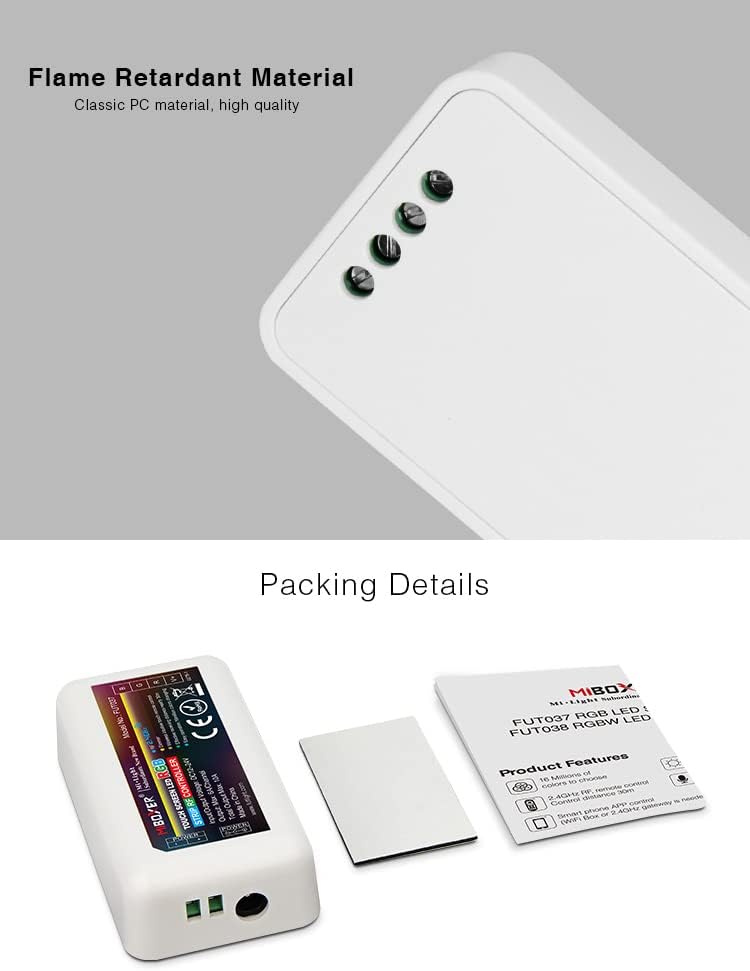
Figure 5: Diagram illustrating smartphone app control and compatibility with Amazon Alexa and Google Assistant via the WL-Box1 Gateway. The gateway is shown as a separate device.
The app allows for comprehensive control, including color selection, brightness, modes, and grouping of multiple controllers.
Voice Control (via WL-Box1 Gateway):
When connected through the WL-Box1 Gateway, the FUT037 controller becomes compatible with Amazon Alexa and Google Home Assistant. This enables voice commands for controlling your LED strip lights. Refer to the WL-Box1 Gateway manual for specific voice command setup and usage.
Grouping of Lights:
You can add an endless number of lights to a zone on the 4-channel remote by linking them to different zones. This provides flexibility in creating various group combinations for synchronized control.

Figure 6: Example diagram showing how multiple controllers can be grouped and controlled by a single remote, illustrating the flexibility in zone assignments.
Maintenance
- Keep the controller clean and free from dust. Use a soft, dry cloth for cleaning.
- Ensure proper ventilation around the controller to prevent overheating.
- Regularly check all connections for security and integrity.
- Avoid exposing the controller to moisture or extreme temperatures.
- If using rechargeable batteries for remote controls, ensure they are properly maintained and replaced when necessary.
Troubleshooting
| Problem | Possible Cause | Solution |
|---|---|---|
| LED strip not lighting up. | No power to controller; Incorrect wiring; Faulty LED strip. | Check power supply connection and voltage. Verify all wire connections (V+, R, G, B). Test LED strip with a different power source if possible. |
| Remote control not working. | Controller not linked to remote; Dead batteries in remote; Remote out of range. | Perform linking procedure (see Setup section). Replace remote batteries. Ensure remote is within 30m range and not obstructed by excessive walls. |
| Lights flicker or behave erratically. | Unstable power supply; Loose connections; Electromagnetic interference. | Ensure power supply is stable and sufficient. Check all wiring connections. Relocate controller away from strong electromagnetic sources. |
| Smartphone app/voice control not working. | WL-Box1 Gateway not set up correctly; Network issues; Controller not linked to gateway. | Verify WL-Box1 Gateway setup and network connection. Ensure the controller is properly linked to the gateway within the app. |
If the problem persists after attempting these solutions, please contact customer support.
Specifications
| Feature | Detail |
|---|---|
| Model Number | FUT037 |
| Input Voltage | DC 12-24V |
| Output Current | Max. 6A/Channel |
| Total Output Current | Max. 10A |
| Control Method | 2.4GHz RF Wireless, App Control (via Gateway), Remote Control |
| Control Distance | 30 meters (98 feet) |
| Compatible LED Strips | RGB (4-wire) |
| Material | Acrylonitrile Butadiene Styrene (Flame Retardant PC) |
| Dimensions (L x W x H) | 3.35 x 1.77 x 0.89 inches (85 x 45 x 22.5 mm) |
| Item Weight | 1.58 ounces |
| Indoor/Outdoor Usage | Indoor |
| Water Resistance Level | Not Water Resistant |
| UPC | 603813404357 |
Warranty and Support
Warranty Information:
Specific warranty details for the LGIDTECH FUT037 controller are typically provided at the point of purchase or on the manufacturer's official website. Please retain your proof of purchase for any warranty claims.
Customer Support:
For technical assistance, troubleshooting beyond this manual, or warranty inquiries, please contact LGIDTECH customer support through their official channels. Refer to the product packaging or the brand's website for contact information.
Ask a question about this manual
Ask about setup, troubleshooting, compatibility, parts, safety, or missing instructions. Manuals+ will review the question and use this page’s manual context to help answer it.