
Sauder 432726
Sauder Palladia Office Desk Instruction Manual
Model: 432726 | Brand: Sauder
Product Overview
The Sauder Palladia Office Desk is designed to provide a functional and stylish workspace. This executive desk features a spacious top surface, multiple storage options including pencil drawers, storage drawers, and a file drawer, along with integrated cable management and a keyboard tray. Its Glacier Oak finish with Rosso Slate accents offers a sophisticated aesthetic suitable for various home office environments.

Image: Front view of the Sauder Palladia Office Desk, showcasing its Glacier Oak finish and dark top surface.
Key Features
- Spacious Work Surface: Accommodates laptops, notepads, and other office essentials.
- Integrated Keyboard Tray: A large drawer with a flip-down panel for keyboard, mouse, or laptop.
- Multiple Storage Drawers: Includes two pencil drawers and two storage drawers for organization.
- File Drawer: Lower file drawers with full extension slides accommodate letter, legal, or European size hanging files.
- Cable Management: Features two desktop grommets and numerous pass-throughs to reduce cord clutter.
- Durable Construction: Crafted with engineered wood and metal runners for smooth drawer operation.
- Elegant Finish: Glacier Oak finish with Rosso Slate accents.
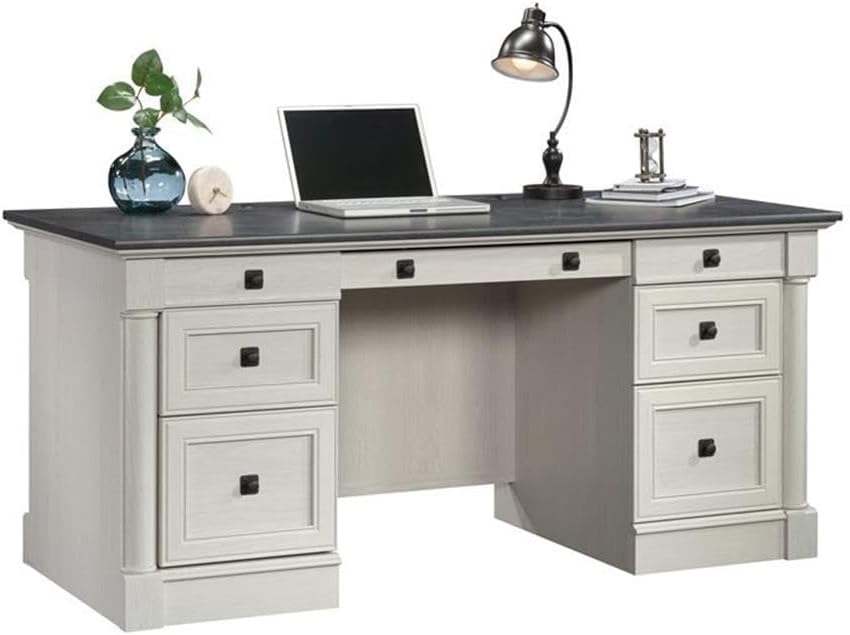
Image: The desk with its central keyboard tray pulled out and the bottom right file drawer open, demonstrating storage capabilities.

Image: A close-up view of the file drawer, showing its capacity for hanging files.

Image: A detailed view of the pull-out keyboard tray, designed to hold a keyboard and mouse.
Specifications
| Attribute | Detail |
|---|---|
| Brand | Sauder |
| Model Number | 432726 |
| Model Name | Palladia |
| Color | Glacier Oak |
| Product Dimensions (D x W x H) | 29.53"D x 65.12"W x 29.61"H |
| Item Weight | 242 Pounds |
| Base Material | Engineered Wood |
| Finish Type | Paper Laminate |
| Number of Drawers | 4 (plus keyboard tray) |
| Drawer Glide Mechanism | Metal runners or slides |
| Maximum Weight Recommendation (Top Surface) | 75 Pounds |
| Required Assembly | Yes |
| Tools Recommended For Assembly | Hammer, Screw Driver |

Image: A detailed diagram showing the overall dimensions of the desk and the internal dimensions of its various drawers.
Assembly Instructions
This desk requires assembly. It is recommended to have at least two people for assembly due to the weight and size of the components. Follow the included manufacturer's assembly manual for detailed, step-by-step instructions. Ensure all parts are accounted for before beginning assembly.
Preparation:
- Clear a large, open workspace.
- Unpack all components and verify against the parts list in the manual.
- Organize hardware and panels by their labels.
- Have a hammer and a #2 Phillips head screwdriver readily available.
General Assembly Tips:
- Read each step completely before performing it.
- Do not overtighten screws, especially into engineered wood, to prevent stripping.
- Ensure all cam locks and fasteners are securely engaged for structural integrity.
- For drawer slides, ensure they are properly aligned and lubricated if necessary for smooth operation.
Operating Features
Keyboard Tray:
The central drawer features a flip-down panel, allowing it to function as a keyboard and mouse tray. Gently pull the drawer out and flip down the front panel to access your keyboard and mouse. Push the panel back up and slide the drawer in to conceal them when not in use.
Storage Drawers:
The desk includes two smaller pencil drawers and two larger storage drawers. The bottom drawers are designed as file drawers, accommodating letter, legal, or European size hanging files. Utilize these drawers to organize documents, office supplies, and personal items.
Cable Management:
Two grommets are located on the top surface of the desk to route cables from your devices (e.g., monitor, laptop charger) through to the back of the desk. Internal pass-throughs are also integrated to help manage and conceal cables, maintaining a tidy workspace.
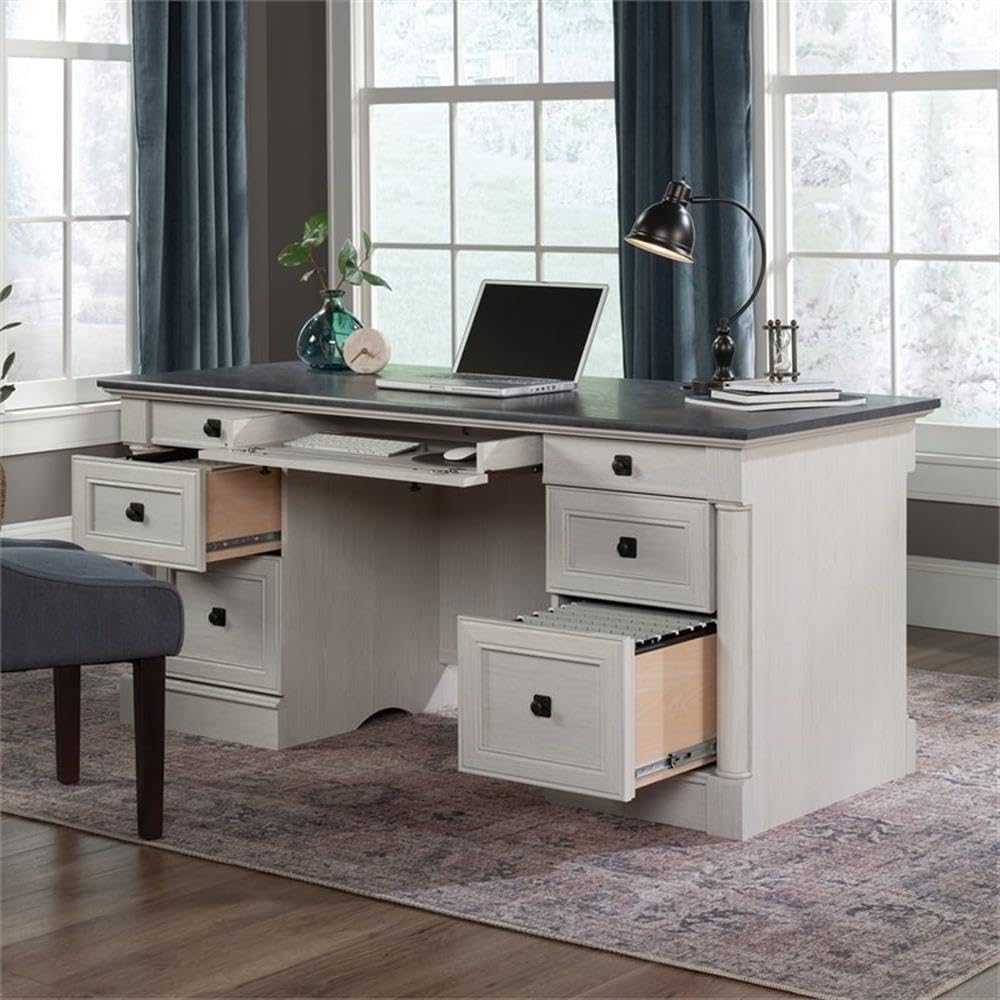
Image: The rear view of the desk, showing the finished back panel and potential cable routing areas.

Image: The rear view of the desk with a cabinet door open, revealing internal storage shelves for books or other items.
Maintenance and Care
To maintain the appearance and longevity of your Sauder Palladia Office Desk, follow these care instructions:
- Cleaning: Wipe the surfaces with a damp cloth. Avoid using harsh chemicals, abrasive cleaners, or polishes that may damage the finish.
- Spills: Immediately wipe up any spills to prevent moisture damage to the engineered wood.
- Heat and Moisture: Avoid placing hot items directly on the surface. Use coasters for beverages to prevent rings and stains.
- Sunlight: Prolonged exposure to direct sunlight may cause fading or discoloration over time.
- Moving: When moving the desk, lift it rather than dragging it to prevent damage to the legs and structure.
Troubleshooting
Drawers do not slide smoothly:
- Ensure the drawer slides are correctly installed and aligned on both the drawer and the desk frame.
- Check for any obstructions in the drawer glides.
- Verify that all screws securing the slides are tightened appropriately, but not overtightened, which can warp the wood.
- Apply a silicone-based lubricant to the metal runners if friction persists.
Desk feels wobbly after assembly:
- Recheck all cam locks and fasteners to ensure they are fully engaged and tightened.
- Verify that all panels are correctly seated in their grooves and connections.
- Ensure the desk is placed on a level surface. Adjust any leveling feet if present.
Missing or damaged parts:
- Refer to the manufacturer's contact information in the warranty section for assistance with replacement parts.
Warranty Information
The Sauder Palladia Office Desk is covered by a 5-year limited warranty on parts. This warranty covers manufacturing defects and material flaws under normal residential use. For specific terms and conditions, please refer to the warranty documentation included with your product or contact Sauder customer support.
Customer Support
For further assistance, including assembly questions, replacement parts, or warranty claims, please contact Sauder customer support. Visit the official Sauder website or refer to the contact information provided in your product packaging.
You can also visit the Sauder Store on Amazon for additional product information and support resources.
Related documents432726


Ask a question about this manual
Ask about setup, troubleshooting, compatibility, parts, safety, or missing instructions. Manuals+ will review the question and use this page’s manual context to help answer it.