
Introduction
This manual provides detailed instructions for the assembly, setup, operation, and maintenance of your Walker Edison Georgetown Modern Farmhouse Double Barn Door TV Stand. Please read all instructions carefully before beginning assembly and retain this manual for future reference.
Safety Information
Adherence to the following safety guidelines is crucial for safe assembly and use of this product:
- Always follow the assembly instructions carefully.
- Keep hands and body away from moving parts during assembly.
- Use appropriate safety gear when handling heavy components.
- Do not exceed the weight capacity of the cabinet (100 Pounds).
- Keep the cabinet away from heat sources and moisture to prevent warping or damage.
- Always unplug any electronic devices from the power source before cleaning or performing any maintenance on the stand.
Proposition 65 Warning: This product may contain chemicals known to the State of California to cause cancer and birth defects or other reproductive harm.
Package Contents
Verify that all components are present before beginning assembly. If any parts are missing or damaged, contact customer support.
- Frame components
- Legs
- Shelves (3 total)
- Hardware pack (screws, dowels, cam locks, handles, hinges, corner accents)
- Barn-style doors (2 total)

Image: All components of the Walker Edison Georgetown TV Stand laid out before assembly.
Assembly Instructions
This TV stand is designed for ready-to-assemble construction. Detailed step-by-step instructions are included in the packaging. It is recommended to have two people for assembly.
For a digital copy of the installation manual, please refer to the official document provided by the manufacturer:
Download Installation Manual (PDF)

Image: The fully assembled TV stand positioned in a living room, showcasing its barnwood finish and double barn doors.
Setup
Placement
Place the TV stand on a flat, stable surface. Ensure there is adequate space around the stand for ventilation of electronic devices and for opening the barn doors.
TV Compatibility
This TV stand is designed to accommodate most televisions up to 65 inches in size. Ensure the base of your television fits within the top surface dimensions of the stand.

Image: Visual representation of the TV stand's capacity to hold televisions ranging from 32 inches to 65 inches.
Dimensions
The overall dimensions of the TV stand are approximately 58 inches wide, 16 inches deep, and 24 inches high.
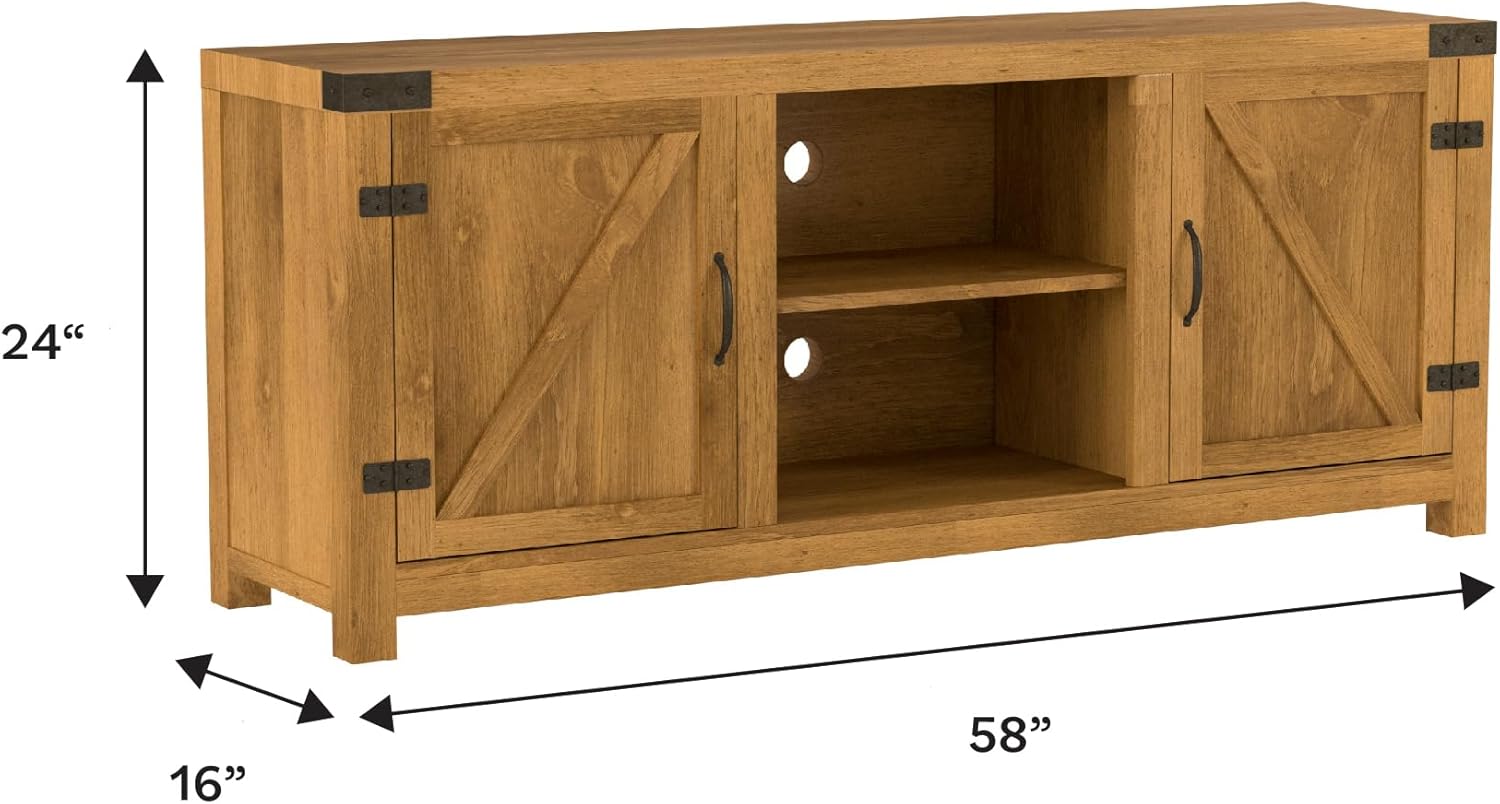
Image: A diagram illustrating the width, depth, and height measurements of the TV stand.
Operating Instructions
Storage Access
The TV stand features two barn-style doors that slide open to reveal concealed storage compartments. The central open shelving area provides easy access for media devices.

Image: A detailed view of the TV stand with one barn door open, showing the interior storage space and an adjustable shelf.
Adjustable Shelving
The shelves within the concealed compartments are adjustable, allowing you to customize the storage space to fit various media and accessories.

Image: An interior view of the TV stand, displaying the central open shelves and the side compartments with books and decorative items.
Cord Management
The stand includes pre-drilled cut-outs in the back panel for organized cord management, helping to keep cables tidy and out of sight.
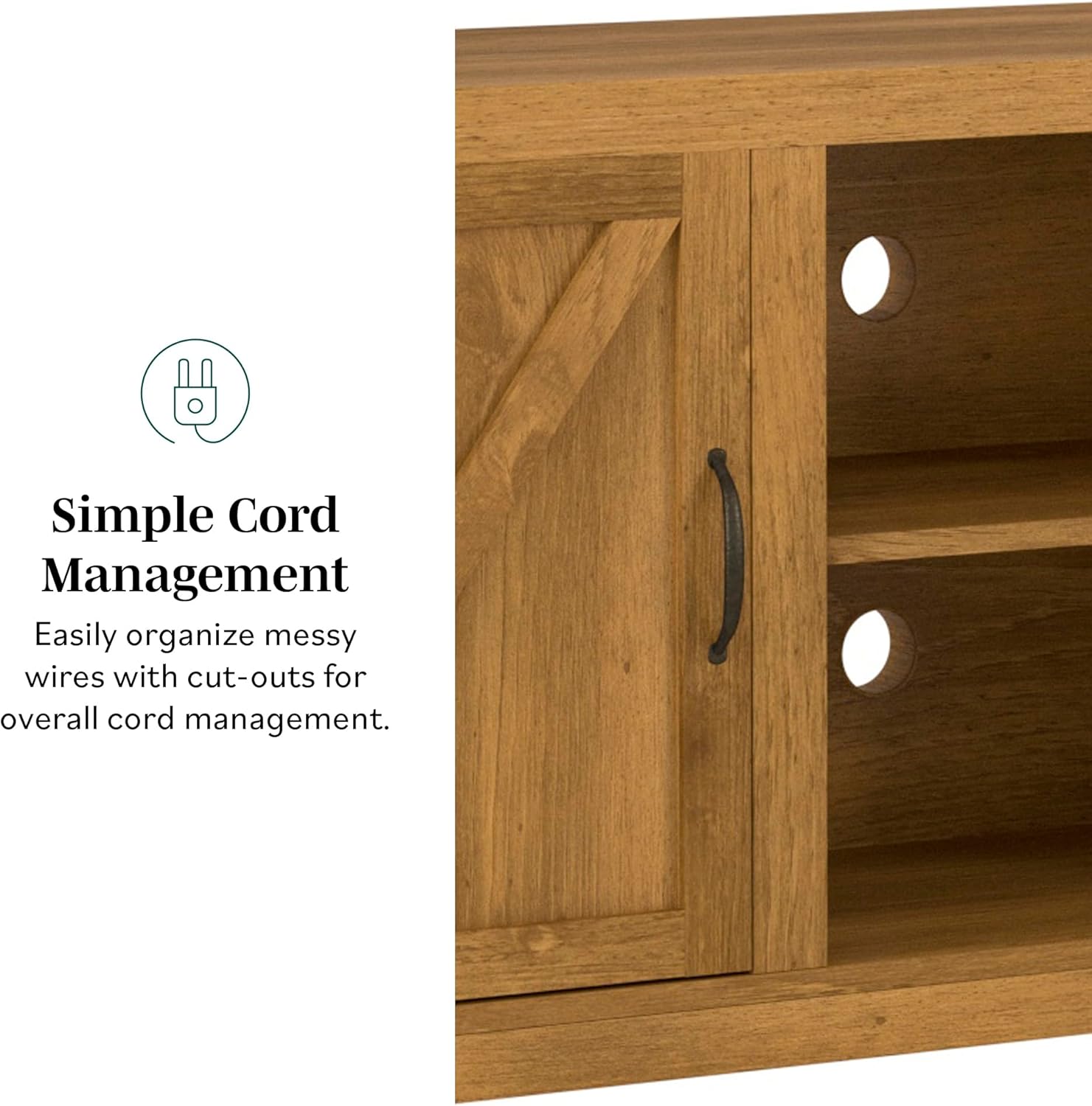
Image: A close-up view highlighting the circular cut-outs on the back panel designed for routing power and media cables.
Maintenance
Cleaning
Wipe the surface with a soft, damp cloth. Avoid using harsh chemicals or abrasive cleaners, as these can damage the finish. Dry immediately with a clean cloth.
Care
Periodically check all fasteners to ensure they remain tight. Retighten as necessary. Avoid placing hot items directly on the surface without protection. Protect the stand from direct sunlight and extreme temperature changes to prevent warping or fading.
Troubleshooting
- Wobbly Stand: Ensure all screws and cam locks are fully tightened. Verify that the stand is on a level surface.
- Doors Not Sliding Smoothly: Check that the door tracks are clear of debris. Ensure hinges and rollers are properly installed and lubricated if necessary.
- Missing Parts: Refer to the "Package Contents" section. If parts are missing, contact customer support immediately.
For further assistance, please contact Walker Edison customer support.
Specifications
| Feature | Detail |
|---|---|
| Brand | Walker Edison |
| Model Name | Georgetown |
| Model Number | W58BDSDBW |
| Color | Barnwood |
| Product Dimensions (D x W x H) | 16"D x 58"W x 24"H (approximate) |
| Item Weight | 87 Pounds |
| Weight Limit | 100 Pounds |
| Material | Engineered Wood |
| Number of Shelves | 3 |
| Assembly Required | Yes |
| UPC | 842158102133 |
Warranty and Support
Walker Edison offers customer support for product inquiries and replacement parts. Replacement parts are available. Please contact Walker Edison within 30 days of delivery for any issues.
Contact Information:
- Phone: 1-801-433-3008
- Email: service@walkeredison.com

Image: Customer support details including phone number and email for Walker Edison.
For additional information or to explore other products, visit the official Walker Edison store:


