
1. Important Safety Information
Please read this instruction manual carefully before operating the Einhell GE-CC 18 Li Solo Cordless Grout Cleaner. Keep these instructions in a safe place for future reference. Failure to follow these instructions may result in electric shock, fire, and/or serious injury.
- Wear Eye Protection: Always wear appropriate safety goggles or safety glasses with side shields when operating the grout cleaner to protect against flying debris.
- Wear Protective Gloves: Use sturdy work gloves to protect your hands.
- Keep Work Area Clear: Ensure the area you are working in is free from other people, children, and pets.
- Check for Obstacles: Before starting, inspect the area for any loose stones, wires, or other objects that could be thrown by the rotating brush.
- Battery Safety: This tool is part of the Power X-Change family. Use only original Einhell Power X-Change batteries and chargers. Do not expose batteries to heat or fire. Do not short-circuit batteries.
- Secure Grip: Always maintain a firm grip on the tool with both hands during operation.
- Two-Point Safety Switch: The tool is equipped with a two-point safety switch to prevent accidental activation. Ensure you understand its operation before use.
2. Product Overview and Components
The Einhell GE-CC 18 Li Solo is a cordless grout cleaner designed for effective removal of weeds, moss, and dirt from paving joints. It features an adjustable telescopic handle and interchangeable brushes for various cleaning tasks.
- Main Handle with Safety Switch: Ergonomically designed for comfortable and secure operation.
- Adjustable Telescopic Long Handle: Allows for upright working posture, reducing strain.
- Infinitely Adjustable Second Handle (Auxiliary Handle): Provides additional control and comfort.
- Guide Wheel: Assists in maintaining a consistent cleaning depth and direction.
- Brush Head: Houses the rotating brush.
- Replaceable Brushes: Includes one nylon brush for light cleaning and one steel brush for tougher debris.
- Battery Compartment: For Einhell Power X-Change 18V batteries (battery and charger sold separately).

Figure 2.1: Einhell GE-CC 18 Li Solo Cordless Grout Cleaner (Battery and Charger Not Included)

Figure 2.2: Important Note: Battery and Charger are NOT included with this model.

Figure 2.3: Included replaceable brushes: Nylon brush (left) for lighter tasks and Steel brush (right) for tougher debris.
3. Setup
3.1 Attaching the Auxiliary Handle
- Slide the auxiliary handle onto the telescopic shaft.
- Adjust its position for comfortable operation and tighten the locking mechanism.

Figure 3.1: Adjusting the auxiliary handle for optimal comfort and control.
3.2 Installing/Changing the Brush
- Ensure the tool is switched off and the battery is removed.
- Locate the brush attachment point at the bottom of the tool.
- Align the desired brush (nylon or steel) with the spindle and secure it according to the tool's mechanism (refer to the diagram for specific locking details).
- Ensure the brush is firmly seated before use.

Figure 3.2: Detail of the brush attachment mechanism.
3.3 Inserting the Battery
- Ensure the battery is fully charged.
- Slide the 18V Power X-Change battery into the battery compartment until it clicks into place.
- To remove, press the release button on the battery and slide it out.
4. Operating Instructions
4.1 Starting and Stopping the Tool
- To Start: Press and hold the safety lock-off button (usually on the side of the main handle), then squeeze the trigger switch.
- To Stop: Release the trigger switch. The brush will stop rotating.
4.2 Cleaning Technique
- Select the appropriate brush for the task (nylon for light growth, steel for stubborn weeds/moss).
- Adjust the telescopic handle and auxiliary handle to a comfortable working height that allows you to stand upright.
- Position the guide wheel along the edge of the paving or directly in the grout line.
- Start the tool and gently guide the rotating brush along the grout lines. Allow the brush to do the work; avoid pressing down too hard.
- Move the tool slowly and steadily to ensure thorough cleaning.
- For optimal results, work in small sections.

Figure 4.1: Proper operating posture with the adjustable handle.
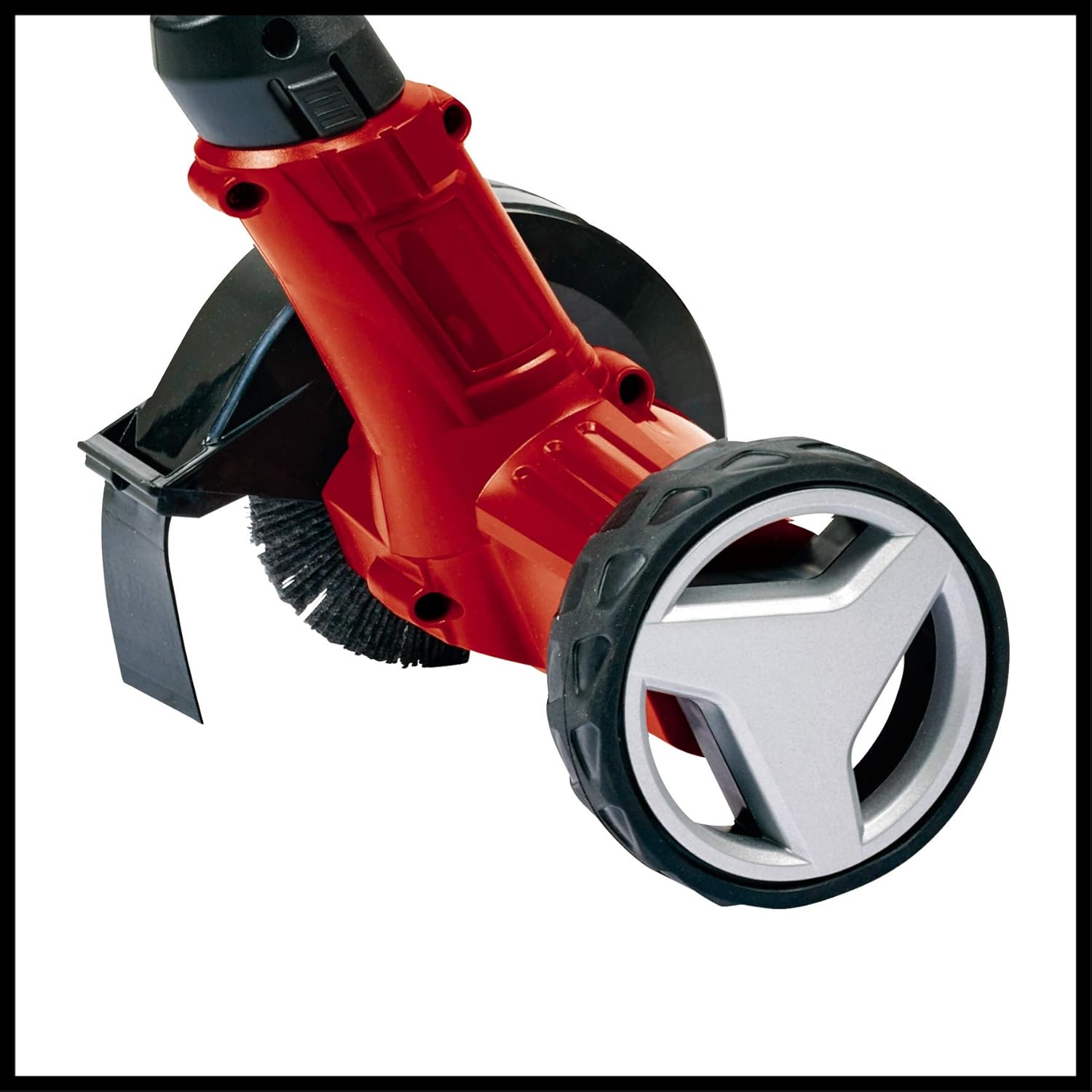
Figure 4.2: The guide wheel helps maintain consistent cleaning along grout lines.
5. Maintenance
Regular maintenance ensures the longevity and optimal performance of your grout cleaner.
- Cleaning the Tool: After each use, remove the battery and clean the tool housing with a damp cloth. Do not use harsh chemicals or abrasive cleaners.
- Brush Inspection and Replacement: Regularly inspect the brushes for wear and damage. Replace worn brushes promptly to maintain cleaning effectiveness and prevent damage to the tool. Refer to section 3.2 for brush replacement instructions.
- Battery Care: Store batteries in a cool, dry place. Do not store fully discharged batteries for extended periods. Charge batteries before long storage periods.
- Storage: Store the grout cleaner in a dry, secure location out of reach of children.
6. Troubleshooting
| Problem | Possible Cause | Solution |
|---|---|---|
| Tool does not start. | Battery not inserted correctly or discharged. Safety switch not engaged. | Ensure battery is fully charged and correctly inserted. Press the safety lock-off button before squeezing the trigger. |
| Poor cleaning performance. | Brush is worn or incorrect type for the task. | Inspect and replace the brush if worn. Use the steel brush for tougher debris. |
| Excessive vibration. | Brush not properly secured or damaged. | Check brush attachment. Replace brush if damaged. |
7. Specifications
| Model: | GE-CC 18 Li Solo |
| Power Source: | 18V Battery Powered (Einhell Power X-Change) |
| Speed: | 9000 RPM |
| Cutting Width: | 10 Centimeters |
| Item Weight: | 2.04 Kilograms (approx. 4.49 pounds) |
| Product Dimensions: | 34.45"L x 7.87"W |
| Included Components: | 1 x Nylon brush, 1 x Steel brush |
| Battery/Charger: | Not included |
8. Warranty and Support
For detailed warranty information, product registration, and customer support, please refer to the official Einhell website or contact your local Einhell service center. Keep your purchase receipt as proof of purchase.
Einhell Official Website: www.einhell.com


