
1. Introduction
Thank you for choosing the KING GATES Dynamos XL 2500 Irreversible Sliding Gate Motor. This product is designed to provide reliable and efficient automation for sliding gates, ensuring security and convenience. This manual contains essential information for the correct installation, operation, and maintenance of your gate motor. Please read it thoroughly before proceeding with any procedures.
2. Safety Information
Important Safety Instructions:
- Installation and maintenance must be performed by qualified personnel only.
- Disconnect power before performing any service or maintenance.
- Ensure all electrical connections comply with local regulations and standards.
- Do not allow children to play with or operate the gate motor controls.
- Keep hands and clothing clear of the gate and motor mechanism during operation.
- Install safety devices such as photocells and safety edges to prevent entrapment.
- Ensure the gate moves freely and is properly balanced before installing the motor.
3. Package Contents
Verify that all components are present and undamaged upon unpacking:
- Dynamos XL 2500 Gate Motor Unit
- Mounting Plate and Fasteners
- Release Key (for manual operation)
- Control Board (integrated or separate)
- Remote Controls (quantity may vary)
- User Manual and Installation Guide
- Optional accessories (e.g., photocells, flashing light, rack gear - sold separately)
4. Setup and Installation
Installation of the Dynamos XL 2500 motor requires technical expertise. It is highly recommended that installation be carried out by a certified professional.
4.1 Mounting the Motor Unit
- Prepare a stable, level concrete foundation next to the gate opening.
- Secure the mounting plate to the foundation using appropriate anchor bolts.
- Mount the Dynamos XL 2500 motor unit onto the mounting plate, ensuring it is level and aligned with the gate's rack gear.
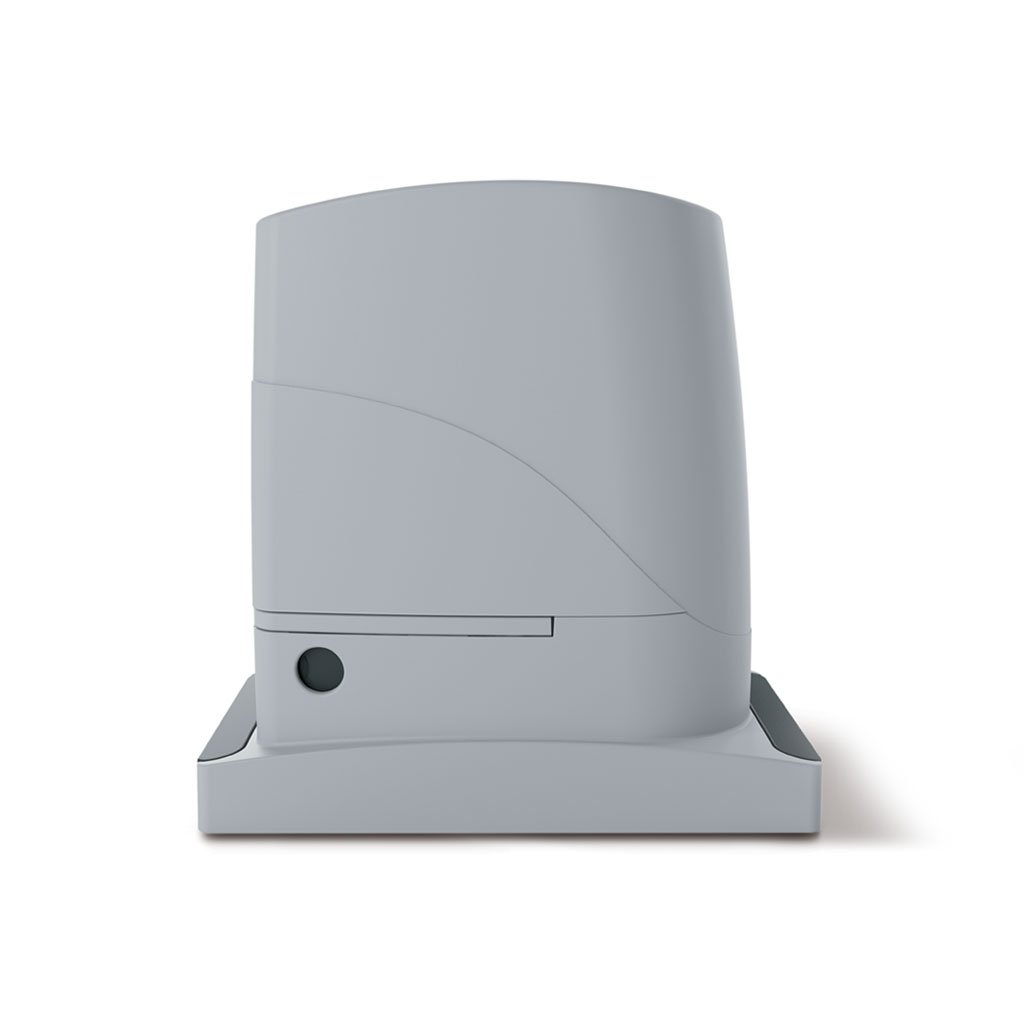
This image displays the main unit of the KING GATES Dynamos XL 2500 irreversible sliding gate motor. It shows the compact design of the motor housing, typically installed at the base of a sliding gate, ready for rack gear attachment.
4.2 Electrical Connections
- Connect the main power supply to the control board terminals as indicated in the wiring diagram (refer to the detailed installation guide).
- Connect any safety devices (photocells, safety edges) and accessories (flashing light, antenna) to their respective terminals.
- Ensure proper grounding for all electrical components.
4.3 Limit Switch Adjustment
- Manually move the gate to its fully open and fully closed positions.
- Adjust the mechanical or magnetic limit switches on the motor to correspond with these positions. This tells the motor when to stop.
- Perform several test cycles to ensure the gate stops correctly at both ends without excessive force.
5. Operating Instructions
5.1 Remote Control Pairing
- Press the programming button on the control board (refer to the control board manual for exact location). The LED indicator will illuminate or flash.
- Within a few seconds, press the desired button on your remote control.
- The LED on the control board will confirm successful pairing (e.g., by flashing rapidly or turning off).
- Repeat for additional remote controls.
5.2 Gate Operation
- Press the programmed button on your remote control to open the gate.
- Press the same button again to stop the gate during its movement.
- Press the button a third time to close the gate.
- The gate may have an automatic closing function, which can be configured via the control board settings.
5.3 Manual Release
In case of power failure or malfunction, the gate can be operated manually:
- Locate the manual release mechanism on the motor unit.
- Insert the provided release key and turn it to disengage the motor.
- The gate can now be moved by hand.
- To re-engage, turn the key back to its original position and remove it.
6. Maintenance
Regular maintenance ensures the longevity and safe operation of your gate motor.
- Monthly: Check the gate's smooth movement. Ensure the rack gear is clean and free of debris. Inspect safety devices (photocells) for proper function.
- Every 6 Months: Inspect all electrical connections for corrosion or loose wiring. Check the motor housing for any signs of damage. Lubricate moving parts if recommended by the detailed installation guide.
- Annually: Have a qualified technician perform a comprehensive inspection and service.
Always disconnect power before performing any maintenance.
7. Troubleshooting
If you encounter issues, refer to the following common problems and solutions:
| Problem | Possible Cause | Solution |
|---|---|---|
| Gate does not move. | No power; remote control not paired; safety devices obstructed; motor in manual release mode. | Check power supply; re-pair remote; clear obstructions from safety sensors; ensure motor is engaged. |
| Gate stops unexpectedly. | Obstruction detected by safety devices; motor overheating; limit switch issue. | Check for obstructions; allow motor to cool; verify limit switch settings. |
| Remote control not working. | Dead battery in remote; remote not paired; signal interference. | Replace remote battery; re-pair remote; check for sources of interference. |
| Gate is noisy during operation. | Lack of lubrication; worn rack gear; misalignment. | Lubricate moving parts; inspect rack gear for wear; check gate and motor alignment. |
If problems persist, contact a qualified technician or KING GATES customer support.
8. Specifications
Key technical specifications for the KING GATES Dynamos XL 2500:
| Feature | Detail |
|---|---|
| Manufacturer | KING GATES |
| Model | Dynamos XL 2500 |
| Type | Irreversible Sliding Gate Motor |
| Number of Items | 1 |
| Batteries Included | No |
| Batteries Required | No |
| Spare Parts Availability | Information unavailable |
| ASIN | B01MTDJF5N |
| Date First Available | June 1, 2022 |
| Currently Produced | Yes |
9. Warranty and Support
The KING GATES Dynamos XL 2500 motor comes with a standard manufacturer's warranty against defects in materials and workmanship. Please refer to your purchase documentation or the official KING GATES website for specific warranty terms and conditions.
For technical support, spare parts, or warranty claims, please contact your authorized KING GATES dealer or visit the official KING GATES support portal. Ensure you have your product model and serial number available when contacting support.


