
1. Introduction
This manual provides comprehensive instructions for the Angrox Universal Remote Control, models RM-YD103 and RM-YD102. This remote is designed as a replacement for various Sony Bravia HDTV, LCD, LED, and 3D Smart TV models. Please read this manual carefully to ensure proper setup and operation of your new remote control.
2. Product Overview
The Angrox Universal Remote Control is a high-grade replacement remote, offering stable performance and a comfortable grip. It is designed to function without any programming or complex setup, directly replacing your original Sony remote.
Key Features:
- No Programming Required: Ready to use out of the box after battery installation.
- Ergonomic Design: Compact size with silicone rubber buttons for easy grip and comfortable use.
- Stable Performance: Ensures reliable operation and a farther transmitting distance.
- Full Functionality: Replaces damaged or old remotes, covering all functions of the original.
Compatibility:
This remote control is compatible with a wide range of Sony Bravia TV models, including but not limited to:
- KDL-32W700B, KDL-40W590B, KDL-40W600B, KDL-42W700B
- KDL46HX750, KDL46HX751, KDL46HX850
- KDL-48W590B, KDL-48W600B, KDL-50W700B
- KDL55HX750, KDL55HX751, KDL55HX850, KDL-55W700B
- KDL-60W610B, KDL-60W630B
- RMYD073, VSX30, VSX31
- XBR55HX950, XBR-55X800B, XBR65HX950, XBR-65X800B
It also replaces other Sony remote models such as RM-YD102, RM-YD028, RM-YD092, RM-YD065, RM-YD063, RM-YD040, RM-YD027, RM-YD026, RM-YD025, RM-YD024, RM-YD021, RM-YD018, RM-YD014, RM-YD005.

Figure 1: Front, side, and back views of the Angrox Universal Remote Control RM-YD103.
3. Setup
3.1 Battery Installation
- Locate the battery compartment on the back of the remote control.
- Slide the battery compartment cover downwards or in the direction indicated by an arrow to open it.
- Insert two (2) AAA batteries (not included) into the compartment. Ensure the positive (+) and negative (-) terminals of the batteries match the diagrams inside the compartment.
- Slide the battery compartment cover back into place until it clicks securely.
Note: Batteries are not included with the remote control and must be purchased separately.

Figure 2: The Angrox Universal Remote Control RM-YD103 held comfortably in hand.
3.2 Initial Use
The Angrox Universal Remote Control requires no programming or setup. Once the batteries are correctly installed, it is ready for immediate use with your compatible Sony Bravia TV.
4. Operating Instructions
Point the remote control directly at your Sony Bravia TV's infrared receiver. Press the desired buttons to control your television functions.
Common Button Functions:
- POWER: Turns the TV on or off.
- INPUT: Selects input sources (HDMI, AV, etc.).
- VOL +/-: Adjusts the volume level.
- CH +/-: Changes TV channels.
- MUTE: Mutes or unmutes the TV sound.
- Number Buttons (0-9): Directly selects channels.
- Navigation Pad (Up, Down, Left, Right, Enter): Navigates menus and selects options.
- HOME: Accesses the TV's main menu or Smart TV interface.
- RETURN/BACK: Returns to the previous screen or menu.
- NETFLIX / DISCOVER / APPS: Direct access buttons for specific smart TV functions or applications.
- PLAY / PAUSE / STOP / PREV / NEXT: Media playback controls.
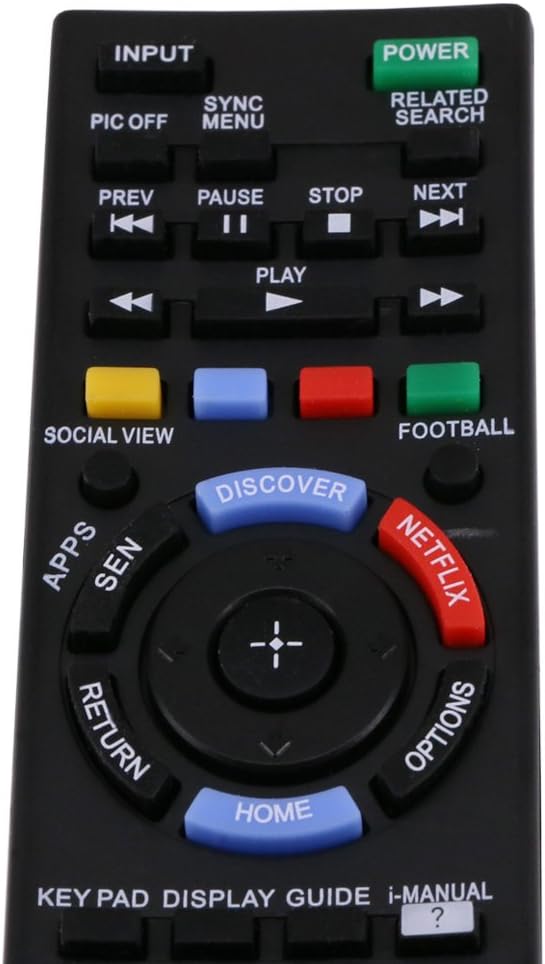
Figure 3: Close-up of the Angrox Universal Remote Control RM-YD103 buttons, highlighting common functions.

Figure 4: The Angrox Universal Remote Control RM-YD103 in active use with a Sony television.
5. Maintenance
5.1 Cleaning
To clean the remote control, gently wipe it with a soft, dry cloth. For stubborn dirt, slightly dampen the cloth with water or a mild, non-abrasive cleaner. Avoid using harsh chemicals or abrasive materials, as these can damage the remote's surface or internal components.
5.2 Battery Replacement
Replace the batteries when the remote control's performance diminishes or it stops responding. Always replace both batteries at the same time with new AAA batteries. Do not mix old and new batteries, or different types of batteries, as this can lead to leakage or malfunction.
5.3 Storage
If the remote control will not be used for an extended period, remove the batteries to prevent potential leakage and damage to the device.
6. Troubleshooting
If you experience issues with your Angrox Universal Remote Control, please refer to the following common problems and solutions:
- Remote is not working:
- Ensure batteries are inserted correctly with the correct polarity (+/-).
- Replace old batteries with new AAA batteries.
- Check if there is any obstruction between the remote and the TV's infrared receiver.
- Ensure you are within the effective range of the TV's IR receiver.
- Some buttons are not responding:
- This remote is designed to cover all original functions. If a specific button does not work, ensure your TV model supports that function with its original remote.
- Clean the remote control, especially around the unresponsive buttons, to remove any dirt or debris.
- Remote control range is reduced:
- Replace the batteries. Low battery power can reduce the remote's effective range.
- Ensure there are no strong light sources (like direct sunlight or bright fluorescent lights) interfering with the IR signal.
7. Specifications
| Feature | Detail |
|---|---|
| Model | RM-YD103 |
| Type | Universal Remote Control for Sony LED LCD Smart TV |
| Color | Black |
| Power Supply | 2 x AAA Batteries (Not Included) |
| Connectivity Technology | Infrared |
| Product Dimensions | Approx. 15.1 x 5 x 2.6 cm (5.9 x 1.9 x 1.02 inches) / 19.81 x 12.19 x 1.27 cm |
| Weight | Approx. 97 g |
| Manufacturer | Angrox |
8. Warranty Information
The Angrox Universal Remote Control comes with a 60-day warranty from the date of purchase. This warranty covers manufacturing defects and ensures the product functions as described under normal use. Please retain your proof of purchase for warranty claims.
9. Support
For any issues not covered in this manual or for further assistance, please contact Angrox customer support. When contacting support, please provide your product model (RM-YD103 or RM-YD102) and a detailed description of the problem.
We are committed to ensuring your satisfaction with our products.

