
1. Introduction
The CURRENT USA eFlux DC Flow Pump is designed to provide efficient and controllable water flow for various aquatic systems. This pump features a sealed DC motor and magnetic drive, allowing for versatile use in both marine and freshwater environments. Its advanced design ensures quiet operation and significant energy savings compared to traditional AC pumps.
Key Features:
- Adjustable Flow: DC-powered for complete flow control.
- Submersible or External Use: Can be installed inline or submerged.
- Energy Efficient: Up to 65% energy savings.
- Quiet Operation: Engineered for minimal noise.
- Safe Low Voltage: Operates on 24V DC.
- LOOP Compatible: Integrates with the LOOP system for enhanced control.
- Soft Start: Gently ramps pump to speed.
- IC Electronic Detection: Protects the pump if no water is present.

Image: The CURRENT USA eFlux DC Flow Pump operating in a vibrant aquarium setup.
2. Safety Information
- Always disconnect power before performing any maintenance or installation.
- The pump operates on safe, low voltage 24V DC. Ensure the power supply is correctly connected and rated for the pump.
- Do not run the pump dry. The integrated IC electronic detection system is designed to protect the pump if no water is present, but prolonged dry running should be avoided.
- Ensure all connections are secure to prevent leaks.
- Keep the controller and power supply away from water to prevent electrical hazards.
3. Package Contents
Verify that all items are present in the package:
- eFlux DC Flow Pump (1050 GPH model)
- DC Pump Controller
- Power Supply (24V DC)
- Power Cord
- Hose Barb Fittings (various sizes for 3/4 and 1 inch tubing)
- O-rings/Gaskets
- Strainer (for submersible use)
- User Manual

Image: All components included in the eFlux DC Flow Pump package.
4. Setup
The eFlux DC Flow Pump offers flexible installation options, allowing it to be used either fully submerged or externally (inline).
4.1. Choosing Installation Method
- Submersible: Place the pump directly into your sump or aquarium. Ensure the strainer is attached to the inlet to prevent debris from entering the pump.
- External (Inline): Install the pump outside the water, connecting it to your plumbing system. Quick-couple hose barb fittings are provided for easy connection.
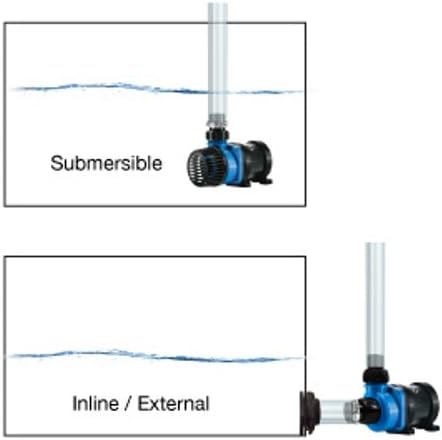
Image: Visual guide for submersible and inline/external pump installation.
4.2. Connecting the Pump and Controller
- Attach the appropriate hose barb fittings to the pump's inlet and outlet. For submersible use, ensure the strainer is securely attached to the inlet.
- Connect the pump's power cable to the DC Pump Controller.
- Connect the power supply to the DC Pump Controller.
- Plug the power supply into a suitable electrical outlet.
Video: Installation Display
Video Description: This video demonstrates the physical installation process of the pump, including attaching fittings and connecting the pump to its controller and power supply.
5. Operating Instructions
The eFlux DC Flow Pump features a user-friendly controller for precise flow adjustment and special modes.
5.1. Adjustable Flow Control
Unlike traditional AC pumps, the eFlux DC pump allows you to adjust the flow rate directly. Simply turn the dial on the controller to increase or decrease the water flow. The pump can be adjusted from 20% to 100% of its maximum flow capacity. Adjusting the flow also impacts power consumption, allowing for energy savings at lower flow rates.
5.2. Feed Mode
The controller includes a 'Feed Mode' function. When activated, the pump's flow rate will reduce to 30% for a duration of 10 minutes. This allows fish and corals to feed without being disturbed by strong currents and prevents food from being quickly drawn into filtration systems. After 10 minutes, the pump automatically resumes its previous setting.
5.3. LOOP Compatibility
The eFlux DC Flow Pump is LOOP compatible. When connected to a LOOP network, the controller provides an indicator LED for when the pump is in Feed Mode. The controller also features micro USB ports at the bottom, allowing connection to other eFlux DC flow pumps, wave pumps, or your lighting system hub to create an integrated LOOP network.
Video: Speed Control and Feed Mode Demonstration
Video Description: This video illustrates how to adjust the pump's speed using the controller and demonstrates the Feed Mode function, showing the reduction in water flow.
Video: Flow Adjustment and Power Consumption
Video Description: This video highlights the adjustable flow feature of the eFlux DC pump and demonstrates how adjusting the flow rate directly impacts the power consumption, offering energy efficiency.
6. Performance Chart
To select the optimal eFlux DC Flow Pump for your system, it is recommended to calculate your total system volume (aquarium volume + sump volume) and aim for a 5x turnover rate per hour through your filter. Once you have this target flow rate, refer to the performance chart below to identify the appropriate pump model.

Image: Performance chart illustrating the relationship between flow rate, head pressure, and recommended aquarium volume for various eFlux DC Flow Pump models.
| Model | Description | Flow Range GPH | Watts Range | ~Flow Rate @ 5ft. Head GPH | Maximum Recommended Aquarium Volume |
|---|---|---|---|---|---|
| 6009 | DC Flow Pump 1050 | 210-1050 | 6-30 | 500 GPH | 100 gallons (90 gal. tank) |
| 6010 | DC Flow Pump 1900 | 380-1900 | 11-55 | 1000 GPH | 200 gallons (150 gal. aquarium) |
| 6011 | DC Flow Pump 3170 | 635-3170 | 16-80 | 2000 GPH | 350 gallons (250 gal. aquarium) |
7. Maintenance
Regular maintenance ensures optimal performance and longevity of your eFlux DC Flow Pump. The pump is designed for tool-less disassembly for easy cleaning.
- Disconnect Power: Always unplug the pump from the power source before cleaning.
- Disassembly: Gently twist and pull the pump housing to separate it from the motor. The impeller housing can then be removed to access the impeller.
- Clean Impeller and Housing: Remove any debris, algae, or mineral buildup from the impeller, impeller shaft, and pump housing. A soft brush or cloth can be used. For stubborn mineral deposits, a mild acid solution (like vinegar) can be used, followed by thorough rinsing.
- Inspect Components: Check the impeller for any signs of wear or damage. Ensure the O-rings are clean and properly seated to maintain a watertight seal.
- Reassembly: Reassemble the pump by aligning the components and twisting them back into place. Ensure all parts are securely fitted before reconnecting power.
Video: Tool-less Disassembly for Maintenance
Video Description: This video demonstrates the tool-less disassembly of a similar pump model, showing how to access the impeller for cleaning and maintenance.
8. Troubleshooting
- Pump Not Running:
- Check power connections to the outlet, power supply, and controller.
- Ensure the pump is submerged in water if used submersibly. The IC electronic detection will prevent dry running.
- Inspect the impeller for any obstructions or damage.
- Reduced Flow:
- Check the controller dial setting; increase the flow rate if necessary.
- Clean the impeller and pump housing for any debris or buildup.
- Ensure intake strainer is not clogged.
- Verify plumbing for any blockages or kinks.
- Unusual Noise:
- Inspect the impeller for foreign objects or damage.
- Ensure the pump is securely placed and not vibrating against surfaces.
- Water Shortage/Stuck Protection: The pump is equipped with self-protection features. If the pump detects a water shortage or a stuck impeller, it will automatically activate protection to prevent damage. Address the underlying issue (e.g., add water, clear obstruction) before restarting.
Video: Water Shortage and Stuck Protection
Video Description: This video demonstrates the pump's self-protection mechanism in case of water shortage or a stuck impeller, highlighting its safety features.
9. Specifications
| Feature | Detail |
|---|---|
| Brand | CURRENT |
| Model Number | 6009 |
| Maximum Flow Rate | 1050 GPH (3974 Liters Per Hour) |
| Power Source | Corded Electric (24V DC) |
| Power Consumption | 6-30 Watts |
| Maximum Head Height | 10.5 ft |
| Product Dimensions (LxWxH) | 8.5" x 6.9" x 5.3" |
| Item Weight | 3.63 pounds |
| Material | Plastic |
| Color | Black |
| UPC | 842959060090 |
10. Warranty & Support
CURRENT-USA products carry a one-year limited warranty from the date of purchase. If your product is within warranty and you require a replacement part or service, please contact Current-USA customer support. For further assistance or inquiries, please refer to the contact information provided in your product packaging or visit the official CURRENT-USA website.

