
Introduction
The ISTA I-H614 150W Inline External Heater is designed to maintain a stable water temperature in freshwater and saltwater aquariums. This external heater features two temperature sensors for accurate monitoring and a thermal spraying glass for efficient heating. Its inline design allows for easy installation outside the aquarium, saving space within the tank. This manual provides essential information for the safe and effective use of your heater.
Safety Information
- Read all instructions before use.
- Ensure the heater is fully submerged in water flow when operating. Never operate dry.
- Always disconnect power before performing any maintenance or installation.
- This appliance is for indoor aquarium use only.
- Do not use if the power cord or plug is damaged.
- Keep out of reach of children.
- Ensure all connections are secure to prevent leaks.
- Always use a drip loop for the power cord to prevent water from traveling along the cord and reaching the electrical outlet.
Product Features
- Power: 150W
- Dual Temperature Sensors: Two sensors monitor water temperature at both inlet and outlet for precise control.
- Thermal Spraying Glass: Facilitates a faster heating process.
- External Design: Easy to install and does not occupy space inside the aquarium.
- Temperature Display: Displays temperature in Celsius.
Setup and Installation
The ISTA I-H614 inline heater is designed for external use with canister filters or other external water circulation systems. It is compatible with 5/8" (16/22mm) hoses.
- Identify Hose Connections: Locate the return hose from your canister filter that directs water back into the aquarium.
- Cut Hose: Carefully cut a section of the return hose where you intend to install the heater. Ensure there is enough slack for proper placement.
- Connect Heater: Connect one end of the cut hose to the inlet barb of the heater and the other end to the outlet barb. Ensure the water flow direction matches the arrows on the heater unit.
- Secure Connections: Use hose clamps (not included) on both ends to secure the hoses to the heater barbs, preventing leaks.
- Position Heater: Place the heater in a stable, vertical position, ensuring it is below the water level of the aquarium to maintain proper water flow.
- Check for Leaks: Before plugging in, turn on your filter and check all connections for any leaks. Address any leaks immediately.
- Power Connection: Once all connections are secure and leak-free, plug the heater into a grounded electrical outlet. Ensure a drip loop is formed with the power cord.
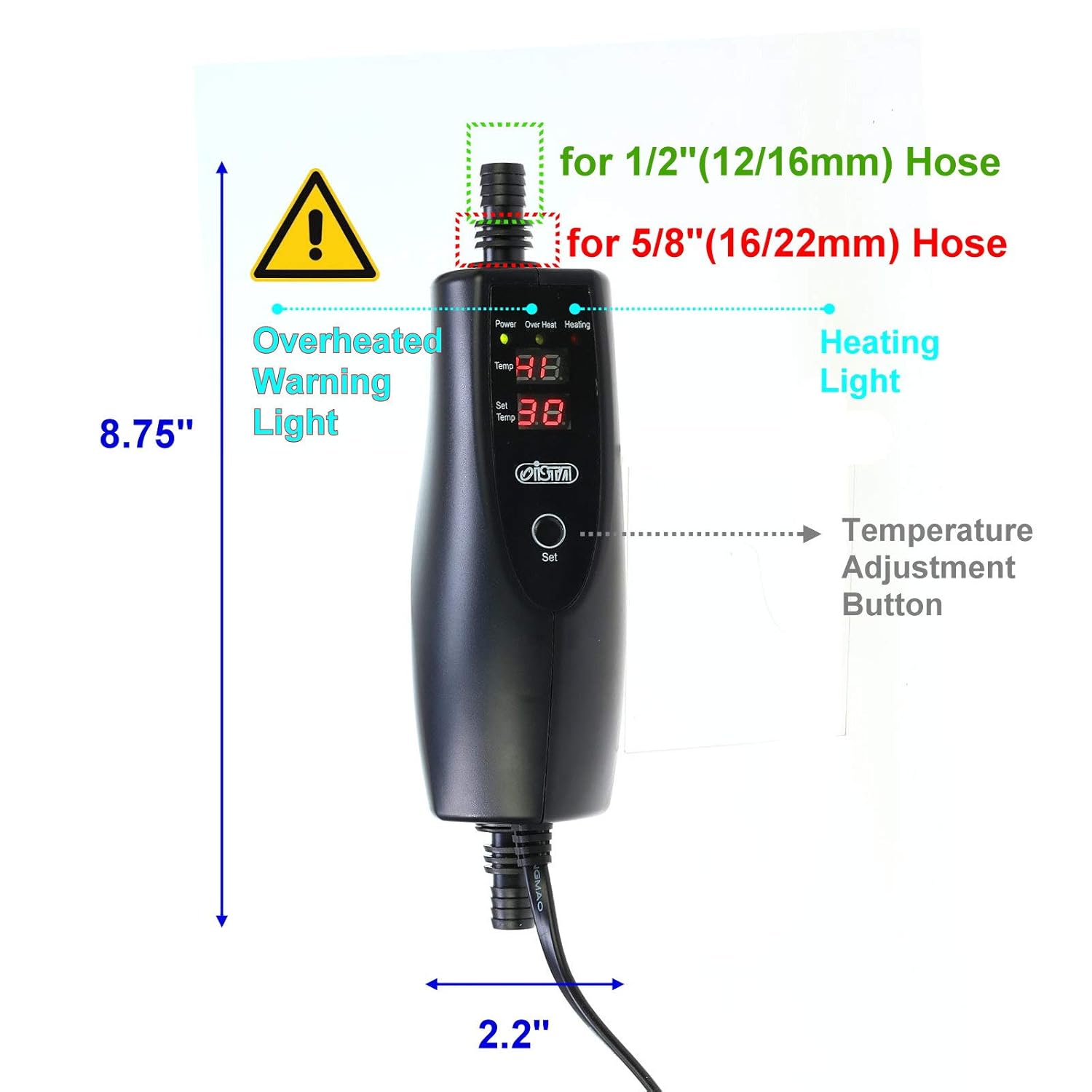
Image: Installation diagram for the ISTA I-H614 inline heater.

Image: Dimensions and key features of the ISTA I-H614 inline heater.
Operating Instructions
The heater features a digital display and a single 'Set' button for temperature adjustment.
- Power On: Once plugged in, the heater will power on, and the digital display will show the current water temperature (Temp) and the set temperature (Set Temp). The 'Power' indicator light will illuminate.
- Set Temperature: Press the 'Set' button once. The 'Set Temp' display will begin to flash. Press the 'Set' button repeatedly to cycle through the desired temperature settings. The temperature is displayed in Celsius.
- Confirm Setting: Stop pressing the 'Set' button when your desired temperature is displayed. After a few seconds, the display will stop flashing, and the new temperature will be saved.
- Heating Indicator: When the heater is actively heating the water, the 'Heating' indicator light will illuminate. Once the set temperature is reached, the 'Heating' light will turn off.
- Overheat Warning: If the heater detects an unsafe temperature or malfunction, the 'Over Heat' warning light will illuminate, and the heater will automatically shut off for safety.

Image: Control panel and display of the ISTA I-H614 heater.
Maintenance
- Regular Cleaning: Periodically inspect the heater for any mineral buildup or debris. Disconnect power and remove the heater from the hose connections for cleaning. Use a soft brush and warm water to gently clean the exterior. Do not use harsh chemicals.
- Hose Inspection: Regularly check the hoses and connections for any signs of wear, cracks, or leaks. Replace hoses or clamps as needed.
- Sensor Check: Ensure the temperature sensors are clean and free from obstructions for accurate readings.
- Storage: If storing the heater, ensure it is clean and dry. Store in a cool, dry place away from direct sunlight.
Troubleshooting
- Heater Not Turning On:
- Check if the power cord is securely plugged into a working outlet.
- Verify that the power outlet is receiving electricity.
- Heater Not Heating Water:
- Ensure the set temperature is higher than the current water temperature.
- Check if the 'Heating' indicator light is on. If not, re-adjust the set temperature.
- Verify that water is flowing through the heater. A lack of flow can prevent heating or trigger safety shutdowns.
- Ensure the heater is correctly sized for your aquarium volume.
- 'Over Heat' Light On:
- This indicates the heater has detected an excessively high temperature or a malfunction.
- Immediately disconnect power.
- Check water flow through the heater. Blockages can cause localized overheating.
- Allow the unit to cool down before reconnecting. If the issue persists, discontinue use and contact support.
- Inaccurate Temperature Reading:
- Ensure the sensors are clean and free from debris.
- Verify that water is flowing consistently through the unit.
- Consider using an independent aquarium thermometer to cross-reference the heater's reading.
- Leaks from Connections:
- Tighten hose clamps securely.
- Inspect hoses and barbs for damage. Replace if necessary.
Important Note: For critical applications, it is highly recommended to use a dedicated external heater controller (thermostat) in conjunction with any aquarium heater. This provides an additional layer of safety and temperature regulation, preventing potential overheating in case of a heater malfunction.
Specifications
| Feature | Detail |
|---|---|
| Brand | ISTA |
| Model Number | I-H614 |
| Wattage | 150 Watts |
| Hose Compatibility | 5/8" (16/22mm) |
| Temperature Sensors | Dual |
| Temperature Display | Celsius |
| Material Type | Glass (heating element) |
| Special Feature | Dual Temperature Sensors |
| Mount Type | External / Inline |
Warranty Information
This product is covered by a limited manufacturer's warranty against defects in materials and workmanship. The warranty period typically begins from the date of purchase. Please retain your proof of purchase for warranty claims. For specific warranty terms and conditions, refer to the packaging or contact ISTA customer support.
Customer Support
If you have any questions, require technical assistance, or need to report a problem with your ISTA I-H614 Inline External Heater, please contact your retailer or the manufacturer directly. Provide your product model number (I-H614) and a detailed description of the issue for faster service.
For general inquiries, you may visit the ISTA official website or consult their product support resources.