
1. Product Overview
The Fujifilm XF50mmF2 R WR lens is a compact, lightweight, and weather-resistant prime lens designed for Fujifilm X-series cameras. It features a focal length equivalent to 76mm in the 35mm film format, making it suitable for portraits and general photography. The F2.0 maximum aperture allows for excellent low-light performance and beautiful background blur (bokeh). Its fast and silent autofocus system ensures quick and precise focusing. The lens is constructed to withstand temperatures as low as -10°C, providing reliability in various environmental conditions.

Figure 1: Front view of the Fujifilm XF50mmF2 R WR lens, showing the aperture ring and focus ring.
2. What's in the Box
Verify that all the following items are included in your product package:
- Fujifilm XF50mmF2 R WR Lens
- Lens Pouch
- Instruction Manual (this document)
- U.S.A. Warranty Card
3. Setup
3.1 Attaching the Lens
- Ensure the camera is turned off.
- Remove the rear lens cap and the camera body cap.
- Align the white mounting mark on the lens with the white mounting mark on the camera body.
- Insert the lens into the camera mount and rotate it clockwise until it clicks into place.
3.2 Removing the Lens
- Ensure the camera is turned off.
- While pressing the lens release button on the camera body, rotate the lens counter-clockwise until it stops.
- Carefully remove the lens from the camera body.
- Attach the rear lens cap to the lens and the body cap to the camera.
3.3 Attaching the Lens Hood
The included lens hood helps to reduce flare and ghosting caused by stray light entering the lens, and also provides protection for the front element.
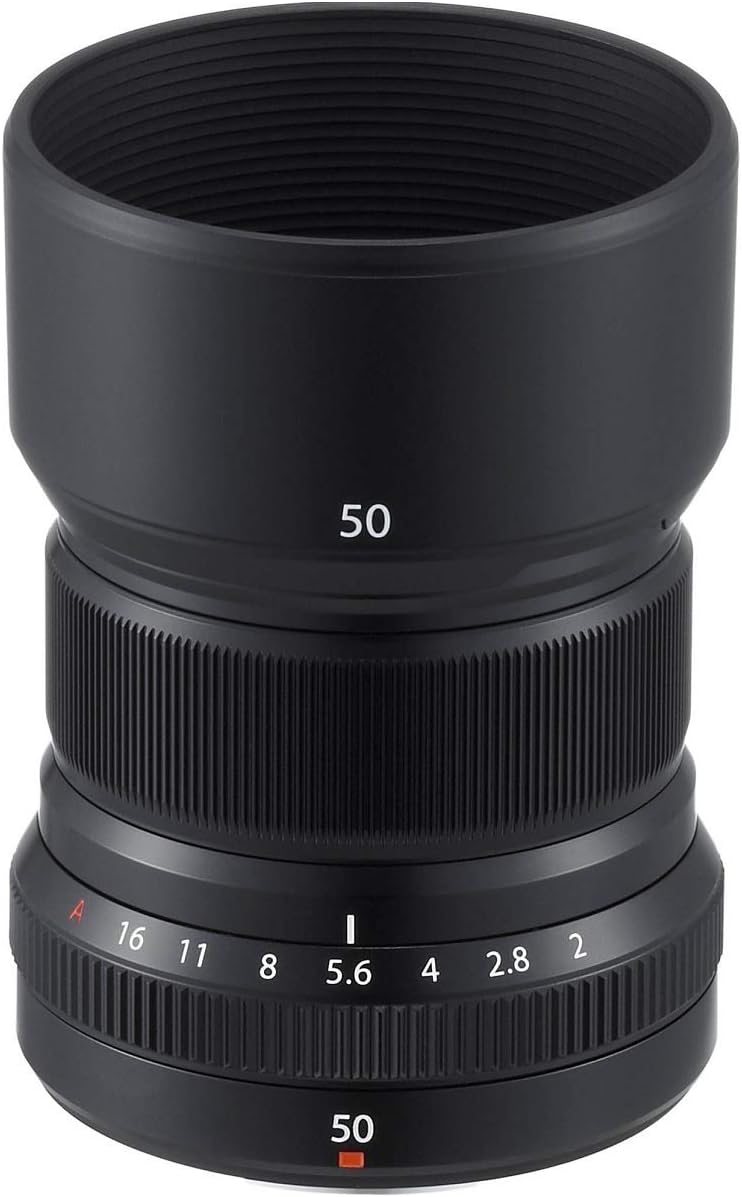
Figure 2: The Fujifilm XF50mmF2 R WR lens and its dedicated lens hood, shown separately.
- Align the mark on the lens hood with the mark on the front of the lens.
- Rotate the hood clockwise until it clicks into place.

Figure 3: The Fujifilm XF50mmF2 R WR lens with the lens hood correctly attached.
3.4 Removing the Lens Hood
- Rotate the lens hood counter-clockwise until it detaches.
4. Operating Instructions
4.1 Focusing
The XF50mmF2 R WR lens supports both autofocus (AF) and manual focus (MF).
- Autofocus: Set your camera's focus mode to AF. The lens features a fast and silent autofocus motor for quick subject acquisition.
- Manual Focus: Set your camera's focus mode to MF. Rotate the focus ring on the lens to adjust focus manually. The smooth operation of the focus ring allows for precise control.
4.2 Aperture Control
The lens features an aperture ring for direct control over the aperture setting. Rotate the aperture ring to select your desired f-stop, from F2.0 to F16. The "A" setting allows the camera to control the aperture automatically.

Figure 4: Close-up view of the Fujifilm XF50mmF2 R WR lens, highlighting the aperture ring with f-stop markings.
4.3 Weather Resistance
This lens is weather and dust resistant. When used with a weather-sealed Fujifilm X-series camera body, it provides enhanced protection against moisture and dust, allowing for use in challenging outdoor conditions. Avoid prolonged exposure to heavy rain or direct water immersion.
5. Maintenance
5.1 Cleaning the Lens
- Use a blower brush to remove dust from the lens surface.
- For smudges or fingerprints, use a clean, soft microfiber cloth specifically designed for optical lenses. Apply a small amount of lens cleaning solution to the cloth, not directly to the lens.
- Never use abrasive materials or harsh chemicals.
5.2 Storage
- Store the lens with both front and rear caps attached in a cool, dry place away from direct sunlight.
- If storing for an extended period, consider using a desiccant to prevent mold growth, especially in humid environments.
6. Troubleshooting
6.1 Lens Not Focusing
- Ensure the camera's focus mode is set correctly (AF for autofocus, MF for manual focus).
- Check for sufficient light in the scene. Autofocus performance may be reduced in very low light conditions.
- Verify that the lens is securely mounted to the camera body.
6.2 Image Quality Issues (e.g., blurry images)
- Confirm that the lens elements are clean and free from dust or smudges.
- Check the camera's shutter speed. A slow shutter speed can lead to motion blur.
- Ensure the aperture is set appropriately for the desired depth of field.
7. Specifications
| Feature | Detail |
|---|---|
| Model Number | XF50mmF2 R WR |
| Focal Length | 50mm (76mm equivalent in 35mm format) |
| Maximum Aperture | F2.0 |
| Minimum Aperture | F16 |
| Lens Type | Telephoto Prime |
| Compatible Mountings | Fujifilm X Mount |
| Minimum Focus Range | 39cm (1.28 ft) |
| Maximum Magnification | 0.15x |
| Angle of View | 31.7° |
| Filter Size | 46mm |
| Weather Resistant | Yes |
| Operating Temperature | -10°C to +40°C (14°F to 104°F) |
| Product Dimensions | 4.3 x 5 x 5.4 inches (approximate) |
| Item Weight | 11.2 ounces (approx. 317g) |
8. Warranty and Support
8.1 Warranty Information
This product is covered by a U.S.A. Warranty. Please refer to the included warranty card for specific terms, conditions, and duration of coverage. Keep your proof of purchase for warranty claims.
8.2 Customer Support
For technical assistance, service, or inquiries regarding your Fujifilm XF50mmF2 R WR lens, please contact Fujifilm customer support. Contact details can typically be found on the Fujifilm official website or on your warranty card.


