
QCY Q29
Contents
QCY Q29 Wireless Bluetooth In-Ear Headphones
User Manual
1. Introduction
Welcome to the user manual for your new QCY Q29 Wireless Bluetooth In-Ear Headphones. This guide provides detailed instructions on how to set up, operate, maintain, and troubleshoot your device to ensure optimal performance and longevity. Please read this manual thoroughly before using the product.
2. Product Overview
The QCY Q29 are truly wireless in-ear headphones designed for a cable-free audio experience. They feature advanced Bluetooth 4.2 technology for stable connectivity and clear stereo sound. The compact design includes a portable charging case for extended battery life.

Image: QCY Q29 Wireless Bluetooth In-Ear Headphones with their charging case, showcasing the compact design and individual earbuds.
- Truly Cable-free Design: Enjoy complete freedom of movement without tangled wires.
- Stereo Voice & Advanced Bluetooth 4.2 Technology: Provides incredible stereo sound and stable connectivity with the CSRA64210 Bluetooth Chipset.
- Noise Cancelling Function: Focus on your music with effective noise cancellation.
- Built-in Microphone: Supports clear phone calls.
- Charge Case Supply Extended Battery Life: The mini and portable charging case provides additional power for extended use.
3. What's in the Box
Upon unpacking your QCY Q29 headphones, please ensure all the following items are present:
- QCY Q29 Wireless Bluetooth In-Ear Headphones (Left and Right earbuds)
- Portable Charging Case
- Ear Cushions (various sizes for optimal fit)
- Protective Case (for the charging case)
- USB Charging Cable (not explicitly listed but standard for such devices)
- User Manual (this document)
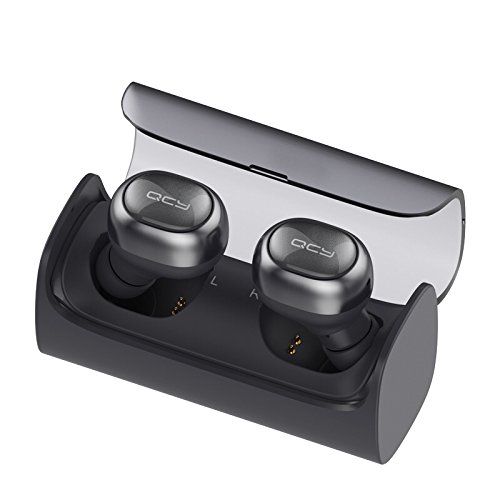
Image: The QCY Q29 earbuds securely placed within their charging case, ready for charging or storage.
4. Setup
4.1. Charging the Headphones and Case
Before first use, fully charge both the earbuds and the charging case. The charging case has a 220 mAh battery, providing extended usage. Each earbud has a 45 mAh battery.
- Place the earbuds into the charging case, ensuring they are properly seated on the charging contacts.
- Connect the charging case to a USB power source using the provided USB cable.
- Indicator lights on the case and earbuds will show charging status. Once fully charged, the lights will change or turn off.
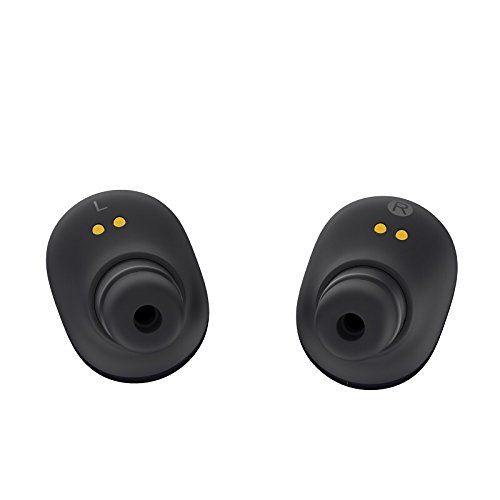
Image: Close-up view of the bottom of the QCY Q29 earbuds, highlighting the gold charging contacts.
4.2. Pairing with a Device
The QCY Q29 uses Bluetooth 4.2 for wireless connectivity. Pairing can be a bit challenging initially but is achievable.
- Ensure both earbuds are charged and removed from the charging case.
- Turn on Bluetooth on your smartphone or other compatible device.
- The earbuds should automatically enter pairing mode. Look for "QCY Q29" or a similar name in your device's Bluetooth settings.
- Select the device name to connect. Once connected, you will hear an audio prompt.
- For stereo mode, ensure both earbuds are paired together before connecting to your device. Refer to online resources or manufacturer's specific pairing instructions if you encounter difficulties.
5. Operating Instructions
5.1. Wearing the Earbuds
Insert the earbuds into your ears, ensuring a comfortable and secure fit. Experiment with the included ear cushions to find the best seal for optimal sound quality and comfort. While designed for extended wear, some users may experience slight discomfort after prolonged periods.

Image: A woman wearing a single QCY Q29 earbud, demonstrating how the earbud fits in the ear.

Image: A woman wearing both QCY Q29 earbuds, showing the discreet and comfortable fit.
5.2. Touch Controls
The QCY Q29 earbuds feature touch controls for various functions. Specific touch gestures (single tap, double tap, long press) will control playback, calls, and voice assistant activation. Refer to the quick start guide or manufacturer's website for a detailed list of touch commands.
5.3. Music Playback
Once paired, you can play music from your connected device. Use the touch controls on the earbuds to play/pause, skip tracks, and adjust volume (if supported by the specific touch configuration).
5.4. Making and Receiving Calls
The built-in microphone supports clear phone calls. When receiving a call, you can answer or reject it using the touch controls. Please note that during calls, typically only one earbud will function for audio and microphone input.
6. Maintenance
Proper maintenance ensures the longevity and performance of your QCY Q29 headphones.
- Cleaning: Regularly wipe the earbuds and charging case with a soft, dry, lint-free cloth. Do not use abrasive cleaners or immerse in water.
- Ear Cushions: Remove and clean the ear cushions periodically to prevent wax buildup, which can affect sound quality.
- Storage: Always store the earbuds in their protective charging case when not in use to prevent damage and keep them charged.
- Avoid Extreme Conditions: Do not expose the headphones to extreme temperatures, humidity, or direct sunlight.
7. Troubleshooting
If you encounter issues with your QCY Q29 headphones, refer to the following common problems and solutions:
| Problem | Possible Cause / Solution |
|---|---|
| Earbuds not pairing or connecting | Ensure both earbuds are charged. Turn Bluetooth off and on again on your device. Forget the device in your Bluetooth settings and try pairing again. Refer to the pairing instructions in Section 4.2. |
| Sound quality is poor or volume is low | Check earbud fit and try different sized ear cushions. Ensure earbuds are clean and free of debris. Adjust volume on both the earbuds and your connected device. |
| Intermittent connection or audio skipping | Ensure your connected device is within the 10-meter (33ft) wireless range. Keep your phone or audio source close to the earbuds, ideally in your hand or a pocket close to the earbuds, to maintain a stable connection. Avoid environments with strong Wi-Fi or other wireless interference. |
| Battery drains quickly | Ensure earbuds are fully charged before use. The charging case battery life may vary; ensure the case itself is fully charged. Reduce listening volume to conserve battery. |
| Microphone quality is poor during calls | Ensure the microphone is not obstructed. Note that the microphone may not have advanced echo cancellation and call quality can be affected by environmental noise. During calls, only one earbud typically functions for the microphone. |
8. Specifications
Key technical specifications for the QCY Q29 Wireless Bluetooth In-Ear Headphones:
| Model Name | QCY Q29 |
| Connectivity Technology | Wireless (Bluetooth) |
| Bluetooth Version | 4.2 |
| Ear Placement | In Ear |
| Control Method | Touch |
| Microphone Format | Built-In |
| Special Features | Noise Cancelling |
| Item Weight | 100 g |
| Material | Plastic |
| Manufacturer | QCY |
| Compatible Devices | Apple iPhone 7 Plus (and other Bluetooth-enabled smartphones) |
9. Warranty and Support
For information regarding warranty coverage, returns, or technical support, please refer to the documentation provided at the time of purchase or contact the retailer/manufacturer directly. Keep your proof of purchase for warranty claims.
For further assistance, you may visit the official QCY website or contact their customer service department.
Ask a question about this manual
Ask about setup, troubleshooting, compatibility, parts, safety, or missing instructions. Manuals+ will review the question and use this page’s manual context to help answer it.