
Steinel 090014
Steinel 009014 Mini Replacement Sensor Instruction Manual
For L 265, L 630 & L 631 Outdoor Sensor Lights
Introduction
This manual provides detailed instructions for the installation, operation, and maintenance of your Steinel 009014 Mini Replacement Sensor. Please read this manual carefully before use to ensure proper function and safety.
The Steinel 009014 Mini Replacement Sensor is designed for easy integration with compatible Steinel outdoor sensor lights, offering reliable 360° motion detection and customizable function programs.
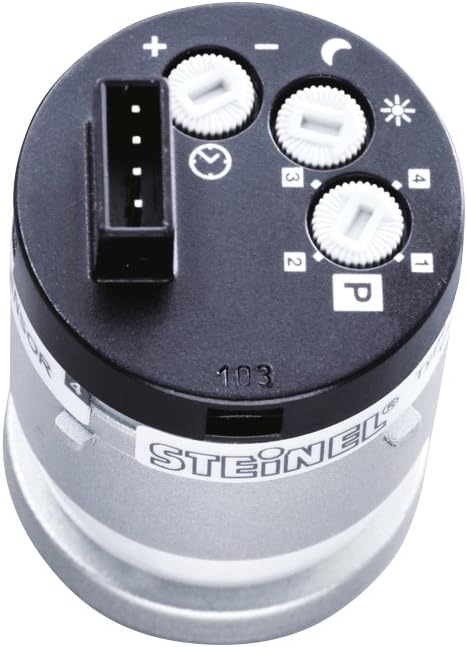
Figure 1: Top view of the Steinel 009014 Mini Replacement Sensor, highlighting the adjustment dials for light duration, brightness, and program selection. This compact unit is designed for seamless integration into compatible Steinel outdoor luminaires.
Compatibility
This replacement sensor is compatible with the following Steinel outdoor sensor lights:
- Steinel Sensor Outdoor Light L 265 S (from 2018 models)
- Steinel Sensor Outdoor Light L 265 LED (from 2018 models)
- Steinel Sensor Outdoor Light L 630 LED
- Steinel Sensor Outdoor Light L 631 LED
Setup and Installation
The Steinel 009014 Mini Replacement Sensor is designed for easy installation. Ensure power is disconnected before proceeding with any installation steps.
- Power Disconnection: Before beginning, ensure the power supply to the outdoor light fixture is completely switched off at the main circuit breaker.
- Accessing the Sensor Compartment: Carefully open the housing of your compatible Steinel outdoor sensor light to access the existing sensor or the sensor compartment. Refer to your specific luminaire's manual for detailed instructions on opening the housing.
- Removing the Old Sensor (if applicable): If replacing an existing sensor, gently disconnect it from its electrical contacts and remove it from the fixture.
- Inserting the New Sensor: Align the Steinel 009014 Mini Replacement Sensor with the designated slot in the luminaire. Ensure the electrical contacts are properly engaged. The sensor is designed for a secure fit.
- Securing the Housing: Once the new sensor is in place, carefully close and secure the housing of the outdoor light fixture.
- Power Reconnection: Restore power to the light fixture at the main circuit breaker.

Figure 2: Illustrates the process of inserting the mini replacement sensor into the compatible outdoor light fixture. The sensor module is held by hand and guided into its designated slot, ensuring proper alignment for electrical connection.
Operating Instructions and Settings
The sensor features intuitive controls for customizing its operation. Adjustments are made via dials located on the top of the sensor unit.

Figure 3: An overview of the sensor's capabilities, including its removable design for easy adjustment, stepless settings for light duration and response brightness, reliable motion detection up to 8 meters, 360° gap-free detection, and an additional lens for creep-under protection. The diagram also shows the ability to limit the detection area.
Adjustment Dials:
- Time Setting (Light Duration): This dial controls how long the light remains on after motion is detected. Rotate the dial to increase or decrease the duration.
- Twilight Setting (Response Brightness): This dial determines the ambient light level at which the sensor activates the light. Rotate towards the sun icon for activation in brighter conditions, or towards the moon icon for activation only in darker conditions.
- Program Selector (P): This dial allows selection of one of the four available function programs.

Figure 4: A close-up image demonstrating the adjustment of a program dial on the sensor. A small tool is used to precisely rotate the dial, allowing users to select desired operational settings.
Function Programs:
The sensor is equipped with 4 proven function programs. The new version of the sensor includes a specific program 4 for the Nightmatic function.
- Program 1: Standard motion detection with adjustable light duration and twilight threshold.
- Program 2: (Specific details would be in the full product manual, but generally variations of detection logic)
- Program 3: (Specific details would be in the full product manual)
- Program 4 (Nightmatic Function): This program provides automatic illumination during twilight hours, independent of motion, and can be combined with motion detection. Consult the luminaire's main manual for full details on Nightmatic operation.
Detection Area:
The sensor offers full 360° detection with an additional lens for creep-under protection, ensuring comprehensive coverage. The detection range is up to 7 meters. The detection area can be limited if necessary, using masking segments (not included with sensor, typically part of the luminaire).
Maintenance
The Steinel 009014 Mini Replacement Sensor requires minimal maintenance.
- Cleaning: Periodically clean the sensor lens with a soft, damp cloth to ensure optimal detection performance. Avoid abrasive cleaners or solvents.
- Inspection: Regularly inspect the sensor and its connections for any signs of damage or wear.
- Replacement: If the sensor malfunctions or is damaged, replace it with an original Steinel 009014 Mini Replacement Sensor.
Troubleshooting
If you encounter issues with your sensor, refer to the following common problems and solutions:
| Problem | Possible Cause | Solution |
|---|---|---|
| Light does not switch on when motion is detected. |
|
|
| Light remains on continuously. |
|
|
| Light switches on too frequently or not frequently enough. |
|
|
For further assistance, please refer to the complete manual of your specific Steinel outdoor luminaire or contact Steinel customer support.
Specifications
| Feature | Detail |
|---|---|
| Brand | Steinel |
| Model Number | 090014 (Reference: 110036591) |
| Product Dimensions (L x W x H) | 8.7 x 8.2 x 9.8 cm; 145 grams |
| Color | Anthracite |
| Material | Plastic |
| Power Source Type | Electric Cable |
| Mounting Type | Wall Mount, Ceiling Mount (within compatible luminaires) |
| Included Components | Detector |
| Batteries Required | No |
| Maximum Range | 7 Meters |
| Detection Angle | 360° with creep-under protection |
| Compatible Devices | Steinel Luminaires (L 265 S, L 265 LED, L 630 LED, L 631 LED) |
| Recommended Uses | Light control and automation |
Warranty Information
Specific warranty details for the Steinel 009014 Mini Replacement Sensor are typically provided with the original product packaging or can be found on the official Steinel website. Please retain your proof of purchase for warranty claims.
For information regarding returns or replacements, please refer to the seller's return policy. The buybox winner indicates a return policy duration of 31 days for refund/replacement.
Customer Support
For technical support, troubleshooting beyond this manual, or inquiries about spare parts, please visit the official Steinel website or contact their customer service department. Information regarding spare parts availability for this specific component is currently unavailable.
You can also visit the Steinel Brand Store on Amazon for additional product information.
Related documents090014


Ask a question about this manual
Ask about setup, troubleshooting, compatibility, parts, safety, or missing instructions. Manuals+ will review the question and use this page’s manual context to help answer it.