1. Product Overview
The OMRON Evolv Bluetooth Wireless Upper Arm Blood Pressure Monitor is an innovative one-piece device designed for precise and clinically accurate blood pressure readings. It features Omron's exclusive Heart Health Algorithm and Advanced Accuracy technology, minimizing interference from movement to deliver reliable results. Its compact, tube- and wire-free design makes it highly portable and simple to use.
Key Features:
- Portable BP Monitor: Compact, 1-piece design with simple, intuitive controls.
- Advanced Technology: Features Heart Health Algorithm and Advanced Accuracy for precise, clinically accurate readings.
- Wireless Bluetooth Convenience: Syncs with the free OMRON connect app to track trends, save unlimited readings, and easily share data.
- Trusted Quality: OMRON is a #1 doctor and pharmacist-recommended brand.
- FDA-Registered & VDL-Approved: Ensures clinical accuracy and reliability.

Figure 1.1: OMRON Evolv Blood Pressure Monitor and companion app interface.
2. Product Components
The OMRON Evolv Blood Pressure Monitor comes with the following items:
- OMRON Evolv Blood Pressure Monitor (main unit with integrated cuff)
- 4 AAA Batteries
- Instruction Manual (this document)

Figure 2.1: The OMRON Evolv Blood Pressure Monitor as packaged.
3. Setup
3.1 Battery Installation
- Locate the battery compartment on the side of the monitor.
- Open the battery cover.
- Insert the 4 AAA batteries, ensuring correct polarity (+/-).
- Close the battery cover securely.
3.2 Cuff Placement
Proper cuff placement is crucial for accurate readings.
- Sit in a chair with your back straight and your palm facing upward.
- Apply the cuff directly on your upper arm, ensuring it is snug but not too tight.
- Rest your arm on a table or surface so the cuff is at heart level.
- Place your feet flat on the floor; do not cross them.
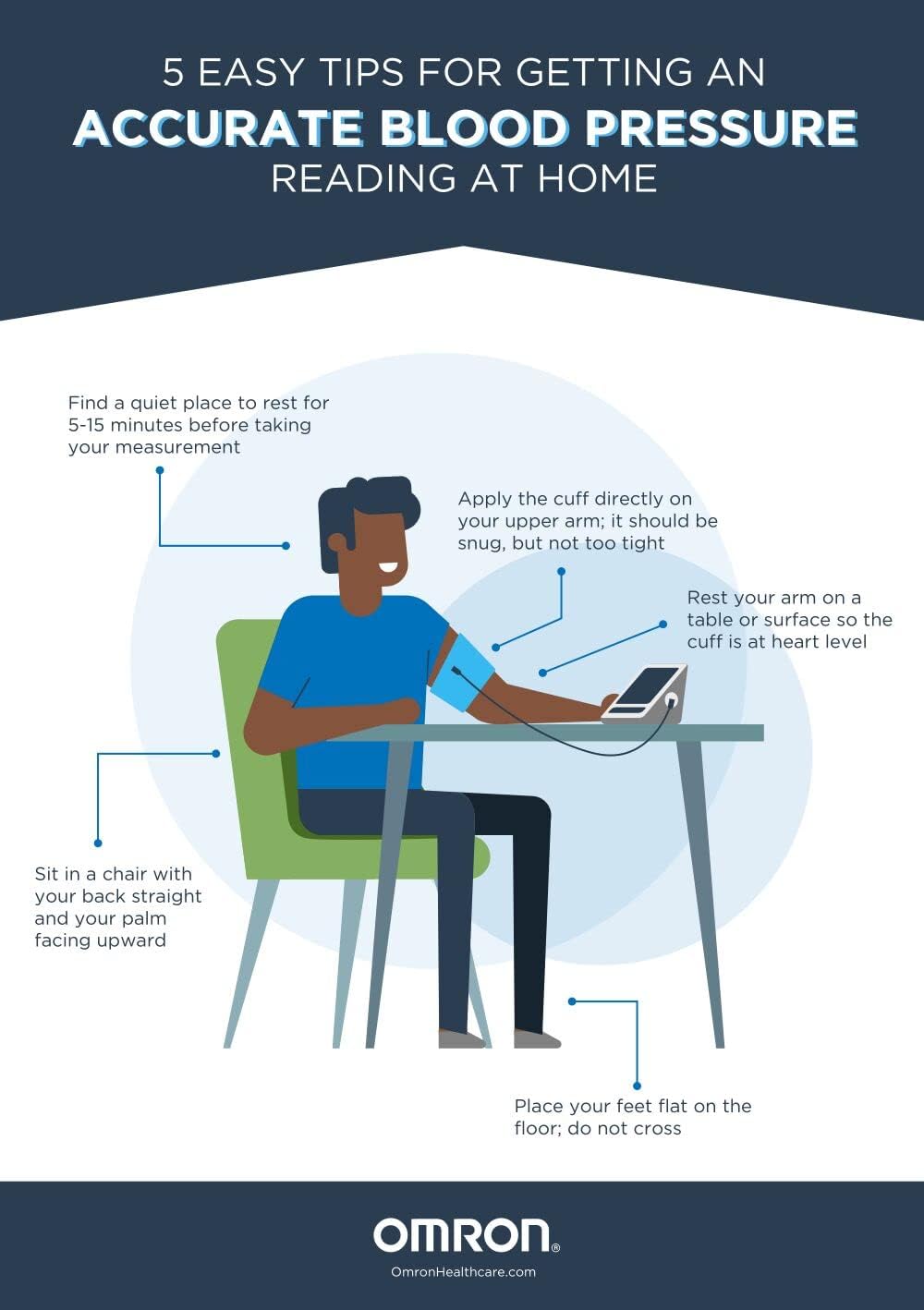
Figure 3.1: Correct posture and cuff placement for accurate blood pressure measurement.
3.3 OMRON Connect App Setup
The OMRON Evolv monitor connects wirelessly via Bluetooth to the free OMRON connect app.
- Download the free OMRON connect app from your device's app store.
- Follow the in-app instructions to pair your OMRON Evolv monitor via Bluetooth.
- Once paired, your readings will automatically sync to the app.

Figure 3.2: The OMRON Connect app for tracking and managing blood pressure data.
4. Operating Instructions
4.1 Taking a Measurement
- Ensure the cuff is correctly placed on your upper arm as described in Section 3.2.
- Press the START/STOP button on the monitor. The cuff will begin to inflate.
- Remain still and do not talk during the measurement.
- The monitor will display your Systolic, Diastolic, and Pulse readings once complete.

Figure 4.1: The compact, one-piece design of the OMRON Evolv monitor during use.
4.2 Understanding Your Readings
The monitor provides clear digital readings. Refer to the OMRON Connect app for detailed interpretation and historical data.
- Systolic (SYS): The top number, indicating the pressure in your arteries when your heart beats.
- Diastolic (DIA): The bottom number, indicating the pressure in your arteries between beats.
- Pulse: Your heart rate, measured in beats per minute (BPM).
- The monitor may also display symbols for irregular heartbeat or incorrect measurement. Consult your physician if you frequently observe irregular heartbeat symbols.

Figure 4.2: Explanation of common symbols and indicators on the monitor display.
5. Maintenance
5.1 Cleaning
- Wipe the monitor and cuff with a soft, dry cloth.
- Do not use abrasive cleaners or immerse the unit in water.
5.2 Storage
- Store the monitor in a cool, dry place away from direct sunlight and extreme temperatures.
- Keep the unit in its original packaging or a protective case when not in use to prevent damage.
6. Troubleshooting
If you encounter issues with your OMRON Evolv monitor, try the following:
- No Power/Display: Check battery installation and replace batteries if necessary.
- Inaccurate Readings: Ensure proper cuff placement and body posture. Avoid talking or moving during measurement.
- Bluetooth Connectivity Issues: Ensure Bluetooth is enabled on your smart device and the monitor is within range. Restart both devices if needed.
- Error Messages: Refer to the full user manual (PDF link provided in Section 8) for specific error code explanations.
7. Specifications
| Specification | Value |
|---|---|
| Model Name | BP7000 |
| Power Source | 4 AAA Batteries (included) |
| Display Type | LCD |
| Use for | Arm |
| Band Size | 22-42 cm |
| Item Weight | 8 ounces |
| Product Dimensions | 3.5 x 1 x 8 inches |
| Country of Origin | Japan |
8. Warranty and Support
The OMRON Evolv Blood Pressure Monitor is backed by a 5-year warranty, ensuring long-term reliability and peace of mind.
For detailed information, advanced troubleshooting, or customer support, please refer to the official User Manual PDF:


