
Introduction
The BLACK+DECKER HFS215J01 Lithium Floor Sweeper is designed for quick and easy cleaning of various floor types. Its lightweight and cordless design offers maneuverability and convenience for everyday messes. This manual provides essential information for the safe and efficient operation, maintenance, and care of your new floor sweeper.
Safety Instructions
Always follow basic safety precautions when using electrical appliances to reduce the risk of fire, electric shock, and personal injury.
- Read all instructions before using the appliance.
- Do not use outdoors or on wet surfaces.
- Do not allow to be used as a toy. Close attention is necessary when used by or near children.
- Use only as described in this manual. Use only manufacturer’s recommended attachments.
- Do not use with damaged cord or plug. If appliance is not working as it should, has been dropped, damaged, left outdoors, or dropped into water, return it to a service center.
- Do not pull or carry by cord, use cord as a handle, close a door on cord, or pull cord around sharp edges or corners. Do not run appliance over cord. Keep cord away from heated surfaces.
- Do not unplug by pulling on cord. To unplug, grasp the plug, not the cord.
- Do not handle plug or appliance with wet hands.
- Do not put any object into openings. Do not use with any opening blocked; keep free of dust, lint, hair, and anything that may reduce air flow.
- Keep hair, loose clothing, fingers, and all parts of body away from openings and moving parts.
- Turn off all controls before unplugging.
- Use extra care when cleaning on stairs.
- Do not use to pick up flammable or combustible liquids, such as gasoline, or use in areas where they may be present.
- Do not pick up anything that is burning or smoking, such as cigarettes, matches, or hot ashes.
- Do not use without dust cup and/or filters in place.
- Prevent unintentional starting. Ensure the switch is in the off-position before connecting to battery pack, picking up or carrying the appliance.
- Recharge only with the charger specified by the manufacturer. A charger that is suitable for one type of battery pack may create a risk of fire when used with another battery pack.
- Use appliances only with specifically designated battery packs. Use of any other battery packs may create a risk of injury and fire.
- When battery pack is not in use, keep it away from other metal objects, like paper clips, coins, keys, nails, screws or other small metal objects, that can make a connection from one terminal to another. Shorting the battery terminals together may cause burns or a fire.
- Under abusive conditions, liquid may be ejected from the battery; avoid contact. If contact accidentally occurs, flush with water. If liquid contacts eyes, additionally seek medical help. Liquid ejected from the battery may cause irritation or burns.
- Do not use a battery pack or appliance that is damaged or modified. Damaged or modified batteries may exhibit unpredictable behavior resulting in fire, explosion or risk of injury.
- Do not expose a battery pack or appliance to fire or excessive temperature. Exposure to fire or temperature above 130°C (265°F) may cause explosion.
- Follow all charging instructions and do not charge the battery pack or appliance outside of the temperature range specified in the instructions. Charging improperly or at temperatures outside of the specified range may damage the battery and increase the risk of fire.
- Have servicing performed by a qualified repair person using only identical replacement parts. This will ensure that the safety of the product is maintained.
- Do not modify or attempt to repair the appliance or the battery pack (as applicable) except as indicated in the instructions for use and care.
Package Contents
Verify that all items are present in your package:
- 1 x Powered Floor Sweeper
- 1 x Jack Plug Charger
- 1 x Brush Bar Cleaning Tool
Setup
The BLACK+DECKER HFS215J01 Lithium Floor Sweeper requires no assembly. Simply ensure the handle is securely attached to the sweeper head.

Charging the Sweeper
Before first use, fully charge the sweeper's lithium-ion battery. The built-in LED indicator will show the battery status.
- Locate the charging port on the sweeper.
- Insert the jack plug charger into the charging port.
- Plug the charger into a standard electrical outlet.
- Allow the sweeper to charge until the LED indicator shows a full charge.
- Unplug the charger once charging is complete.
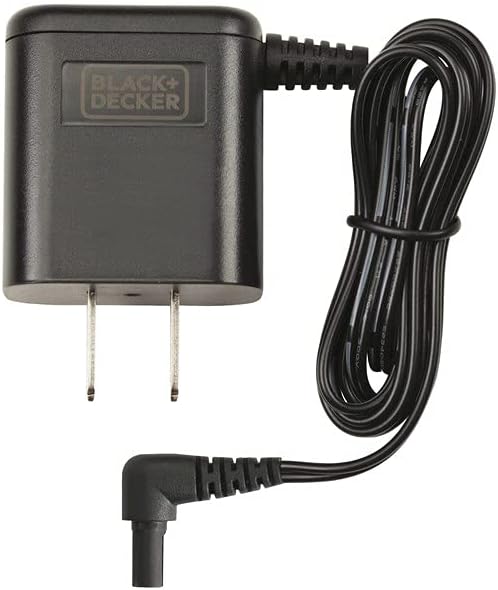
The sweeper is designed for cordless operation after charging, providing up to 100 minutes of sweeping power.
Video 1: Official product video demonstrating the BLACK+DECKER Floor Sweeper in use, including charging and operation.
Operating the Sweeper
The HFS215J01 is designed for ease of use on various surfaces.
- Power On/Off: Step on the large white power button located on the sweeper head to turn the unit on or off.
- Sweeping: Gently push the sweeper across the floor surface. The head swivels smoothly, allowing for effortless steering around, under, and behind furniture.
- Surface Compatibility: This sweeper is effective on both hard floors and low-pile carpets.
- LED Indicator: Monitor the built-in LED to check the battery status during operation.


Maintenance
Emptying the Dustbin
The sweeper features an easy-to-empty dustbin for hygienic disposal of collected debris.
- Position the sweeper over a trash can.
- Locate the two levers on the underside of the sweeper head.
- Pinch the two levers together to open the bottom plate of the dustbin.
- Allow the collected dirt, hair, and crumbs to fall directly into the trash can.
- Release the levers to close the dustbin.

Cleaning the Brush Bar
Regularly clean the brush bar to maintain optimal sweeping performance, especially if hair or fibers accumulate.
- Turn off the sweeper.
- Use the provided brush bar cleaning tool to remove any tangled hair or debris from the brush bar. The tool features a wire brush and a cutting edge for effective cleaning.
- Ensure the brush bar spins freely after cleaning.


Troubleshooting
If your sweeper is not performing as expected, consult the following common issues and solutions:
| Problem | Possible Cause | Solution |
|---|---|---|
| Sweeper does not turn on. | Battery is not charged. | Charge the sweeper fully. |
| Sweeper is not picking up debris effectively. | Dustbin is full. Brush bar is tangled with hair/debris. | Empty the dustbin. Clean the brush bar using the provided tool. |
| Reduced runtime. | Battery not fully charged. Battery life diminishing over time. | Ensure full charge before use. Contact customer support for battery replacement options if runtime significantly decreases. |
Specifications
| Feature | Detail |
|---|---|
| Brand | BLACK+DECKER |
| Model Name | Lithium Floor Sweeper |
| Model Number | HFS215J01 |
| Special Feature | Cordless |
| Filter Type | Cartridge |
| Capacity | 150 Milliliters (20.6 ounces) |
| Wattage | 90 watts |
| Recommended Uses | Hard Floor, Carpets |
| Form Factor | Stick |
| Color | Gray |
| Battery Type | Lithium-Ion (1 included) |
| Battery Life | Up to 100 minutes (as per product description, 60 minutes in feature bullets) |
| Noise Level | 80 Decibels |
| Product Dimensions | 15 x 9 x 4 inches |
| Item Weight | 2 pounds |
| Indoor/Outdoor Usage | Indoor |
Warranty
The BLACK+DECKER HFS215J01 Lithium Floor Sweeper is backed by a 2-year limited warranty. Please retain your proof of purchase for warranty claims. For detailed terms and conditions, refer to the warranty card included with your product or visit the official BLACK+DECKER website.
Support
For further assistance, product registration, or to purchase replacement parts, please visit the official BLACK+DECKER website or contact their customer service department.
- Website: www.blackanddecker.com
- Customer Service: Refer to your product packaging or the official website for regional contact information.


