
Introduction
This manual provides detailed instructions for the installation, operation, and maintenance of your RISEPRO Wireless Waterproof Bike Computer Model YT-813. Please read this manual thoroughly before using the device to ensure proper function and longevity.
The YT-813 is designed to track various cycling metrics, featuring a clear 4-line LCD display, backlight for night use, and waterproof construction. It supports settings for two bicycles and offers a wide range of functions for comprehensive ride analysis.
Package Contents
Verify that all items listed below are included in your package:
- 1 x Bike Computer (Main Unit)
- 1 x Wireless Transmitter
- 2 x CR2032 Batteries (1 for computer, 1 for transmitter)
- 1 x Mounting Bracket
- 2 x Cable Ties
- 1 x Adhesive Pad
- 1 x Magnetic Sensor
- 1 x Instruction Guide

Image: All components included in the RISEPRO YT-813 Bike Computer package.
Key Features
- Large 4-Line LCD Display: Provides clear and easy-to-read cycling data.
- Dual Bike Settings: Pre-program parameters for two different bicycles (Bike A and Bike B) for easy switching and data comparison.
- Comprehensive Functions: Includes odometer, maximum speed, average speed, riding time, calorie consumption, current speed, total riding time, total mileage, current temperature, and RPM.
- Backlight: Ensures visibility in low-light conditions and at night.
- Waterproof Design: Suitable for use in various weather conditions.
- Wide Compatibility: Works with electric bikes, bicycles, and motorcycles with wheel sizes from 10.1 cm to 101.6 cm (4 to 40 inches).
- Temperature Display: Shows ambient temperature in Fahrenheit or Celsius.
- Clock and Calendar: Integrated time and date functions.
- Low Battery Indicator: Alerts when battery replacement is needed.
- Auto Power Off: Conserves battery life when not in use.

Image: The bike computer display showing various functions and metrics.
Setup and Installation
1. Battery Installation
Install one CR2032 battery into the main computer unit and another CR2032 battery into the wireless transmitter. Ensure correct polarity.
2. Mounting the Components
- Mounting Bracket: Attach the mounting bracket to your bicycle's handlebar or stem using the provided cable ties. Ensure it is securely fastened.
- Bike Computer: Slide the bike computer onto the mounting bracket until it clicks into place.
- Wireless Transmitter: Securely attach the wireless transmitter to the front fork of your bicycle using cable ties. Position it so that its sensor faces the wheel spokes.
- Magnetic Sensor: Attach the magnetic sensor to a spoke on your front wheel. Ensure it is aligned with the wireless transmitter.
Important Distance Requirements:
- The distance between the bike computer and the wireless transmitter must be less than 60 cm.
- The distance between the wireless transmitter and the magnetic sensor (on the spoke) must be no more than 1 cm.

Image: Step-by-step visual guide for installing the bike computer components.
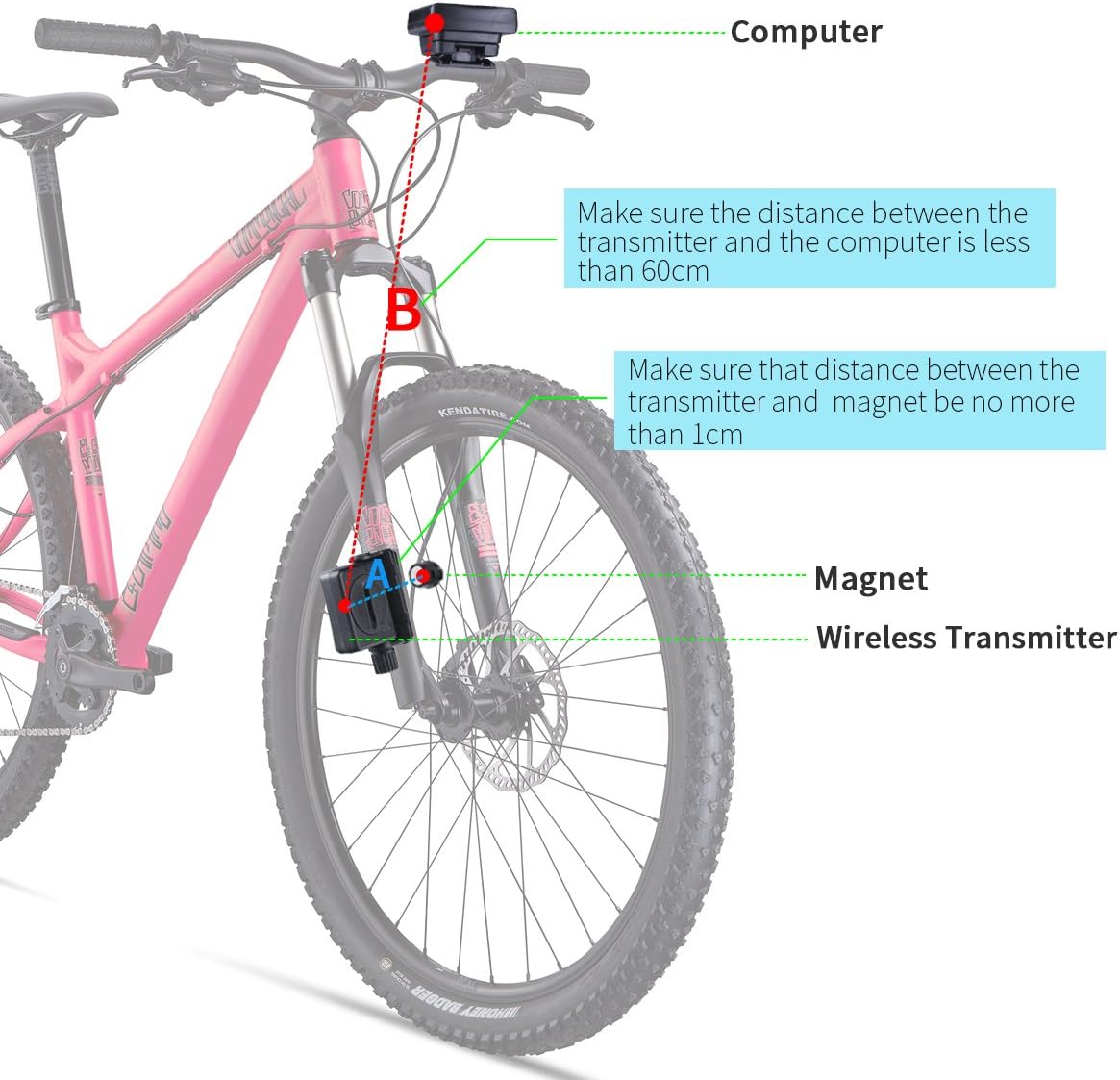
Image: Overview of component placement and wireless induction distances on a bicycle.
3. Wheel Circumference Setting
Accurate speed and distance readings depend on correctly setting the wheel circumference. Refer to your bicycle's tire specifications for the exact circumference in millimeters (mm). If not available, measure the wheel's circumference manually.
Calculation Example: For a 29-inch tire, a common method is to calculate: Wheel Diameter (inches) x Pi (approximately 3.14) x 25.4 (mm/inch). For instance, a 29-inch wheel might have a circumference around 2280 mm. Enter this 4-digit value into the computer's settings.
Consult your bike computer's specific setup menu for entering this value. Typically, you will press and hold a button (e.g., MODE) to enter settings mode, then use other buttons to adjust the digits.
Operating Instructions
Button Functions
The bike computer typically features one or two buttons (e.g., MODE, SET) for navigation and settings. Refer to the specific button layout on your device.
- MODE Button: Short press to cycle through different display modes (e.g., Odometer, Trip Distance, Max Speed, Average Speed, Temperature, Clock). Long press to enter setting mode.
- SET Button (if present): Used to confirm selections or adjust values within setting mode.
Display Modes
The 4-line display shows various data simultaneously. Use the MODE button to switch the primary displayed metric. Common displays include:
- Current Speed (SPD)
- Maximum Speed (MAX)
- Average Speed (AVG)
- Odometer (ODO - total distance)
- Trip Distance (DST - current ride distance)
- Riding Time (TM - current ride duration)
- Clock (CLK)
- Temperature (TH)
- Calories (CAL)
Backlight Activation
The backlight can be activated for improved visibility in dark conditions. Typically, a short press of a specific button (often the MODE button) or a combination of buttons will turn the backlight on or off. The backlight may also activate automatically with button presses or movement.

Image: The bike computer display showing both day and night modes with backlight.
Dual Bike Settings (Bike A / Bike B)
The YT-813 allows you to store settings and track data for two different bicycles. To switch between Bike A and Bike B, locate the corresponding setting in the menu (often indicated by an icon on the display). This feature is useful for comparing performance between different bikes or for multiple users.
Units (Metric/Imperial)
You can select your preferred units for speed and distance (km/h and km, or mph and miles) and temperature (°C or °F) in the settings menu.
Auto Power Off
To conserve battery, the computer will automatically enter sleep mode after a period of inactivity. It will wake up automatically upon sensing movement or a button press.
Maintenance
- Cleaning: Wipe the computer and transmitter with a soft, damp cloth. Do not use abrasive cleaners or solvents.
- Battery Replacement: When the low battery indicator appears, replace the CR2032 batteries in both the computer and the transmitter. Ensure proper disposal of old batteries.
- Storage: If storing the device for an extended period, remove the batteries to prevent leakage. Store in a cool, dry place.
Troubleshooting
- No Speed/Distance Reading:
- Check battery levels in both the computer and transmitter. Replace if low.
- Verify the distance between the transmitter and magnet (should be < 1 cm).
- Ensure the transmitter and computer are within 60 cm of each other.
- Check that the magnet and transmitter are correctly aligned.
- Inaccurate Readings:
- Re-check the wheel circumference setting. An incorrect value will lead to inaccurate data.
- Ensure the magnet and transmitter are securely mounted and not shifting during rides.
- Display Not Working:
- Check the computer battery.
- Ensure the computer is properly seated in its mounting bracket.
Specifications
| Feature | Specification |
|---|---|
| Model Number | YT-813 |
| Brand | RISEPRO |
| Display Type | LCD (4-line) |
| Screen Size | 4.3 Centimeters |
| Connectivity Technology | Wireless (ANT) |
| Sensor Type | Speed Sensor |
| Power Source (Computer) | 1 x CR2032 Battery |
| Power Source (Transmitter) | 1 x CR2032 Battery |
| Average Battery Life | 2 years |
| Product Dimensions (L x W x H) | 6 x 4.5 x 1.5 cm |
| Item Weight | 62 Grams |
| Mounting Type | Stem or Handlebar Mount |
| Input Interface | Buttons |
| Compatibility | Wheels 10.1 to 101.6 cm (4 to 40 inches) |
Warranty and Support
For warranty information or technical support, please refer to the contact details provided with your purchase or visit the official RISEPRO website. Keep your purchase receipt as proof of purchase.