
1. Product Overview
The ASAKUKI 500ml Premium Essential Oil Diffuser is a versatile 5-in-1 aromatherapy device designed to enhance your living space. It functions as an essential oil diffuser, humidifier, air purifier, ionizer, and night light. Featuring a large water tank, remote control, and multiple settings, it provides a relaxing and fragrant atmosphere.
Key Features:
- 5-in-1 Functionality: Diffuser, Humidifier, Air Purifier, Ionizer, Night Light.
- Large Capacity: 500ml water tank for extended operation.
- Remote Control: Conveniently adjust settings from a distance.
- 7 LED Light Colors: Customizable ambient lighting, fixed or cycling.
- Multiple Mist Modes: Continuous, 60/120/180 minute timers, and intermittent mist.
- Ultra-Quiet Operation: Noise level below 23 dB for undisturbed use.
- Auto-Off Safety Switch: Automatically shuts off when water runs out.
- BPA-Free Material: Safe for use around babies and pets.
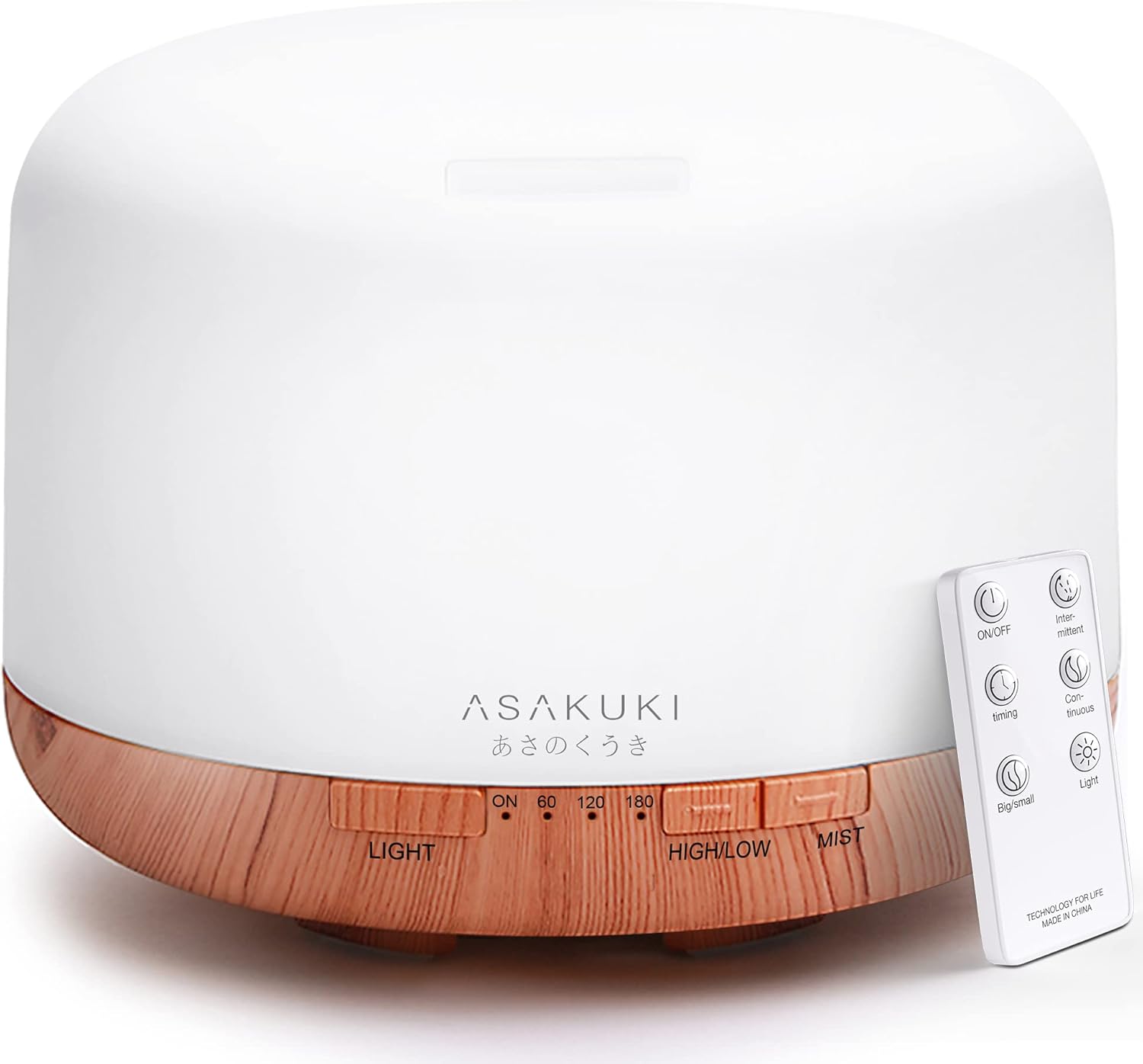
The ASAKUKI 500ml Premium Essential Oil Diffuser, shown with its remote control.
2. Setup Guide
Follow these steps for the initial setup of your ASAKUKI Essential Oil Diffuser:
- Place the Diffuser: Position the diffuser on a flat, stable surface. Ensure it is not near any water-sensitive electronics or open flames.
- Connect Power: Plug the power adapter into the diffuser's DC jack, then plug the adapter into a wall outlet.
- Remove the Cover: Gently lift the top cover of the diffuser.
- Add Water: Using a measuring cup, fill the water tank with clean tap water up to the maximum water level line (500ml). Do not overfill.
- Add Essential Oil: Add 2-3 drops of your preferred essential oil directly into the water tank. Adjust the quantity based on your preference and room size.
- Replace the Cover: Carefully place the top cover back onto the diffuser, ensuring it is properly seated.

Step 1: Connect the power adapter to the diffuser.

Step 2: Fill the water tank up to the MAX line.

Step 3: Add a few drops of essential oil.

Step 4: Replace the cover and power on the unit.
3. Operating Instructions
Your ASAKUKI diffuser can be operated using the buttons on the unit or the included remote control.
Using the Remote Control:

The remote control allows for convenient operation from up to 16.5 feet away.
- ON/OFF Button: Press to turn the diffuser on or off.
- Mist Button: Press to cycle through mist modes: Continuous, 60 minutes, 120 minutes, 180 minutes.
- High/Low Button: Adjusts mist intensity between high and low.
- Light Button: Turns the LED light on/off. Press repeatedly to cycle through 7 colors or set to a fixed color.
- Intermittent Mist: Some remotes may have a dedicated button for intermittent mist (e.g., 10 seconds on, 10 seconds off).
Using the Unit Buttons:
- LIGHT Button: Controls the LED light. Press to turn on, cycle through colors, or fix a color. Hold to turn off.
- HIGH/LOW Button: Adjusts mist intensity.
- MIST Button: Turns on the mist and cycles through timer settings (ON, 60, 120, 180 minutes). Hold to turn off.

The diffuser is suitable for various occasions, from working to sleeping.
4. Maintenance and Care
Regular cleaning is essential to ensure optimal performance and longevity of your diffuser.
Cleaning Instructions:
- Unplug the Diffuser: Always disconnect the power adapter before cleaning.
- Empty Water: Pour out any remaining water from the tank, ensuring to pour from the side opposite the air outlet to avoid water entering the internal components.
- Wipe Down: Use a soft cloth or sponge to wipe the inside of the water tank. For stubborn residue or oil buildup, use a cotton swab dipped in rubbing alcohol or a mixture of distilled water and white vinegar (1:1 ratio).
- Clean Ultrasonic Plate: Gently wipe the ultrasonic vibration plate (the small ceramic disc at the bottom of the tank) with a cotton swab. Do not scratch or apply excessive pressure.
- Rinse and Dry: Rinse the tank with clean water (avoiding the air outlet) and wipe it dry with a clean cloth.
- External Cleaning: Wipe the exterior of the diffuser with a soft, dry cloth.
Important Note:
- • Do not use corrosive detergents or harsh chemicals.
- • Do not immerse the entire unit in water.
- • Clean the diffuser regularly, especially if you change essential oils frequently or use it daily.
5. Troubleshooting
| Problem | Possible Cause | Solution |
|---|---|---|
| No mist or low mist output |
|
|
| Diffuser beeps twice and shuts off | Water tank is empty. | Refill the water tank. This is a safety feature to prevent dry burning. |
| Light not working | Light function is off or malfunction. | Press the 'Light' button on the unit or remote to turn it on. If it still doesn't work, contact support. |
| Remote control not responding | Battery drained or obstruction. | Replace the remote control battery. Ensure no obstructions between the remote and the diffuser. |
| Cannot select specific light color via Alexa/Smart Home | This model does not support specific color selection via smart home integration. | The LED light will cycle through colors automatically or can be fixed to a color by pressing the physical button on the device to 'pause' the cycle. Specific color selection via voice command is not a supported feature for this model. |
6. Specifications
| Feature | Detail |
|---|---|
| Brand | ASAKUKI |
| Model Name | ROCK |
| Model Number | 100-DF001 |
| Capacity | 500 Milliliters |
| Runtime | Up to 18 hours (low mist mode) |
| Coverage Area | 300 square feet |
| Noise Level | Less than 23 dB |
| Power Source | Corded Electric |
| Wattage | 12 watts |
| Material | Polypropylene (PP), BPA Free |
| Product Dimensions | 6.62"L x 6.62"W x 4.93"H (16.8 cm L x 16.8 cm W x 12.5 cm H) |
| Item Weight | 1.1 pounds (500 Grams) |
| UPC | 190835221999 |

Product dimensions and capacity details.
7. Warranty and Support
ASAKUKI provides a two-year technical support for this product. Your satisfaction is paramount. For any technical assistance or inquiries, please refer to the official user guide or contact ASAKUKI customer service.
You can also download the comprehensive User Guide in PDF format for more detailed information: Download User Guide (PDF)


