
1. Introduction
This instruction manual provides essential information for the safe and effective operation, maintenance, and troubleshooting of your FERM JSM1026 Cordless Jigsaw. Please read this manual thoroughly before using the tool and keep it for future reference. Proper use and care will ensure optimal performance and extend the lifespan of your jigsaw.
2. General Safety Instructions
Always observe the following safety precautions to reduce the risk of electric shock, fire, and serious injury.
2.1. Work Area Safety
- Keep the work area clean and well-lit. Cluttered or dark areas invite accidents.
- Do not operate power tools in explosive atmospheres, such as in the presence of flammable liquids, gases, or dust. Power tools create sparks which may ignite the dust or fumes.
- Keep children and bystanders away while operating a power tool. Distractions can cause you to lose control.
2.2. Electrical Safety
- Avoid body contact with earthed or grounded surfaces such as pipes, radiators, ranges, and refrigerators. There is an increased risk of electric shock if your body is earthed or grounded.
- Do not expose power tools to rain or wet conditions. Water entering a power tool will increase the risk of electric shock.
2.3. Personal Safety
- Always wear eye protection. Use safety glasses, goggles, or a face shield.
- Wear hearing protection when operating power tools for extended periods.
- Dress properly. Do not wear loose clothing or jewelry. Keep your hair, clothing, and gloves away from moving parts.
- Stay alert, watch what you are doing, and use common sense when operating a power tool.
3. Product Overview and Components
The FERM JSM1026 is a compact and versatile cordless jigsaw designed for cutting various materials such as wood, metal, and plastic. It offers freedom of movement due to its cordless design.

Figure 1: Overview of the FERM JSM1026 Cordless Jigsaw with a blade installed.
3.1. Main Components
- Blade Clamp
- Saw Blade
- Base Plate
- On/Off Trigger Switch
- Lock-off Button (Safety Switch)
- Soft Grip Handle
- Battery Pack (removable)
- Battery Charger Port

Figure 2: Detail of the trigger switch and safety lock-off button for operation.
4. Setup
4.1. Charging the Battery
The jigsaw is powered by a 12V Li-Ion battery. Ensure the battery is fully charged before first use.
- Remove the battery pack from the tool by pressing the release buttons on the sides of the battery and sliding it out.
- Connect the charger to a suitable power outlet.
- Insert the battery pack into the charger. Ensure it clicks into place.
- The charging indicator light on the charger will show the charging status. Refer to the charger's specific instructions for light indications.
- Once fully charged, disconnect the charger from the power outlet and remove the battery pack.
- Reinsert the charged battery pack into the jigsaw until it clicks securely.
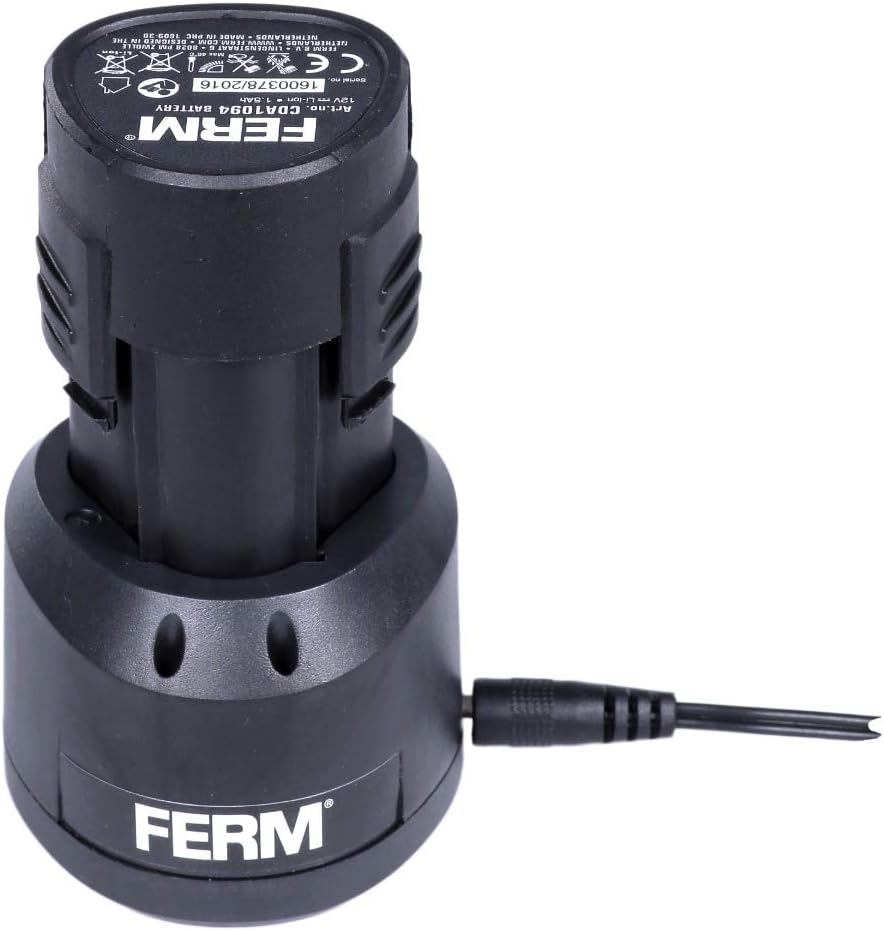
Figure 3: The 12V Li-Ion battery being charged with its dedicated charger.
4.2. Installing/Removing the Saw Blade
Always ensure the tool is switched off and the battery pack is removed before installing or removing blades.
- To Install:
- Loosen the blade clamp screw (if applicable, some models have tool-free blade change).
- Insert the shank of the saw blade into the blade clamp with the teeth facing forward.
- Ensure the blade is fully seated and secured. Tighten the blade clamp screw firmly.
- To Remove:
- Loosen the blade clamp screw.
- Carefully pull the saw blade out of the clamp. Be cautious as the blade may be hot or sharp.

Figure 4: Detail of the blade clamp area, showing where the saw blade is inserted and secured.
5. Operating the Jigsaw
5.1. General Operation
- Ensure the workpiece is securely clamped or held.
- Place the base plate of the jigsaw flat on the workpiece.
- Press the lock-off button (if present) and then squeeze the trigger switch to start the tool.
- Allow the blade to reach full speed before contacting the workpiece.
- Guide the jigsaw along the cutting line with steady, even pressure. Do not force the tool.
- To stop, release the trigger switch.

Figure 5: Proper technique for operating the jigsaw, with the base plate flat on the material.
5.2. Cutting Different Materials
- Wood: Use wood-specific blades. For thicker wood, a slower, steady pace is recommended.
- Metal: Use metal-specific blades. Apply cutting oil for better performance and blade life. Maintain a slower cutting speed.
- Plastic: Use fine-tooth blades. Avoid excessive heat buildup which can melt the plastic.
Always select the appropriate blade for the material and desired cut quality.
6. Maintenance
Regular maintenance ensures the longevity and safe operation of your jigsaw.
6.1. Cleaning
- After each use, clean the tool with a soft cloth.
- Remove any sawdust or debris from the ventilation openings to prevent overheating.
- Do not use solvents or abrasive cleaners.
6.2. Blade Replacement
Replace blades when they become dull or damaged. Refer to Section 4.2 for blade installation/removal instructions.
6.3. Battery Care
- Store batteries in a cool, dry place away from direct sunlight.
- Do not store batteries in a discharged state for extended periods.
- Do not expose batteries to extreme temperatures.
7. Troubleshooting
This section addresses common issues you might encounter with your FERM JSM1026 jigsaw.
| Problem | Possible Cause | Solution |
|---|---|---|
| Tool does not start. | Battery not charged or not properly inserted. Safety lock-off engaged. | Charge battery. Ensure battery is fully inserted. Press lock-off button before trigger. |
| Blade not cutting efficiently. | Dull or incorrect blade for material. | Replace with a sharp, appropriate blade. |
| Excessive vibration. | Loose blade. Damaged blade. | Ensure blade is securely clamped. Replace damaged blade. |
| Tool overheats. | Blocked ventilation slots. Overloading the tool. | Clean ventilation slots. Reduce cutting pressure. Allow tool to cool. |
8. Specifications
Technical data for the FERM JSM1026 Cordless Jigsaw.
| Specification | Value |
|---|---|
| Brand | Ferm |
| Model | JSM1026 |
| Voltage | 12 Volts |
| Battery Type | Li-Ion (1.5 Ah) |
| No-load Speed | 2100 rpm |
| Blade Material | Metal (for included blades) |
| Recommended Surface | Wood, Metal, Plastic |
| Item Weight | 1.9 Kilograms |
| Included Components | 1 Li-Ion battery (12V - 1.5 Ah), 1 wood saw blade, 1 metal saw blade, charger, storage case |

Figure 6: The robust storage case included with the FERM JSM1026 jigsaw, designed for protection and portability.
9. Warranty and Support
For information regarding warranty terms, service, or technical support, please refer to the official FERM website or contact your local FERM dealer. Keep your purchase receipt as proof of purchase for warranty claims.

