
Introduction
This manual provides essential information for the proper setup, operation, and maintenance of your TELECO MIO-868-A04 remote control.
The TELECO MIO-868-A04 is a high-quality remote control designed for gate automation systems, operating at a frequency of 868 MHz. It features a robust design and simple operation, making it an ideal solution for controlling compatible gate receivers.
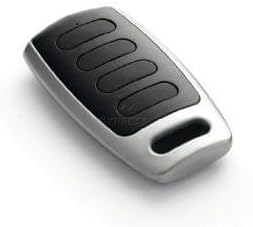
Image: The TELECO MIO-868-A04 remote control, featuring a black and silver casing with four black buttons.
Key Features
- Gate remote control with a frequency of 868 MHz.
- Programming type: Recording directly into the receiver unit.
- Uses a CR2032 battery.
- Compact dimensions: 0.6 x 0.4 x 0.1 cm.
- Equipped with 4 control buttons.
- Maximum operating range of 10 metres.
Setup and Programming
Battery Installation
The remote control comes with a CR2032 battery pre-installed. If replacement is needed, follow these steps:
- Locate the battery compartment on the back of the remote.
- Carefully open the compartment using a small screwdriver or coin.
- Remove the old CR2032 battery.
- Insert the new CR2032 battery with the positive (+) side facing up.
- Close the battery compartment securely.
Programming the Remote Control
The TELECO MIO-868-A04 remote control is programmed by 'recording' it directly into your gate receiver unit. The exact procedure may vary depending on your specific gate receiver model. Please refer to your gate receiver's instruction manual for detailed programming steps. Generally, the process involves:
- Accessing the programming mode on your gate receiver (often by pressing a 'Learn' or 'Prog' button).
- Pressing a button on the new TELECO remote control when the receiver is in programming mode.
- Confirming successful programming (e.g., an LED indicator on the receiver changes or flashes).
Important: Ensure your gate receiver is compatible with 868 MHz frequency remotes.
Operating Instructions
Once programmed, the TELECO MIO-868-A04 remote control is ready for use.
- Opening/Closing Gate: Press the assigned button on the remote control to activate your gate. The remote has 4 buttons, allowing for multiple functions if supported by your receiver (e.g., full open, pedestrian open, stop).
- Range: The maximum effective operating range is approximately 10 metres. Ensure there are no significant obstructions between the remote and the receiver.
- Indicator Light: A small LED indicator on the remote may illuminate when a button is pressed, indicating battery function and signal transmission.
Maintenance
Cleaning
Clean the remote control with a soft, dry cloth. Do not use abrasive cleaners or solvents, as these can damage the casing and internal components.
Battery Replacement
Replace the CR2032 battery when the remote's range decreases significantly or the indicator light fails to illuminate consistently upon button press. Refer to the 'Battery Installation' section for instructions.
Storage
Store the remote control in a dry place, away from extreme temperatures and direct sunlight. Avoid dropping the remote or exposing it to water.
Troubleshooting
| Problem | Possible Cause | Solution |
|---|---|---|
| Remote not working | Dead battery; Not programmed; Out of range; Receiver issue. | Replace battery; Re-program remote (see Setup); Move closer to receiver; Check receiver power/status. |
| Short operating range | Low battery; Interference; Obstructions. | Replace battery; Check for sources of interference (e.g., other wireless devices); Clear line of sight to receiver. |
| LED on remote not lighting up | Dead battery; Faulty remote. | Replace battery; If problem persists, contact support. |
Technical Specifications
| Model Name | MIO-868-A04 |
| Brand | Teleco |
| Frequency | 868 MHz |
| Number of Buttons | 4 |
| Battery Type | CR2032 |
| Product Dimensions | 0.6 x 0.4 x 0.1 cm |
| Weight | 50 g |
| Maximum Range | 10 Metres |
| Colour | Black and Silver |
Warranty and Support
For specific warranty information, please refer to the documentation provided at the time of purchase or contact your retailer. Standard return policies typically allow for returns within 30 days of purchase, subject to retailer terms and conditions.
For technical support or further assistance with programming, it is recommended to contact the manufacturer, Teleco, or your authorized dealer. Ensure you have your model number (MIO-868-A04) ready when seeking support.
