
Introduction
The Kramer VM-214DT is a high-performance 4K UHD distribution amplifier designed for HDMI and HDBaseT signals. This device efficiently reclocks and equalizes incoming signals, then distributes them to four identical HDBaseT outputs and a single looping HDMI output. It supports video resolutions up to 4K@60Hz (4:2:0) UHD, ensuring high-quality signal transmission. The VM-214DT also offers versatile control options and advanced audio de-embedding capabilities, making it suitable for various professional audio-visual installations.
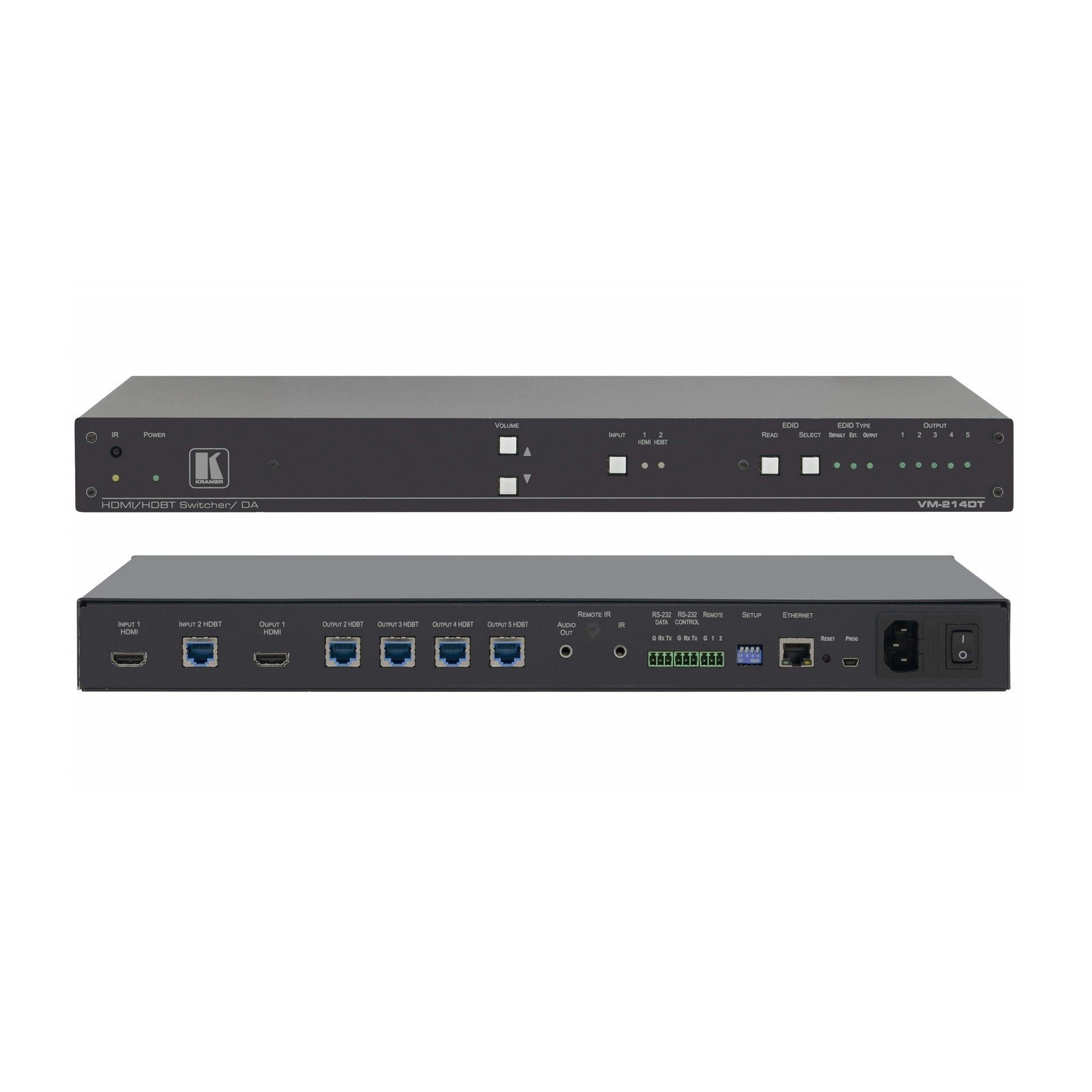
Figure 1: Front view of the Kramer VM-214DT distribution amplifier, showing input and output ports.
Setup Instructions
Follow these steps to properly set up your Kramer VM-214DT distribution amplifier.
Package Contents
Verify that your package contains the following items:
- Kramer VM-214DT unit
- Power adapter
- Rack ears (if applicable)
- Quick start guide
Connecting the Device
- Power Off: Ensure all devices, including the VM-214DT, are powered off before making any connections.
- Connect Source: Connect your HDMI source (e.g., Blu-ray player, computer) to the HDMI input port on the VM-214DT using a high-quality HDMI cable.
- Connect Displays: Connect your HDBaseT receivers (connected to displays) to the four HDBaseT output ports on the VM-214DT using CatX cables. For the looping HDMI output, connect it to an additional HDMI display or another distribution device.
- Connect Power: Connect the power adapter to the VM-214DT and then plug it into a power outlet.
- Power On: Power on the VM-214DT, followed by your source devices and displays.
Operating Instructions
This section details the basic operation and advanced features of the VM-214DT.
Basic Operation
- Signal Distribution: Once connected and powered on, the VM-214DT automatically detects the input signal and distributes it to all connected HDBaseT and HDMI outputs.
- LED Indicators: Observe the LED indicators on the front panel for status information regarding power, input signal presence, and output link status. Refer to the full manual for detailed LED descriptions.
Advanced Features
- 4K UHD Support: The device supports resolutions up to 4K@60Hz (4:2:0) UHD. Ensure your source and displays are compatible for optimal performance.
- Audio De-embedding: The VM-214DT includes audio de-embedding capabilities. Consult the full product manual for instructions on configuring and utilizing this feature.
- Control Options: The unit offers various control options, which may include RS-232 or Ethernet. Refer to the comprehensive manual for detailed control protocols and commands.
Maintenance
Proper maintenance ensures the longevity and optimal performance of your VM-214DT.
- Cleaning: Disconnect power before cleaning. Use a soft, dry cloth to wipe the exterior of the unit. Do not use liquid or aerosol cleaners.
- Ventilation: Ensure the unit has adequate ventilation. Do not block ventilation openings.
- Storage: Store the device in a cool, dry place away from direct sunlight and extreme temperatures when not in use for extended periods.
Troubleshooting
This section provides solutions to common issues you might encounter with the VM-214DT.
| Problem | Possible Cause | Solution |
|---|---|---|
| No video output on displays. | Loose cable connections, incorrect input selection on display, power issue, incompatible resolution. | Check all HDMI and HDBaseT cable connections. Ensure displays are set to the correct input. Verify the VM-214DT is powered on. Confirm source resolution is supported by displays. |
| Intermittent video signal. | Poor quality cables, cable length exceeding limits, interference. | Use high-quality, certified HDMI and CatX cables. Ensure cable lengths are within HDBaseT specifications. Check for potential sources of electromagnetic interference. |
| No audio. | Audio settings on source/display, de-embedding configuration. | Verify audio output settings on the source device. Check audio input settings on the display/receiver. If using audio de-embedding, ensure it is configured correctly. |
Technical Specifications
| Model Number | VM-214DT |
| Brand | Kramer |
| Product Description | 2x1:4 4K UHD HDMI HDBaseT Distribution Amplifier |
| Supported Resolutions | Up to 4K@60Hz (4:2:0) UHD |
| Inputs | 1x HDMI |
| Outputs | 4x HDBaseT, 1x Looping HDMI |
| Connector Type | HDMI |
| Compatible Devices | Television, HDMI sources, HDBaseT receivers |
| Product Dimensions (L x W x H) | 25 x 6 x 9 inches |
| Item Weight | 9 pounds |
| Output Wattage | 400 Watts |
| UPC | 642892778843 |
| ASIN | B01MQA05W |
| Date First Available | October 27, 2016 |
Warranty Information
Kramer products are designed for reliability and performance. For specific warranty terms and conditions, please refer to the warranty card included with your product or visit the official Kramer website. Warranty coverage typically includes defects in materials and workmanship under normal use.
Customer Support
If you encounter any issues or have questions regarding your Kramer VM-214DT, please contact Kramer customer support. You can find contact information, FAQs, and additional resources on the official Kramer website. Please have your model number (VM-214DT) and serial number ready when contacting support.
For further assistance, visit: www.kramerav.com


