
Introduction
This manual provides essential information for the safe and effective use of the UpStart Components 35/5 MFD 440 Volt Dual Round Run Capacitor. This component is designed as a replacement part for various applications, including Trane TTB024C100A2 systems. Please read these instructions carefully before installation and operation.
Product Overview
The UpStart Components Dual Round Run Capacitor is a critical electrical component used to maintain optimal performance in various applications. This 2-pack includes two 35/5 MFD 440 Volt capacitors, model CAP-97F9848. It is designed to provide reliable motor starting and running capabilities.

Image 1: UpStart Components 35/5 MFD 440V Dual Round Run Capacitor shown with its packaging.
Key features include:
- Dual Capacitance: Provides 35 microfarads (MFD) for one winding and 5 MFD for another, typically for fan and compressor motors.
- Voltage Rating: Rated for 440 Volts AC (VAC), suitable for a range of electrical systems.
- Round Design: Standard round shape for compatibility with many existing installations.
- Reliable Performance: Engineered to ensure consistent motor operation.
Safety Information
WARNING: Working on the motor with power connected may result in electrical shock or other conditions that may cause personal injury, death or property damage. Always disconnect power before servicing.
- Ensure all power to the equipment is disconnected and locked out before attempting any installation or replacement.
- Capacitors can store an electrical charge even after power is disconnected. Always discharge the capacitor safely before handling. Consult a qualified electrician if unsure.
- Wear appropriate personal protective equipment (PPE), including insulated gloves and eye protection.
- Installation should only be performed by qualified personnel familiar with electrical systems and safety procedures.
- Do not use if the capacitor appears damaged, bulging, or leaking.
Installation Guide
This section outlines the general steps for replacing a run capacitor. Specific procedures may vary depending on the equipment. Always refer to the equipment manufacturer's service manual for detailed instructions.
- Disconnect Power: Turn off all power to the unit at the circuit breaker or fuse box. Verify power is off using a voltage tester.
- Locate Capacitor: Identify the existing run capacitor within the equipment.
- Discharge Capacitor: Safely discharge the old capacitor using a properly insulated screwdriver or a resistor. Touch the insulated screwdriver across the terminals to discharge any stored energy.
- Note Wiring: Carefully note or photograph the wiring connections to the old capacitor terminals (e.g., Herm, Fan, C).
- Remove Old Capacitor: Disconnect the wires and remove the old capacitor from its mounting bracket.
- Install New Capacitor: Place the new UpStart Components capacitor into the mounting bracket. Connect the wires to the corresponding terminals on the new capacitor. Ensure connections are secure.
- Verify Installation: Double-check all wiring connections and ensure no tools or debris are left inside the unit.
- Restore Power: Restore power to the unit and test its operation.

Image 2: Close-up view of the capacitor terminals, showing the connection points.
Operation
Once correctly installed, the run capacitor operates automatically as part of the motor's electrical circuit. It provides the necessary phase shift to the motor windings, allowing for efficient starting and continuous operation. No user interaction is required for its operation.
Maintenance and Replacement
Capacitors are wear-and-tear components and have a finite lifespan. Regular inspection is recommended, especially during routine equipment servicing.
Consider replacing your capacitor if you observe any of the following conditions:
- Bulging: The top or sides of the capacitor appear swollen or distended.
- Leaking: Any visible signs of oil or fluid leakage from the capacitor casing.
- No Continuity: A multimeter test across the terminals shows no continuity, indicating an open circuit.
- Motor Issues: The motor hums but does not start, or runs inefficiently.
When selecting a replacement capacitor, ensure the following:
- The voltage rating should be equal to or higher than the original capacitor. Never use a capacitor with a lower voltage rating.
- The capacitance (MFD/µF) should precisely match the original capacitor's rating.
- The Hz (Hertz) rating should match the original capacitor.
- The terminal type should be compatible with the existing wiring.
- The physical size and shape should be considered if space within the application is limited.
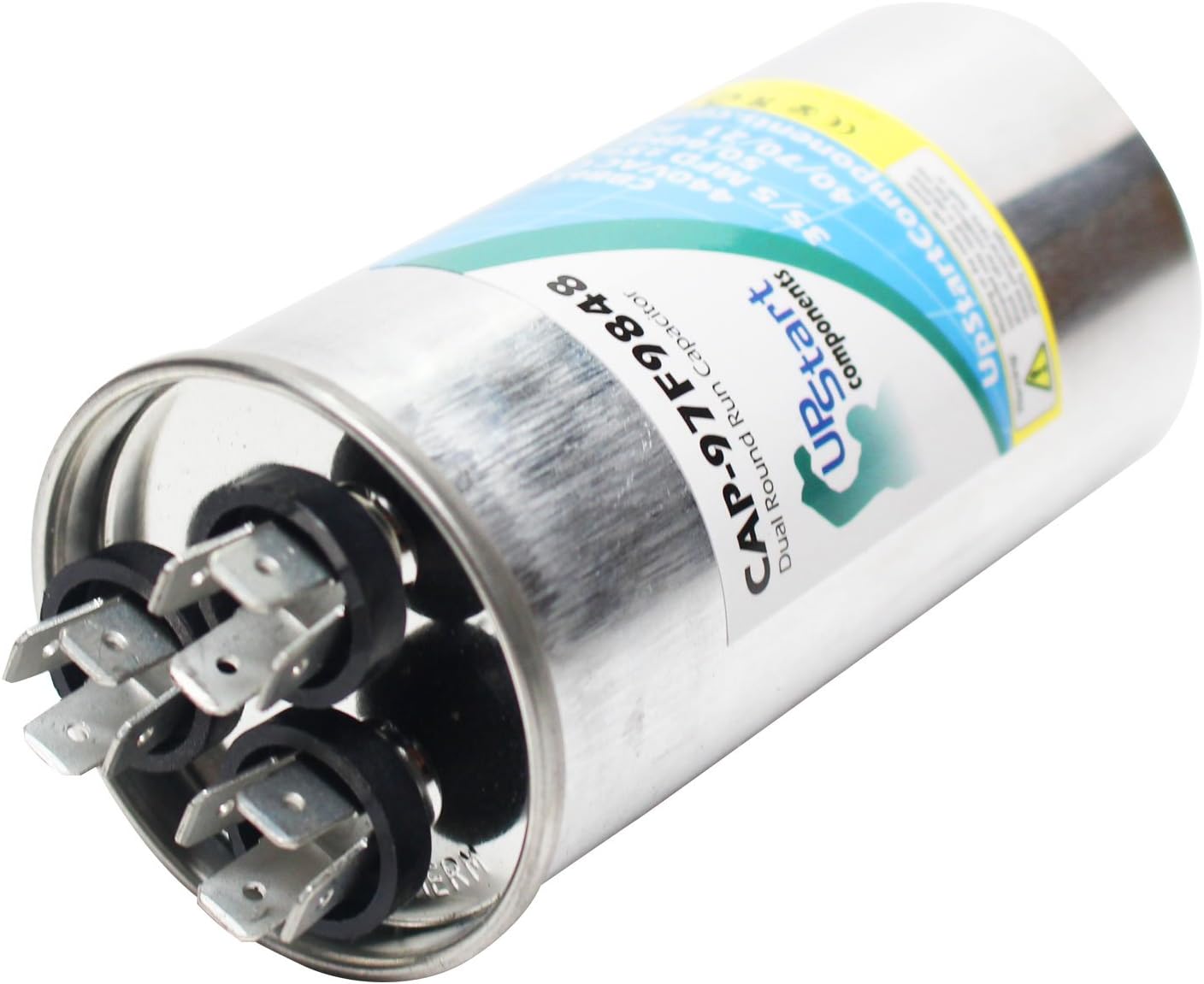
Image 3: Angled view of the capacitor, highlighting the product label with specifications.
Troubleshooting
If the equipment is not functioning correctly after capacitor replacement, consider the following:
- No Power: Verify that power is fully restored to the unit and circuit breaker is not tripped.
- Incorrect Wiring: Double-check all wire connections against the original configuration or equipment diagram. Ensure wires are securely attached to the correct terminals (Herm, Fan, C).
- Incorrect Capacitor: Confirm that the replacement capacitor's MFD and voltage ratings precisely match the original specifications.
- Other Component Failure: If the capacitor is confirmed to be correctly installed and rated, the issue might lie with another component in the system (e.g., motor, relay, wiring). Professional diagnosis may be required.
Specifications
| Attribute | Value |
|---|---|
| Brand | UpStart Components |
| Model Number | CAP-97F9848 |
| Capacitance | 35/5 MFD (Microfarad) |
| Operating Voltage | 440 Volts AC |
| Shape | Round |
| Material | Copper |
| Product Dimensions | Approximately 2 x 4 x 4.68 inches |
| Part Number | CAP-97F9848-2PK-DL467 |
Warranty and Support
For warranty information or technical support regarding your UpStart Components capacitor, please refer to the manufacturer's official website or contact their customer service directly. Keep your purchase receipt for warranty claims.
Note: This manual provides general guidance. Always consult a qualified professional for complex installations or repairs.