
1. Introduction
This manual provides detailed instructions for the safe and efficient operation of the ORIENTEK TR600 SV20A Singlemode SM OTDR. This device is designed for precise fiber optic network testing, offering advanced features for accurate measurement and analysis. Please read this manual thoroughly before using the device to ensure proper functionality and to prevent damage or injury.
2. Safety Information
Observe the following safety precautions to ensure safe operation and to avoid potential hazards:
- Laser Safety: This device uses a laser. Never look directly into the fiber optic port when the device is active, as this can cause severe eye damage.
- Power Source: Use only the specified power adapter and battery. Incorrect power sources can damage the device or pose a fire hazard.
- Environmental Conditions: Do not operate the device in wet or excessively dusty environments. Avoid extreme temperatures.
- Handling: Handle the device with care. Avoid dropping or subjecting it to strong impacts.
- Maintenance: Refer all servicing to qualified personnel. Do not attempt to open or repair the device yourself.
3. Product Overview
The ORIENTEK TR600 SV20A is a robust and portable Optical Time Domain Reflectometer designed for comprehensive fiber optic cable testing. It features a user-friendly interface and high-performance capabilities.
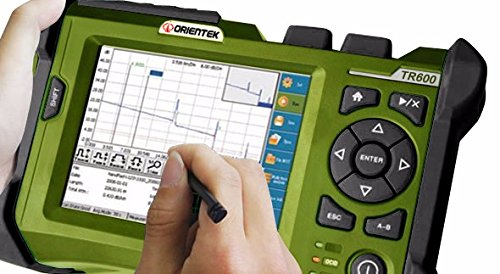
Figure 1: ORIENTEK TR600 SV20A OTDR device. This image displays the ORIENTEK TR600 SV20A Singlemode SM OTDR. The device features a green casing with a large color touchscreen display showing a fiber optic trace graph. A hand is shown using a stylus to interact with the screen. To the right of the screen are various control buttons, including a directional pad with an 'ENTER' button, 'HOME', 'ESC', and 'SHIFT' buttons, and a power button at the bottom. The model number 'TR600' is visible on the top right of the device.
Key Features:
- Event Dead Zone: <3m
- Dynamic Range: 32/30dB
- Wavelength: 1310/1550nm
- Pulse width (ns): 5, 20, 40, 80, 160, 320, 640, 1280, 2560, 5120, 10240, 20480
- Attenuation blind zone (m): 13
- 6.5-inch low-reflection TFT-LCD touch screen display
- USB interfaces for data transfer and printing
- Built-in high-capacity lithium battery for extended operation
4. Setup
- Unpacking: Carefully remove the OTDR from its packaging. Verify that all components listed in the packing list are present.
- Battery Installation/Charging: Ensure the internal lithium battery is charged. Connect the provided power adapter to the device and a power outlet. The charging indicator will illuminate. Allow sufficient time for a full charge before first use (typically 8 hours for full capacity).
- Power On: Press and hold the power button (usually located at the bottom right of the control panel) until the display illuminates.
- Language Selection: Upon first power-on, you may be prompted to select a language. Use the directional keys or touch screen to select "English" or "Spanish" as desired.
- Date and Time Setting: Set the correct date and time for accurate record-keeping of measurements.
5. Operation
5.1. Basic Measurement Procedure
- Connect Fiber: Clean the fiber optic connector thoroughly and connect it to the OTDR's optical port.
- Select Test Mode: From the main menu, select the desired test mode (e.g., Auto Test, Manual Test).
- Set Parameters (Manual Mode): If in Manual Test mode, configure parameters such as wavelength (1310nm or 1550nm), pulse width, and measurement range (e.g., 4km, 8km, up to 256km) according to the fiber under test.
- Start Measurement: Press the "Start" button on the screen or the corresponding physical button to begin the OTDR trace acquisition.
- Analyze Trace: Once the measurement is complete, the trace will be displayed on the screen. Use the touch screen or directional buttons to zoom, pan, and analyze events.
- Save Results: Save the measurement data to the internal memory or a connected USB stick. The device supports storage of over 800 traces.
5.2. Navigating the Interface
- Touch Screen: The 6.5-inch TFT-LCD is a touch screen. Use the provided stylus or your finger for navigation and input.
- Directional Pad: Use the arrow buttons for menu navigation and adjusting parameters. The "ENTER" button confirms selections.
- Home Button: Returns to the main menu.
- ESC Button: Cancels the current operation or returns to the previous screen.
- Shift Button: May provide access to secondary functions of other buttons.
6. Maintenance
- Cleaning:
- Screen: Use a soft, lint-free cloth to clean the display. Do not use abrasive cleaners.
- Casing: Wipe the device casing with a damp cloth. Avoid harsh chemicals.
- Optical Ports: Keep optical ports clean. Use specialized fiber optic cleaning tools and procedures to prevent contamination, which can affect measurement accuracy.
- Battery Care: To prolong battery life, avoid fully discharging the battery frequently. If storing the device for an extended period, ensure the battery is partially charged (around 50%) and recharge it every few months.
- Storage: Store the OTDR in a cool, dry place, away from direct sunlight and extreme temperatures. Use the protective carrying case when transporting the device.
- Calibration: Regular calibration is recommended to maintain measurement accuracy. Refer to ORIENTEK's service guidelines for calibration intervals.
7. Troubleshooting
| Problem | Possible Cause | Solution |
|---|---|---|
| Device does not power on. | Battery discharged or power adapter not connected properly. | Connect the power adapter and allow the battery to charge. Ensure the power button is pressed and held sufficiently. |
| Inaccurate or noisy trace results. | Dirty fiber connectors, incorrect test parameters, or damaged fiber. | Clean fiber connectors. Verify wavelength, pulse width, and range settings. Inspect the fiber for damage. |
| Touch screen unresponsive. | Software glitch or screen calibration issue. | Restart the device. If the issue persists, refer to the calibration section in the full user manual or contact support. |
| Cannot save data to USB. | USB stick not properly inserted or incompatible format. | Ensure the USB stick is fully inserted. Try a different USB stick. Ensure the USB stick is formatted to a compatible file system (e.g., FAT32). |
8. Specifications
| Parameter | Value |
|---|---|
| Model | TR600 SV20A |
| Wavelength | 1310/1550nm |
| Dynamic Range | 32/30dB |
| Event Dead Zone | <3m |
| Attenuation Blind Zone | 13m |
| Pulse Width (ns) | 5, 20, 40, 80, 160, 320, 640, 1280, 2560, 5120, 10240, 20480 |
| Distance Range | 4, 8, 16, 32, 64, 128, 256km |
| Display | 640×480, 6.5 inch low-reflection TFT-LCD (touch screen) |
| Interfaces | USB (for stick, printer, PC download) |
| Memory Capacity | >800 traces |
| Battery Life | >8 hours operating life (lithium battery) |
| Item Weight | 7 pounds |
| Product Dimensions | 12.6 x 14.17 x 14.96 inches |
| Supported Languages | English & Spanish |
9. Warranty and Support
The ORIENTEK TR600 SV20A OTDR comes with a one-year warranty from the date of purchase. This warranty covers defects in materials and workmanship under normal use. Please retain your proof of purchase for warranty claims.
For technical support, service, or warranty inquiries, please contact your authorized ORIENTEK dealer or visit the official ORIENTEK website for contact information. Ensure you have your product model and serial number available when contacting support.
The device includes a Calibration Certificate and CE Certificate, ensuring compliance with relevant standards.


