
Introduction
The YOOYIST CAL-8B is an 8-channel commercial kitchen timer designed for professional environments such as restaurants, bakeries, catering services, and hotels. It enables simultaneous tracking of multiple cooking tasks, enhancing efficiency and precision in time-sensitive operations. This manual provides detailed instructions for the proper setup, operation, maintenance, and troubleshooting of your timer.
Key features include:
- 8 Independent Channels: Manage up to eight different tasks concurrently.
- Loud Alarm: Ensures alerts are heard in noisy kitchen environments.
- Durable Construction: Made from easy-to-clean stainless steel for longevity.
- Clear LED Display: Oversized digits for visibility across the kitchen.
- Memory Function: Retains last settings after power cycles.
- Flexible Mounting: Includes adjustable kickstands for tabletop use and wall-mount capability.
Setup
Follow these steps to set up your YOOYIST CAL-8B timer:
- Unpacking: Carefully remove the timer from its packaging and inspect for any damage. Retain packaging for future transport or storage.
- Placement: Choose a suitable location in your kitchen. The timer can be placed on a flat surface using its adjustable kickstands or mounted on a wall for optimal visibility.
- Power Connection: Connect the timer to a 110V or 220V AC power outlet using the provided power cord. The timer does not require batteries for operation.

Figure 1: Front view of the YOOYIST CAL-8B 8-Channel Commercial Kitchen Timer.

Figure 2: The timer can be used on a tabletop with its kickstands or mounted on a wall for better visibility.
Operating Instructions
The YOOYIST CAL-8B timer features a user-friendly control panel with dedicated buttons for each function.

Figure 3: Close-up of the timer's control panel with 8 displays and function buttons.
Power On/Off
- Press the ON/OFF button to turn the timer on or off. When powered on, all eight displays will light up.
Setting a Timer
- Press the TIME button. The display for channel 1 will show "End" or its previous setting, indicating it's ready for input.
- Use the INCREASE and DECREASE buttons to set the desired time for the selected channel.
- Press the TIME button again to save the set time.
- To start the countdown for a specific channel, press the corresponding number button (1-8). The timer will begin counting down.
Adjusting Alarm Volume
The timer offers two methods to adjust the alarm volume:
- During Alarm: When an alarm is ringing, press the INCREASE or DECREASE button directly to adjust the volume.
- On Standby: When the timer is on standby (not actively counting down or alarming), press the INCREASE or DECREASE button to pre-set the alarm volume.

Figure 4: Use the Increase and Decrease buttons to adjust the alarm volume.
Switching Time Modes (Minutes:Seconds / Hours:Minutes)
The timer supports both Minutes:Seconds (N-S) and Hours:Minutes (H-N) modes.
- Ensure the timer is connected to a power source but not turned on.
- Long press the TIME button. The displays will show "N-S", indicating Minutes:Seconds mode.
- To switch to Hours:Minutes mode, press the corresponding number key (e.g., '1' for channel 1). The display will change to "H-N".
- To save this setting, press the DECREASE button. The mode will be saved until your next switch.
Using Multiple Timers
Each of the 8 channels operates independently. You can set different times for each channel and start them simultaneously or individually. When a timer is running, long-pressing its corresponding number key will reset it to its original set time, not just pause it.
Memory Function
The timer features a built-in memory function that recalls your last settings instantly, even after a power interruption. This saves time and reduces the chance of errors when managing multiple tasks.

Figure 5: The timer retains settings even after power loss, thanks to its memory function.
Official Instruction Video
Video 1: A detailed demonstration of the YOOYIST 8-channel kitchen timer's functions, including setting alarms, adjusting volume, and switching between time modes.
Maintenance
Proper maintenance ensures the longevity and optimal performance of your timer.
- Cleaning: The timer is constructed from stainless steel with an easy-to-clean finish. Wipe the surface with a damp cloth and mild detergent. Avoid abrasive cleaners or harsh chemicals that could damage the finish or electronic components.
- Water Resistance: The timer is water-resistant, meaning it can withstand splashes. However, it is not waterproof. Do not submerge the timer in water or expose it to direct streams of water.
- Storage: When not in use for extended periods, store the timer in a cool, dry place away from direct sunlight and extreme temperatures.
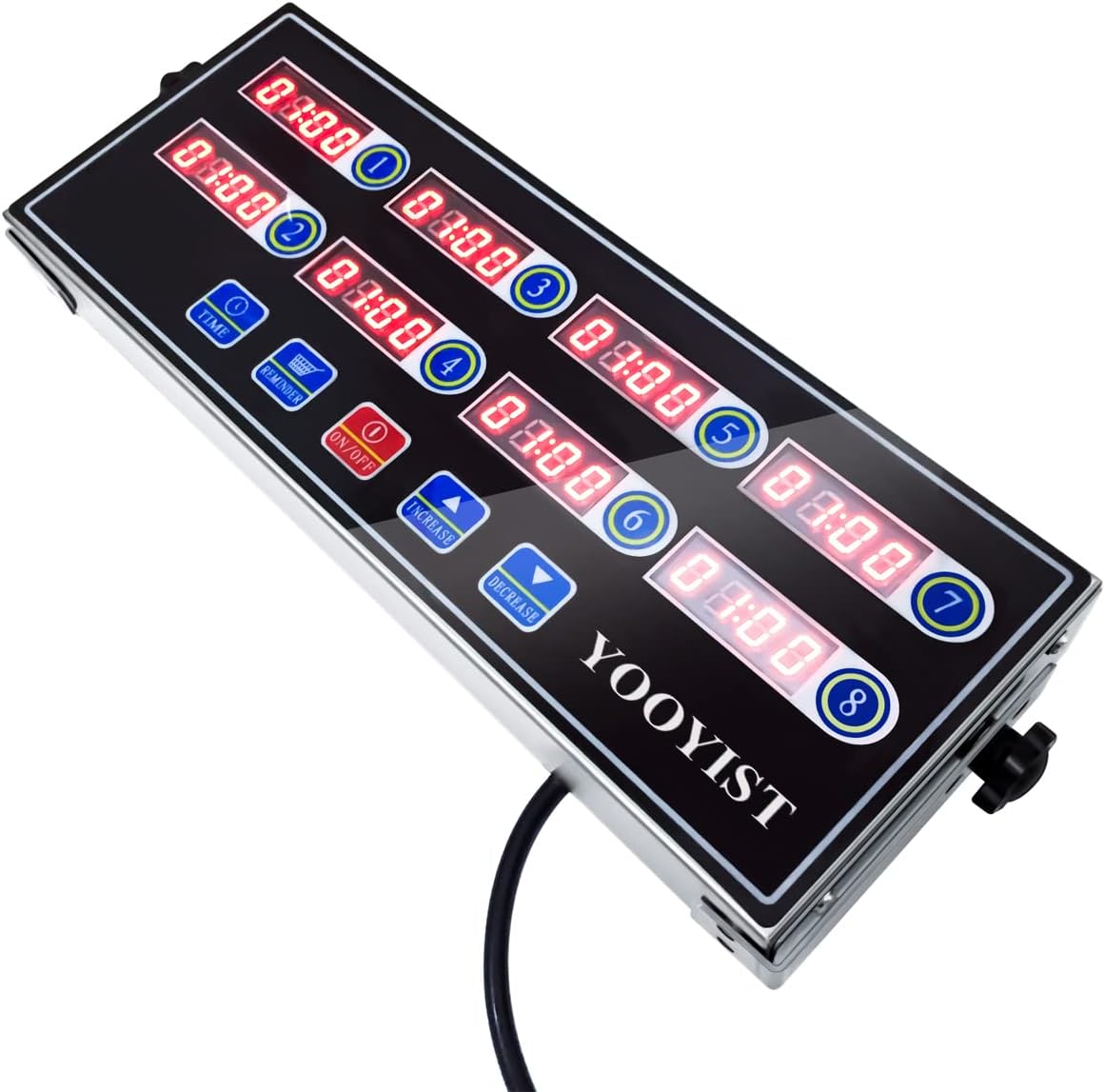
Figure 6: The timer's stainless steel casing is designed for easy cleaning and durability in kitchen environments.
Troubleshooting
If you encounter issues with your YOOYIST CAL-8B timer, refer to the following common solutions:
- Timer Not Powering On: Ensure the power cord is securely plugged into both the timer and a functional power outlet. Verify the outlet is receiving power.
- Alarm Not Audible: Check the alarm volume settings using the INCREASE/DECREASE buttons as described in the Operating Instructions. Ensure the kitchen environment is not excessively loud, or adjust the timer's placement.
- Incorrect Time Display: If the timer displays unexpected characters or behaves erratically, try unplugging it from the power source for a few minutes and then plugging it back in. This can reset the internal system.
- Settings Not Saving: Ensure you press the TIME button after setting a new time for a channel to save it. For mode changes (Minutes:Seconds/Hours:Minutes), remember to press the DECREASE button to save the setting.
Specifications
| Feature | Detail |
|---|---|
| Brand | YOOYIST |
| Model Number | JSQ05 (CAL-8B) |
| Material | Stainless Steel |
| Product Dimensions | 1.4"D x 1.77"W x 0.55"H |
| Item Weight | 2.2 pounds (1 Kilogram) |
| Number of Settings | 8 (Channels) |
| Screen Size | 32 Centimeters |
| Power Source | 110V or 220V AC (Plug-in) |
| UPC | 709311825394 |
Warranty and Support
For warranty information or technical support, please contact YOOYIST customer service. Refer to the product packaging or the official YOOYIST website for the most current contact details.