
Product Overview
The Brita Advanced Water Filter is designed to reduce harmful contaminants such as copper, mercury, and cadmium from tap water, providing cleaner, better-tasting water. Each filter is designed to replace approximately 40 gallons of water, typically lasting about two months for an average family. These filters are guaranteed to work in all Brita pitchers and feature built-in mesh screens to prevent black flecks.

A box containing five Brita Advanced Water Filters, highlighting the "New & Improved" and "Advanced Filter" features. The box states "Reduces harmful contaminants: copper, mercury and cadmium" and "Only brand guaranteed to work in all Brita pitchers."

The back of the Brita filter box, detailing benefits like "Better Water, Less Waste" and explaining the filter's ion-exchange resin and activated carbon components. It also provides instructions for filter replacement and signing up for reminders.
Components
Each Brita Advanced Water Filter consists of:
- Activated Carbon: Reduces chlorine taste and odor, and other impurities.
- Ion-Exchange Resin: Filters out harmful contaminants like copper, mercury, and cadmium.
- Built-in Mesh Screens: Prevents black flecks from entering your water.
- Pull-Top Cap: Designed for easy insertion and removal.

A cross-section diagram illustrating the internal structure of a Brita filter, highlighting the activated carbon, ion-exchange resin, and mesh screens. Arrows indicate water flow through the filter.

An image showing two Brita water filters, one upright and another partially submerged in water, demonstrating their design.

A close-up view of the top of a Brita water filter, showing the mesh screens designed to prevent particles.
Setup and Installation
Follow these steps to properly install your new Brita Advanced Water Filter:
- Prepare the Filter: Remove the new filter from its packaging. It may be moist.
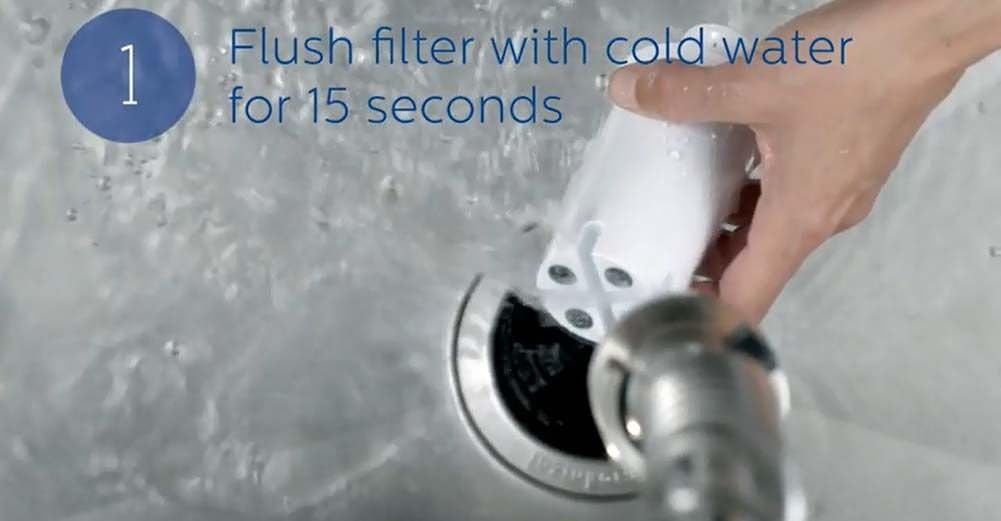
- Flush the Filter: Hold the filter under cold running water for 15 seconds. Carbon dust is normal in the first 1-2 fillings.

A hand holding a Brita filter under a running faucet, illustrating the flushing step.
- Insert into Pitcher: Line up the notch on the filter with the groove in your Brita pitcher's reservoir.

A person's hands demonstrating how to align and insert the Brita filter into the pitcher's water reservoir.
- Secure the Filter: Press firmly to ensure a tight seal.
A close-up image showing the filter being pressed down into the pitcher to create a secure and tight seal.
Operating Instructions
Once the filter is installed, fill the pitcher with tap water. The water will slowly filter through to the lower chamber. The first few fillings may contain some carbon dust, which is harmless. Discard the first 1-2 filtered pitchers of water.
Maintenance
To ensure optimal performance and water quality, replace your Brita filter every 40 gallons or approximately every 2 months for an average family. If the water flow significantly slows down before the 2-month mark, it may indicate that the filter is clogged and needs to be replaced sooner.
For filter change reminders, visit www.brita.com/reminders.
Troubleshooting
| Issue | Possible Cause | Solution |
|---|---|---|
| Slow Water Flow | Filter is clogged or nearing end of life. | Replace the filter. Ensure the filter was properly flushed before initial use. |
| Black Flecks in Water | Carbon dust from new filter. | This is normal for the first 1-2 fillings. Discard the first few pitchers of water. If it persists, re-flush the filter. |
| Water Taste/Odor Not Improved | Filter not properly seated or expired. | Ensure the filter is firmly pressed into the reservoir. Replace the filter if it's old. |
Specifications
- Model Number: OB03
- Material: Copper
- External Testing Certification: NSF
- Product Benefits: Provides safer drinking water, reduces filter replacement costs, offers convenience for Brita pitcher users, and ensures better-tasting water with reliable filters.
- Unit Count: 5 Count
- Compatible Water Purifier Models: BRITA Amalfi Water Pitcher, BRITA Aqualux Water Pitcher, BRITA Atlantis Water Pitcher, BRITA Capri Water Pitcher, BRITA Champlain Water Pitcher, BRITA Chrome Water Filter Pitcher, BRITA Classic Water Pitcher, BRITA Color Series Water Pitcher, BRITA Deluxe Water Pitcher, BRITA Denali Water Pitcher, BRITA Everyday Water Pitcher, BRITA Grand Water Pitcher, BRITA Huron Water Pitcher, BRITA Infinity Water Pitcher, BRITA Lake Water Pitcher, BRITA Marina Water Filtration Pitcher, BRITA Metro Water Pitcher, BRITA Mini Plus Water Pitcher, BRITA Monterey Water Pitcher, BRITA Pacifica Water Pitcher, BRITA Slim Water Filter Pitcher, BRITA Soho Water Pitcher, BRITA Space Saver Water Pitcher, BRITA Stainless Steel Water Pitcher, BRITA Tahoe Water Pitcher, BRITA Ultramax Water Dispenser, BRITA Wave Water Pitcher.
- Item Weight: 1 pounds
- Package Dimensions: 8 x 4 x 2 inches
- Color: White
Warranty and Support
For warranty information or product support, please refer to the official Brita website or contact Brita customer service.
Website: www.brita.com
Customer Service: 1-800-24-BRITA


