
Banshee TE4-0261U
Banshee 2AMP 6/12V 4-Bay Battery Charger/Maintainer
Model: TE4-0261U
Introduction
This manual provides essential instructions for the safe and efficient operation of your Banshee 2AMP 6/12V Battery Charger/Maintainer. This device is designed to charge and maintain 6V and 12V lead-acid batteries, featuring four independent charging bays and two USB ports for additional convenience. Please read this manual thoroughly before first use and retain it for future reference.
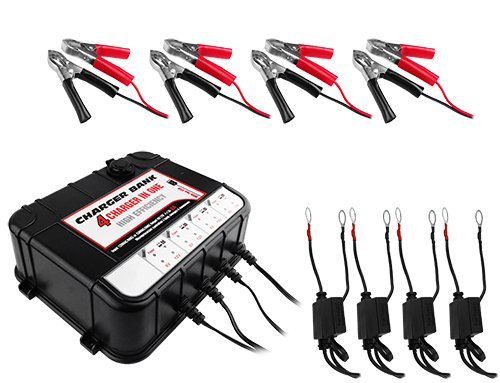
Image: Banshee 2AMP 6/12V 4-Bay Battery Charger/Maintainer with four charging cables connected.
Important Safety Information
WARNING: Read all safety warnings and instructions before using this product. Failure to follow the warnings and instructions may result in electric shock, fire, and/or serious injury.
- This charger is designed for use with lead-acid batteries ONLY (including Wet, Gel, AGM). Do not use with other battery types, such as lithium-ion, as this may cause fire, injury, or damage.
- Always ensure proper ventilation when charging batteries.
- Avoid sparks and flames near the battery during charging, as batteries can emit explosive gases.
- Wear eye protection and gloves when working with batteries.
- Keep out of reach of children.
- Do not expose the charger to rain or wet conditions.
- Disconnect the AC power before making or breaking connections to the battery.

Image: A warning graphic stating, "This charger is designed for use with lead acid batteries only!"
Package Contents
Verify that all items are present before discarding packaging materials:
- Banshee 2AMP 6/12V 4-Bay Battery Charger/Maintainer Unit
- 4 x Alligator Clamp Connectors
- 4 x Eyelet Terminal Connectors
- User Manual (this document)

Image: Red and black alligator clamp connectors.

Image: Red and black eyelet terminal connectors.
Product Features
- 6V / 12V Compatibility: Automatically detects and charges both 6-volt and 12-volt lead-acid batteries.
- 2 Amp Charging Current: Provides a steady 2A charge for efficient battery maintenance.
- 4 Independent Charging Bays: Allows simultaneous charging and maintenance of up to four batteries.
- 2 USB Ports: Conveniently charge mobile devices or other USB-powered accessories.
- Automatic Operation: Fully automatic charging cycle, switching to maintenance mode once the battery is fully charged.
- LED Indicators: Clear LEDs display power status and charging progress for each bay.
- Safety Protections: Includes overcharge protection and short circuit protection for safe operation.

6V & 12V

Automatic

Short Circuit Protection

LED Indicators

4 Charging Ports

2 USB Ports
Setup
- Placement: Place the charger on a stable, non-flammable surface in a well-ventilated area. Ensure it is away from direct sunlight, heat sources, and moisture.
- Battery Preparation:
- For flooded (wet) batteries, check the electrolyte level and add distilled water if necessary, ensuring the plates are covered. Do not overfill.
- Clean battery terminals of any corrosion.
- Connect to Battery:
- Choose either the alligator clamps or eyelet terminals based on your battery type and connection preference.
- Connect the RED positive (+) connector to the positive (+) battery terminal.
- Connect the BLACK negative (-) connector to the negative (-) battery terminal.
- Ensure connections are secure.
- Connect to AC Power: Plug the charger's AC power cord into a standard 105-125V AC, 60Hz electrical outlet.
Operating Instructions
The Banshee 2AMP Charger/Maintainer operates automatically once connected correctly.
- Power On: Once plugged into AC power, the charger will power on. The "Power" LED indicator on each bay will illuminate.
- Charging Process:
- If a battery is connected and requires charging, the "Charging" LED for that bay will illuminate (typically red or amber).
- The charger will automatically detect the battery voltage (6V or 12V) and begin charging.
- The charging process is multi-stage, designed to optimize battery life and performance.
- Charge Completion / Maintenance Mode:
- When the battery is fully charged, the "Charging" LED will change color (typically green) or turn off, indicating that the battery is ready for use or has entered maintenance (float) mode.
- In maintenance mode, the charger provides a small, continuous current to keep the battery at optimal charge without overcharging. This is ideal for long-term storage.
- USB Ports: The two USB ports can be used to charge compatible USB devices at any time the charger is powered on.
- Disconnecting:
- First, unplug the charger from the AC power outlet.
- Then, disconnect the negative (-) connector from the battery.
- Finally, disconnect the positive (+) connector from the battery.
Maintenance
- Cleaning: Disconnect the charger from all power sources and batteries before cleaning. Wipe the exterior with a soft, damp cloth. Do not use harsh chemicals or abrasives.
- Storage: Store the charger in a cool, dry place when not in use. Keep cables neatly coiled to prevent damage.
- Cable Inspection: Regularly inspect the AC power cord and charging cables for any signs of damage, such as cuts, fraying, or exposed wires. Do not use the charger if cables are damaged.
Troubleshooting
| Problem | Possible Cause | Solution |
|---|---|---|
| Charger not powering on. | No AC power; faulty outlet; damaged power cord. | Check AC outlet with another device; inspect power cord for damage; try a different outlet. |
| Battery not charging (Charging LED off/not changing). | Incorrect battery connection; battery is already fully charged; battery is severely discharged or faulty; incorrect battery type. | Ensure correct polarity (+ to +, - to -); verify battery voltage (6V/12V); test battery with a multimeter; ensure it's a lead-acid battery. |
| Overcharge/Short Circuit Protection activated. | Incorrect connection (reverse polarity); short circuit in battery or cables. | Disconnect immediately. Recheck battery connections for correct polarity. Inspect battery and cables for damage or short circuits. |
| USB ports not working. | Charger not powered on; device not compatible; faulty USB cable. | Ensure charger is plugged in; try a different USB device or cable. |
Specifications
- Model: TE4-0261U
- Input Voltage: 105-125V AC, 60Hz
- Output Voltage: 6V / 12V DC (Automatic Detection)
- Charging Current: 2 Amps per bay
- Battery Type: Lead-Acid (Wet, Gel, AGM)
- Charging Bays: 4 Independent Bays
- USB Ports: 2
- Weight: 4.6 Pounds
- Manufacturer: BatteryJack Inc.
Warranty and Support
This Banshee product comes with a 2-Year Replacement Warranty from the date of purchase. This warranty covers defects in materials and workmanship under normal use.
The warranty does not cover:
- Damage caused by misuse, abuse, accident, or neglect.
- Damage from unauthorized repairs or modifications.
- Normal wear and tear.
For warranty claims or technical support, please contact Banshee customer service. Refer to your purchase documentation for specific contact details or visit the official Banshee website.
Manufacturer: BatteryJack Inc.
Ask a question about this manual
Ask about setup, troubleshooting, compatibility, parts, safety, or missing instructions. Manuals+ will review the question and use this page’s manual context to help answer it.