1. Introduction
This manual provides essential information for the safe and efficient operation of your KYOCERA ECOSYS P5026cdw Color Laser Printer. Please read this manual thoroughly before using the printer and keep it for future reference. The ECOSYS P5026cdw is designed for high-quality color and monochrome printing, offering features such as fast output, duplex printing, and versatile connectivity options for both home and office environments.
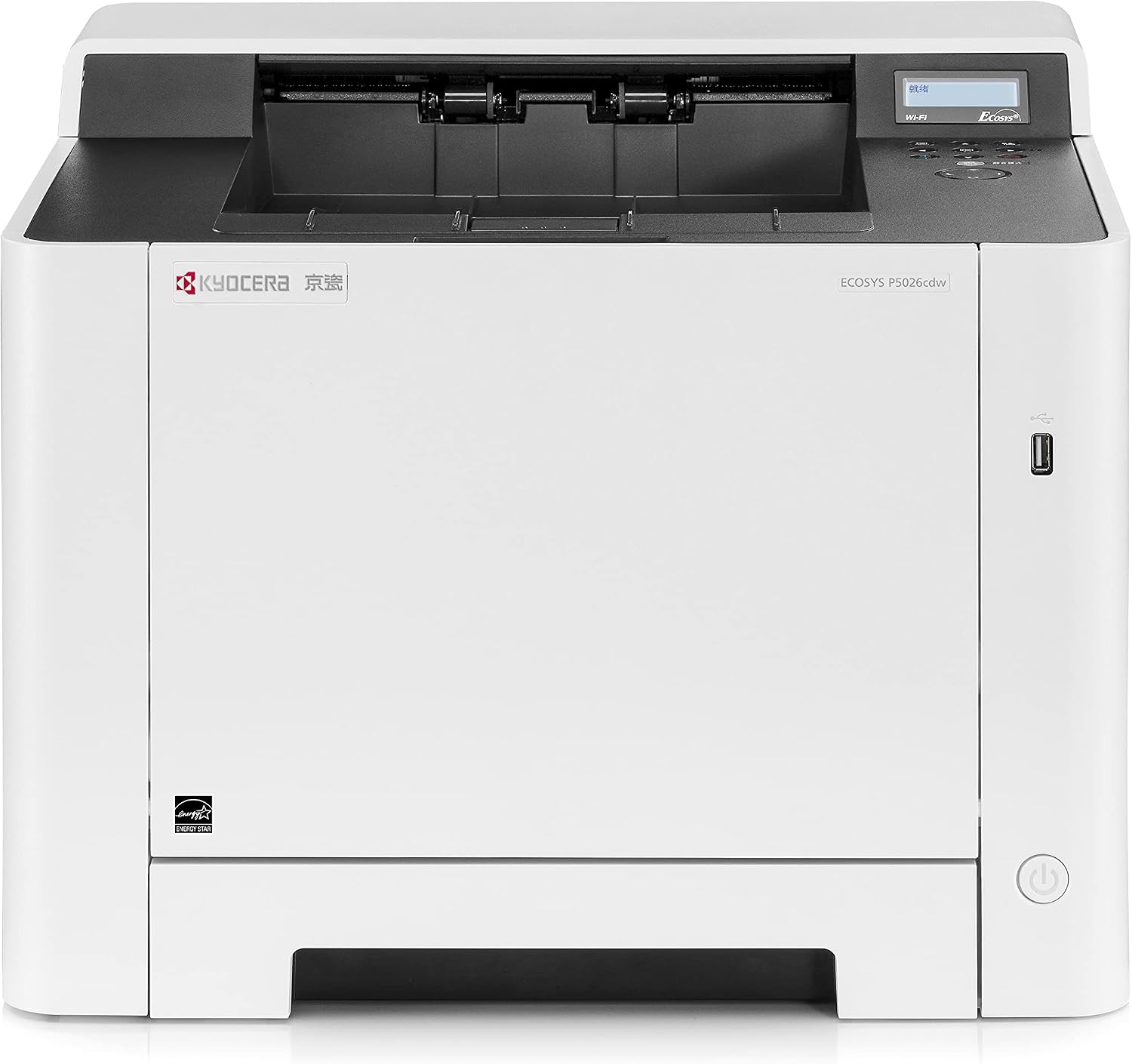
Figure 1.1: Front view of the KYOCERA ECOSYS P5026cdw Color Laser Printer.
2. Safety Information
Always observe the following safety precautions to prevent injury or damage to the printer:
- Do not block or cover the ventilation openings.
- Use only the power supply indicated on the rating label.
- Do not place the printer in an unstable location.
- Keep hands clear of moving parts during operation.
- Unplug the printer from the power outlet before cleaning or servicing.
3. Setup
3.1 Unpacking and Placement
Carefully remove the printer from its packaging. It is recommended that two people lift the printer due to its weight (approximately 46.2 pounds or 21 kg). Place the printer on a stable, level surface with adequate space for ventilation and access to trays and connections. Ensure the product dimensions (16.2"D x 16.2"W x 12.9"H) are accommodated.
3.2 Power Connection
Connect the power cord to the printer and then to a grounded electrical outlet. The printer operates at 375 watts during operation.
3.3 Paper Loading
The printer features a main paper tray and a multi-purpose tray (MPT). Both support paper sizes up to 8.5" x 14".
- Main Paper Tray: Pull out the tray, load paper (plain paper recommended), and adjust the guides to fit the paper size. Gently push the tray back into the printer.
- Multi-Purpose Tray (MPT): Open the MPT cover, extend the tray, and load paper. Adjust the paper guides to prevent skewing.
3.4 Toner Cartridge Installation
The KYOCERA ECOSYS P5026cdw uses four laser toner cartridges: Black (K), Cyan (C), Magenta (M), and Yellow (Y). To install or replace cartridges:
- Open the side cover of the printer.
- Locate the empty cartridge slot.
- Carefully remove the new toner cartridge from its packaging.
- Insert the cartridge into the corresponding slot until it clicks into place.
- Close the side cover.


Figure 3.4.1: Individual toner cartridges (Black, Yellow, Magenta, Cyan).
3.5 Driver Installation
For optimal performance, download and install the latest drivers from the official KYOCERA website. A CD-ROM may be included, but online drivers are typically more current.
3.6 Network Connection
The printer supports multiple connectivity options:
- Ethernet: Connect an Ethernet cable from your network router/switch to the printer's Gigabit Ethernet port.
- USB: Connect the printer directly to your computer using a USB cable.
- Wireless & Wi-Fi Direct: Follow the on-screen instructions on the LCD panel to connect to your wireless network or enable Wi-Fi Direct for peer-to-peer connection.
Video 3.6.1: Overview of KYOCERA A4 Printer Product Line, demonstrating features including paper and toner loading. (Source: KYOCERA Document Solutions)
4. Operating the Printer
4.1 Control Panel
The printer features a 2-line LCD screen and push-button controls for navigation and settings adjustment. Use the arrow keys to navigate menus and the OK button to confirm selections.
4.2 Printing Documents
The ECOSYS P5026cdw offers fast output speeds of up to 27 pages per minute (ppm) in both black and color. It supports a maximum color print resolution of 1200 x 1200 dpi and a maximum black and white print resolution of 1200 dpi.
- Standard Duplex Printing: The printer supports automatic dual-sided printing to reduce paper consumption. This feature can be enabled through your printer's driver settings on your computer.
4.3 Scanning Documents
The printer includes an Automatic Document Feeder (ADF) for efficient scanning. Place your documents in the ADF and initiate scanning from the printer's control panel or your computer's scanning software.
4.4 Mobile Printing
The ECOSYS P5026cdw is compatible with various mobile printing solutions, allowing you to print directly from your smartphones and other compatible devices:
- Apple AirPrint
- Google Cloud Print
- KYOCERA Mobile Print
- Mopria
5. Maintenance
5.1 Toner Replacement
When a toner cartridge is low or empty, a message will appear on the LCD screen. Refer to Section 3.4 for detailed instructions on replacing toner cartridges.
5.2 Cleaning
Regular cleaning helps maintain print quality and extends the life of your printer. Use a soft, lint-free cloth to wipe the exterior of the printer. For internal cleaning, refer to the detailed cleaning instructions in the comprehensive user guide available on the KYOCERA support website.
5.3 Long-Life Consumables
The ECOSYS P5026cdw features ECOSYS Long Life Consumables, designed for a low cost-per-print and minimal waste, reducing the frequency of component replacement.
6. Troubleshooting
If you encounter issues with your printer, consider the following common solutions:
- No Power: Ensure the power cord is securely connected to both the printer and a working electrical outlet.
- Connectivity Issues: Verify network cable connections for Ethernet, or check Wi-Fi settings on both the printer and your device. Restarting the printer and router can often resolve temporary network problems.
- Print Quality Problems: Check toner levels. If print quality degrades, perform a cleaning cycle or calibration from the printer's control panel or driver settings.
- Paper Jams: Follow the instructions displayed on the LCD screen or inside the printer access panels to clear any jammed paper.
- Driver Issues: Ensure you have the correct and latest drivers installed for your operating system. Reinstalling drivers can resolve software-related printing problems.
For more complex issues, consult the full troubleshooting guide on the KYOCERA support website or contact customer support.
7. Specifications
| Feature | Specification |
|---|---|
| Model Name | ECOSYS P5026cdw |
| Printing Technology | Laser |
| Printer Output | Color |
| Max Print Speed (Color) | 26 ppm |
| Max Print Speed (Monochrome) | 26 ppm |
| Max Print Resolution (Color) | 1200 x 1200 dpi |
| Max Print Resolution (Monochrome) | 1200 dpi |
| Duplex Printing | Automatic |
| Connectivity Technology | Wireless, USB, Ethernet |
| Memory Storage Capacity | 512 MB |
| Max Input Sheet Capacity | 550 |
| Product Dimensions | 16.2"D x 16.2"W x 12.9"H |
| Item Weight | 46.2 pounds (21 kg) |
| Power Consumption (On-mode) | 375 Watts |
| Display Type | 2 Line LCD Screen |
8. Warranty and Support
For warranty information, please refer to the documentation included with your printer or visit the official KYOCERA website. For technical assistance, driver downloads, and additional support resources, please visit the KYOCERA support page or contact their customer support directly.
Customer Support: For assistance, please visit the KYOCERA Customer Support page.


