
Introduction
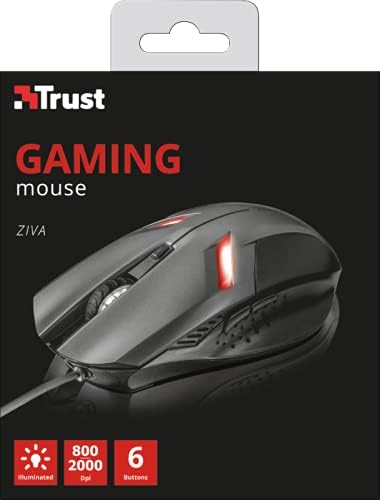
Thank you for purchasing the Trust Ziva Gaming Mouse 21512. This manual provides detailed instructions to help you set up, operate, and maintain your gaming mouse for optimal performance. Please read this manual thoroughly before use.
Package Contents
The Trust Ziva Gaming Mouse 21512 package should contain the following:
- Trust Ziva Gaming Mouse 21512
- User Manual (this document)
Setup
Follow these steps to set up your Trust Ziva Gaming Mouse:
- Connect the Mouse: Locate an available USB port on your PC or laptop. Insert the USB connector of the Trust Ziva Gaming Mouse into the USB port.
- Driver Installation: The mouse is plug-and-play. Your operating system (Windows 10, 8, 7, Vista) should automatically detect and install the necessary drivers. No additional software installation is typically required.
- Verify Connection: Once connected, the mouse's pulsating lighting should activate, indicating it is powered on and ready for use.

Operating Instructions
The Trust Ziva Gaming Mouse 21512 features a responsive optical sensor and multiple programmable buttons for an enhanced gaming experience.
Button Functions:
- Left Click Button: Standard primary action.
- Right Click Button: Standard secondary action.
- Scroll Wheel: For vertical scrolling. Can also be pressed for a middle-click action.
- DPI Speed Dial Button: Located near the scroll wheel. Press this button to cycle through DPI settings (800 to 2000 DPI). This allows for on-the-fly sensitivity adjustments.
- Side Buttons (6 quick action buttons): The mouse features additional buttons, typically located on the side, for quick actions in games or applications. Refer to your game or software settings to customize these buttons.

DPI Adjustment:
The mouse offers adjustable DPI (Dots Per Inch) settings, allowing you to change cursor sensitivity. Press the dedicated DPI button to switch between 800 DPI and 2000 DPI. A higher DPI setting means the cursor moves further with less physical mouse movement, ideal for fast-paced gaming. A lower DPI provides more precise control.
Pulsating Lighting:
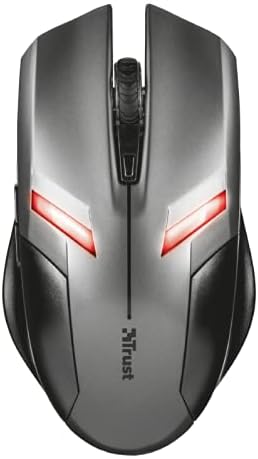
The Trust Ziva Gaming Mouse features integrated pulsating lighting, which provides visual feedback and enhances the aesthetic appeal during use.
Maintenance
Proper maintenance ensures the longevity and optimal performance of your gaming mouse.
- Cleaning: Use a soft, dry cloth to wipe the surface of the mouse. For stubborn dirt, slightly dampen the cloth with water. Avoid using harsh chemicals or abrasive cleaners.
- Sensor Care: Keep the optical sensor on the underside of the mouse clean and free from dust or debris. Use a cotton swab or compressed air if necessary.
- Cable Management: Avoid sharp bends or excessive pulling on the USB cable to prevent damage.
- Storage: When not in use, store the mouse in a clean, dry environment away from extreme temperatures.
Troubleshooting
If you encounter issues with your Trust Ziva Gaming Mouse, refer to the following common problems and solutions:
| Problem | Possible Cause | Solution |
|---|---|---|
| Mouse not responding | Loose USB connection, faulty USB port, driver issue. | Ensure the USB cable is securely plugged in. Try a different USB port. Restart your computer. Check Device Manager for driver issues. |
| Cursor movement is erratic or jumpy | Dirty optical sensor, unsuitable mouse pad surface. | Clean the optical sensor on the underside of the mouse. Use a clean, non-reflective mouse pad or surface. |
| Buttons not working | Software conflict, physical damage. | Test the mouse on another computer. Ensure no conflicting software is running. If the issue persists, the button may be physically damaged. |
| Pulsating lighting not working | Power issue, internal fault. | Ensure the mouse is properly connected and receiving power. If the mouse functions otherwise, this may indicate an internal LED fault. |
Specifications
Detailed technical specifications for the Trust Ziva Gaming Mouse 21512:
- Model Number: 21512
- Connectivity: Wired USB
- Sensor Type: Optical
- DPI Settings: 800 - 2000 DPI (adjustable via speed dial button)
- Buttons: 6 quick action buttons
- Lighting: Pulsating lighting
- Hardware Platform: PC, Notebook
- Operating System Compatibility: Windows 10, Windows 8, Windows 7, Windows Vista
- Item Weight: Approximately 3.39 ounces (96 grams)
- Product Dimensions (LxWxH): Approximately 5.04 x 2.87 x 1.57 inches (12.8 x 7.3 x 4.0 cm)
- Color: Black
Warranty and Support
For warranty information and technical support, please refer to the official Trust website or contact their customer service. Keep your proof of purchase for warranty claims.
Trust Official Website: www.trust.com
Date First Available: November 15, 2016


