
Product Overview
The iCarsoft FT II is a professional and powerful vehicle fault diagnosis tool designed for Fiat and Alfa Romeo vehicles. It features a 4-inch TFT LCD display and unique diagnostic software, enabling full ECU diagnosis across various systems such as engine, transmission, ABS, and SRS. The tool supports multiple test modes including CAN Bus, ISO9141, KWP2000, and J1850, allowing technicians to accurately diagnose complex automotive issues.
Key capabilities include:
- Reading and clearing Diagnostic Trouble Codes (DTCs) across all major systems.
- Live data stream display.
- Oil light/service reset.
- Electronic Parking Brake (EPB) system maintenance.
- Steering Angle Sensor (SAS) calibration.
- Diesel Particulate Filter (DPF) regeneration control system.
- Electronic Throttle Control (ETC) system reset.
- Comprehensive OBD II functions for all OBD II/EOBD compliant vehicles, including I/M Readiness, Freeze Frame, O2 Sensor Test, and turning off the Check Engine Light (MIL).

Figure 1: iCarsoft FT II Diagnostic Tool in use.
Package Contents
Upon opening the package, verify that all components are present:
- iCarsoft FT II Main Unit
- Nylon Carry Case
- TF Card Reader
- Data Cable (for vehicle connection)
- USB Cable (for PC connection)
- TF Card (pre-installed in the main unit)
- Hardcopy User's Manual
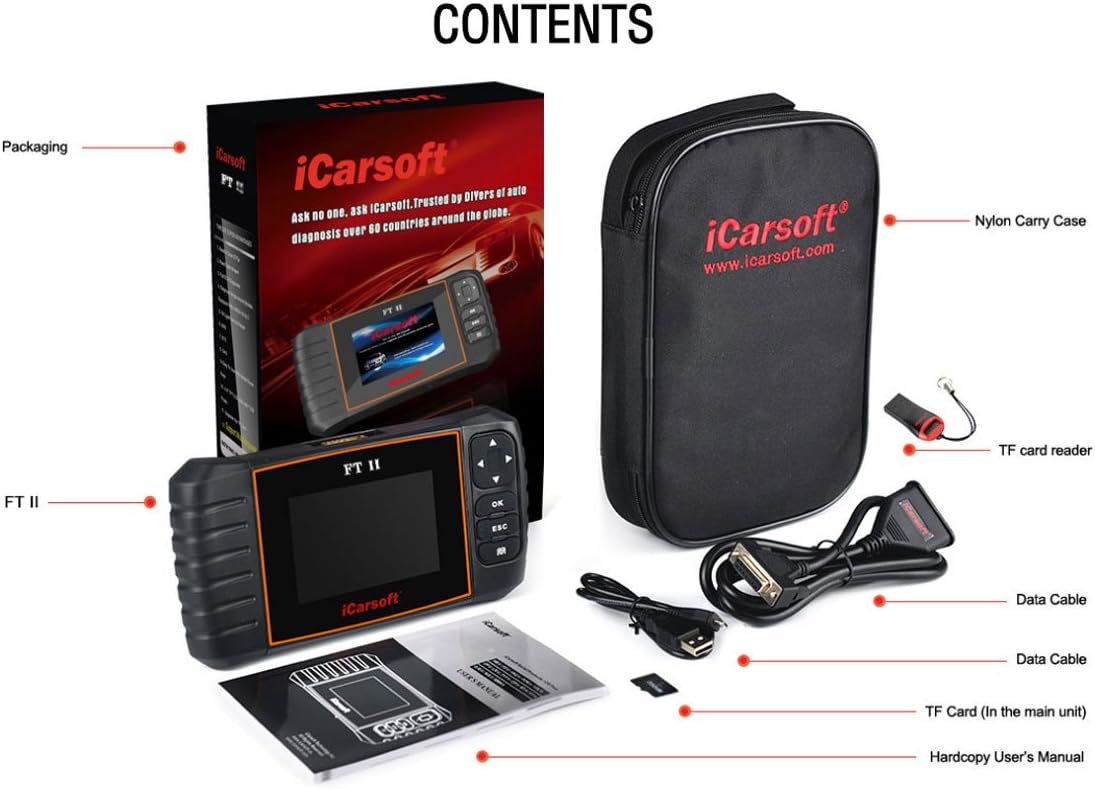
Figure 2: Included items in the iCarsoft FT II package.
Device Layout and Controls
The iCarsoft FT II features a user-friendly design with clearly labeled ports and buttons for intuitive operation.

Figure 3: iCarsoft FT II Device Layout.
- OBD Port: Connects the iCarsoft FT II to the vehicle's Data Link Connector (DLC) via the diagnostic cable.
- Up/Down Buttons (▲/▼): Used to move the cursor up and down for selection within menus.
- Left/Right Buttons (◄/►): Used to move the cursor right or left for selection, or to turn pages up and down when more than one page is displayed.
- OK Button: Confirms a selection or action from a menu list.
- ESC Button: Exits the current program or returns to the previous screen.
- DTC Button (Book Icon): Used to retrieve DTCs from the database.
- LCD Display: Indicates test results and menu options.
- USB Port: Connects to a PC for uploading data or printing test results.
- TF Card Slot: Insert the TF card here to update your tool's software.
Setup and Initial Use
Follow these steps to set up and begin using your iCarsoft FT II diagnostic tool:
- Power On: The device typically powers on automatically when connected to the vehicle's OBD-II port. Ensure the vehicle's ignition is in the ON position (engine off or running, depending on the test).
- Connect to Vehicle: Locate the vehicle's OBD-II Data Link Connector (DLC), usually found under the dashboard on the driver's side. Connect the diagnostic cable from the FT II tool to the vehicle's DLC.
- System Initialization: The tool will automatically establish communication with the vehicle's systems. This may take a few moments.
- Select Vehicle Model: From the main menu, use the Up/Down buttons to navigate and the OK button to select your specific Fiat or Alfa Romeo model.
- Choose Diagnostic Function: Select the desired diagnostic function (e.g., "Diagnose," "Special Functions," "OBDII").
Operating Instructions
Full ECU Diagnosis
This function allows for comprehensive scanning of all available electronic control units (ECUs) in the vehicle.
- From the main menu, select "Diagnose" or "Full System Diagnosis."
- The tool will automatically scan for all detectable systems (e.g., Engine, ABS, SRS, Transmission).
- Once the scan is complete, you can select a specific system to view its DTCs or live data.
Reading and Clearing DTCs
To read and clear trouble codes:
- Navigate to the desired system (e.g., Engine).
- Select "Read Codes" to display current, pending, and historic DTCs.
- To clear codes, select "Clear Codes." Confirm the action when prompted. Note: Clearing codes does not fix the underlying issue. Address the problem before clearing codes to prevent recurrence.
Live Data Stream
View real-time sensor data and parameters:
- From a selected system, choose "Live Data."
- The tool will display various parameters. You can often select specific parameters to view graphically or in list format.
Special Functions
The FT II supports several maintenance and service functions:
- Oil Light/Service Reset: Resets the service lamp after an oil change or scheduled maintenance.
- Electronic Parking Brake (EPB) System Maintenance: Deactivates and reactivates the EPB system for brake pad replacement or initialization.
- Steering Angle Sensor (SAS) Calibration: Calibrates the steering wheel to straight ahead, or recalibrates SAS after steering part replacement.
- Diesel Particulate Filter (DPF) Regeneration Control System: Requests DPF regeneration process while DPF blockage and turns off the DPF indicator.
- Electronic Throttle Control System (ETC) Reset: Relearns the throttle valve control value after cleaning or replacement.
Access these functions from the "Special Functions" menu and follow the on-screen prompts.
OBD II Functions (for all OBD II/EOBD compliant vehicles)
The tool provides standard OBD II diagnostic capabilities:
- I/M Readiness: Checks the status of emission-related monitoring systems.
- Data Stream: Displays live data from various sensors.
- Freeze Frame: Captures a snapshot of vehicle conditions at the moment a DTC was set.
- O2 Sensor Test: Retrieves O2 sensor monitor test results.
- Turn off Check Engine Light (MIL): Clears the Malfunction Indicator Lamp after repairs.
Maintenance
To ensure the longevity and optimal performance of your iCarsoft FT II diagnostic tool, follow these maintenance guidelines:
- Cleaning: Use a soft, dry cloth to clean the tool's exterior. Avoid using abrasive cleaners or solvents.
- Storage: Store the tool in its nylon carry case when not in use to protect it from dust, moisture, and physical damage. Keep it in a cool, dry environment.
- Cable Care: Handle the diagnostic and USB cables carefully. Avoid sharp bends or kinks that could damage the internal wiring.
- Software Updates: Regularly update the tool's software via TF card or PC to ensure compatibility with the latest vehicle models and to access new features and bug fixes.

Figure 4: Front view of the iCarsoft FT II tool.
Troubleshooting
If you encounter issues while using the iCarsoft FT II, consider the following common problems and solutions:
- Tool Does Not Power On:
- Ensure the diagnostic cable is securely connected to both the FT II tool and the vehicle's OBD-II port.
- Verify that the vehicle's ignition is in the ON position.
- Check the vehicle's fuse for the OBD-II port (consult your vehicle's owner's manual).
- Communication Error with Vehicle:
- Confirm the vehicle's ignition is ON.
- Ensure the diagnostic cable is not damaged and is properly connected.
- Verify that the vehicle model selected on the tool matches the vehicle you are working on.
- Some vehicles may require the engine to be running for certain diagnostic functions.
- Tool Does Not Support Specific Vehicle Year/Model:
- The iCarsoft FT II is designed for Fiat and Alfa Romeo vehicles. However, specific model year coverage may vary. For example, some users have reported that the tool's coverage for Fiat Abarth models may extend only up to certain years (e.g., 2014) and not newer models (e.g., 2015).
- Ensure your tool's software is up to date. Software updates often include expanded vehicle compatibility.
- Refer to the official iCarsoft website or contact their support for the most current compatibility list.
- Update Issues:
- If you experience difficulties with software updates via TF card or PC, ensure you are following the update instructions precisely.
- Verify that your internet connection is stable if updating via PC.
- Ensure the TF card is properly inserted and not corrupted.
- If issues persist, contact iCarsoft technical support.
Specifications
Detailed technical specifications for the iCarsoft FT II diagnostic tool:

Figure 5: iCarsoft FT II Dimensions and Specifications.
| Feature | Detail |
|---|---|
| Display | 4.0" TFT LCD, with 480 * 320 Pixels |
| Operating Temperature | 0°C – 50°C (32°F – 122°F) |
| Storage Temperature | -20°C – 70°C (-4°F – 158°F) |
| Power Input | 9V – 18V |
| Operating Current | 150mA@12V (Typical) |
| Power Consumption | 1.8W (Typical) |
| Dimensions (L x W x H) | 205mm x 110mm x 31mm (8.07 x 4.33 x 1.22 inches) |
| Weight | 350g (0.77 lbs) |
| Item Weight (Shipping) | Approximately 2.6 pounds |
| Item Model Number | FT II |
| UPC | 616245679767 |
Warranty and Support
Warranty Information
The iCarsoft FT II diagnostic tool comes with a one-year warranty from the date of purchase. This warranty covers manufacturing defects and malfunctions under normal use. Please retain your proof of purchase for warranty claims.
Software Updates
iCarsoft provides lifetime free updates for the FT II tool. Updates can be performed via TF card or by connecting the device to a PC. Regular updates ensure your tool has the latest vehicle coverage and diagnostic capabilities.
Multi-Language Support
The iCarsoft FT II supports multiple languages, enhancing usability for a global audience.
Technical Support
For technical assistance, troubleshooting, or inquiries regarding product functionality and updates, please visit the official iCarsoft website or contact their customer support directly. Refer to the hardcopy user's manual for specific contact details or support resources.


