
1. Introduction
The REXTiN WS2811 Digital Addressable LED String Lights are designed for various lighting applications, offering full-color RGB illumination. These 12mm pixel lights operate on DC 12V and are suitable for both indoor and outdoor use due to their IP68 waterproof rating. Each pixel is individually addressable, allowing for complex lighting patterns and effects when used with a compatible controller.
2. Product Features
- Working Voltage: DC 12V, 60mA per pixel.
- Waterproof Rating: IP68, suitable for outdoor environments.
- Power Consumption: 0.3W per LED.
- Addressable Pixels: Each LED pixel is individually controllable for dynamic lighting effects.
- Controller Compatibility: Compatible with various preset program controllers such as T1000S, K1000, K-1000C, SP110E, SP105E, SP107E, SP601E, SP602E, SP608E, SP611E, SP108E, SP901E, SP511E, SP530E, WT-SPI, Arduino, and Raspberry Pi controllers (controllers not included).
- Applications: Ideal for outdoor advertising, Christmas decorations, cove lighting, path and contour lighting, and backlighting for signage.
3. Specifications
| Parameter | Value |
| Brand | REXTiN |
| Model Number | fbaws2811dc12v50p |
| LED Type | WS2811 Pixels |
| Working Voltage | DC 12V |
| Power per LED | 0.3W |
| Waterproof Rating | IP68 |
| LED Diameter | 12mm |
| Light Color | Multicolor (RGB) |
| Number of Lights | 50 pcs per string |
| Material | Plastic |
| Item Weight | 0.27 Kilograms (approx. 9.6 ounces) |
| Item Length | Approximately 31 Feet (for 50pcs) |
| Control Method | Remote (with compatible controller) |
4. Package Contents
Each package includes:
- 50 pieces of REXTiN WS2811 Digital Addressable LED String Lights.
5. Safety Information
- Ensure the power supply voltage matches the LED string lights (DC 12V). Using an incorrect voltage can damage the lights.
- Always disconnect power before installation, maintenance, or troubleshooting.
- Do not exceed the maximum current rating of your power supply or controller.
- Ensure all connections are secure and properly insulated, especially for outdoor installations.
- For outdoor use, ensure all components (power supply, controller, connectors) are rated for outdoor and waterproof conditions.
- Avoid bending the wires sharply or applying excessive force to the LED pixels.
6. Setup Instructions
Follow these steps for proper installation and setup of your REXTiN WS2811 LED String Lights:
- Prepare Components: Gather your REXTiN WS2811 LED string lights, a compatible DC 12V power supply, and an appropriate LED controller (e.g., T1000S, SP110E, Arduino, Raspberry Pi).
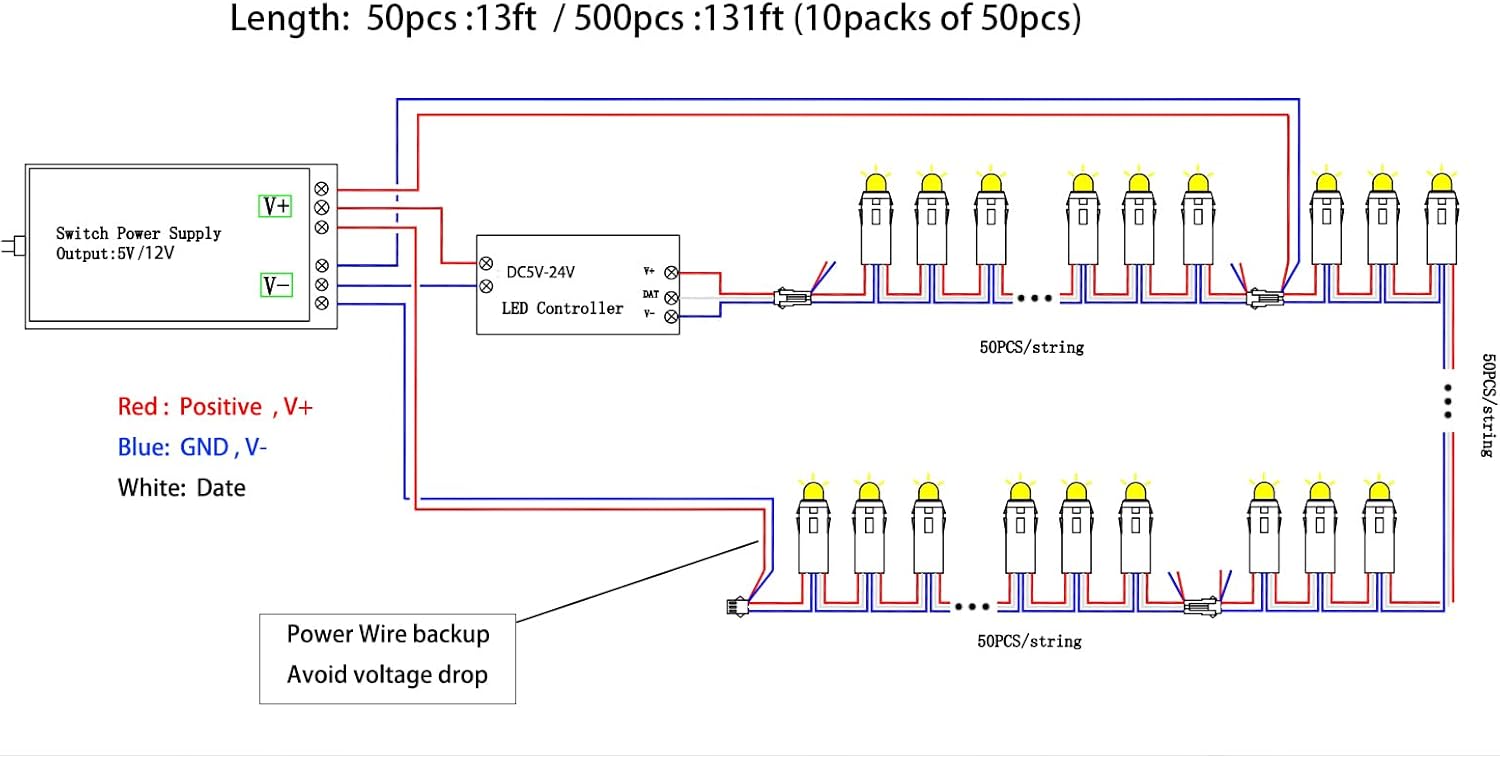
- Understand Wiring: Each pixel has three wires: Red (Positive, V+), Blue (Ground, GND, V-), and White (Data). The lights are directional; ensure the data signal flows from the controller to the first pixel, then sequentially through the string.
- Connect Power Supply: Connect the DC 12V power supply to your LED controller. Ensure the positive (+) output of the power supply connects to the V+ input of the controller, and the negative (-) output connects to the GND input.
- Connect LED String to Controller: Connect the V+, GND, and Data wires from the LED string to the corresponding output terminals on your LED controller.
- Important Ground Connection: Always connect the ground (GND) wire of the LED string directly to the ground pin of your controller and the ground of your power supply. Failure to do so can result in erratic behavior or damage to the LEDs, especially when using an external power supply.
- Power Injection (for longer strings): For longer installations or multiple strings, power injection may be necessary to prevent voltage drop and ensure consistent brightness. Connect additional power supply wires (V+ and GND) to intermediate points along the LED string.
- Secure Installation: Mount the LED string lights securely in your desired location. The IP68 rating ensures protection against dust and water immersion, making them suitable for outdoor use.
7. Operating Instructions
Once the LED string lights are correctly installed and wired, operation depends on the specific controller used. Refer to your LED controller's manual for detailed programming and operation instructions.
- Controller Connection: Ensure your controller is properly connected to the LED string and power supply.
- Programming: Use the controller's software or built-in programs to select desired colors, patterns, and effects. Many controllers offer mobile app control via Bluetooth or Wi-Fi.
- Power On: Apply power to the system. The lights should illuminate according to the programmed settings.

8. Maintenance
The REXTiN WS2811 LED String Lights are designed for durability and minimal maintenance. However, periodic checks can prolong their lifespan:
- Regular Cleaning: Gently clean the LED pixels and wiring to remove dirt, dust, or debris that may accumulate, especially in outdoor environments. Use a soft, damp cloth.
- Inspect Connections: Periodically check all electrical connections for tightness and signs of corrosion or damage. Ensure waterproof seals are intact.
- Wire Integrity: Inspect the wiring for any cuts, abrasions, or signs of wear. Repair or replace damaged sections promptly.
- Environmental Protection: While IP68 rated, extreme weather conditions can still impact longevity. Consider additional protection in harsh environments.
9. Troubleshooting
If you encounter issues with your REXTiN WS2811 LED String Lights, consider the following troubleshooting steps:
- Lights Not Illuminating:
- Check if the power supply is connected and providing the correct DC 12V.
- Verify all wiring connections (V+, GND, Data) are secure and correctly oriented.
- Ensure the controller is powered on and sending a signal.
- Confirm the ground wire of the LED string is connected to the ground of both the controller and the power supply.
- Incorrect Colors or Erratic Behavior:
- This often indicates an issue with the data signal or ground connection. Recheck the data wire connection and ensure the ground is properly connected.
- Verify the controller's software settings match the WS2811 LED type and color order (e.g., GRB or BGR, depending on the specific chip).
- Check for voltage drop on longer runs; power injection may be required.
- Only Part of the String Works:
- This suggests a break in the data line or power line at the point where the lights stop working. Inspect the connections and wires at that segment.
- A faulty pixel can sometimes interrupt the data signal for subsequent pixels. Identify and bypass or replace the faulty pixel if possible.
- Flickering Lights:
- Ensure the power supply is sufficient for the total number of LEDs.
- Check for loose connections or poor soldering.
- Verify the controller's refresh rate and settings.
10. Warranty and Support
REXTiN products are designed for quality and durability. For any issues or concerns, please contact REXTiN customer support. If you are not satisfied with your purchase for any reason, you may request a refund or replacement through Amazon.
11. Product Images


