Introduction
The Nespresso Pixie Coffee and Espresso Machine by De'Longhi is designed for convenience and quality, allowing you to prepare rich espresso and lungo beverages with ease. Its ultra-compact design makes it suitable for any kitchen space, while its high-performance pump ensures optimal extraction. This manual provides essential information for the safe and efficient operation and maintenance of your machine.

Figure 1: Nespresso Pixie Coffee and Espresso Machine.
Key Features
- Ultra-compact design: Elegant profile ideal for limited counter space.
- 19-bar high-performance pump: Ensures optimal pressure for perfect coffee extraction.
- Fast heating time: Ready in approximately 25 seconds.
- Tactile interface: One-touch controls with 2 programmable buttons for Espresso and Lungo.
- Energy-saving mode: Automatic power-off after 9 minutes of inactivity.
- Aeroccino 3 milk frother: Included for preparing milk-based coffee beverages.
- Compatible with Nespresso Original espresso capsules.

Figure 2: Main components of the Nespresso Pixie machine and Aeroccino 3 frother.
Setup
- Unpack the Machine: Carefully remove all packaging materials and place the machine on a flat, stable surface.
- Fill the Water Tank: Remove the water tank from the back of the machine. Fill it with fresh, potable water up to the 'MAX' level. Reattach the water tank securely.
- Plug In: Connect the power cord to a grounded electrical outlet.
- Initial Rinse: Before first use, perform an initial rinse cycle. Turn on the machine by pressing either the Espresso or Lungo button. The buttons will blink while heating up (approx. 25 seconds). Once solid, place a container under the coffee outlet and press the Lungo button to run water through the system without a capsule. Repeat this process 2-3 times to clean the internal components.

Figure 3: Side view of the machine, highlighting the removable water tank.
Operating Instructions
- Power On: Ensure the water tank is filled and the machine is plugged in. Press either the Espresso or Lungo button to turn on the machine. The buttons will blink during the 25-second heat-up phase and become solid green when ready.
- Prepare Your Cup: Adjust the folding drip tray to accommodate your cup size. For smaller cups, keep the tray up. For taller mugs or travel tumblers, fold the drip tray up.
- Insert Capsule: Lift the lever on top of the machine. Insert a Nespresso Original capsule into the designated slot. Close the lever firmly.
- Select Coffee Size:
- Press the Espresso button for a short (40 ml / 1.35 oz) coffee.
- Press the Lungo button for a longer (110 ml / 3.7 oz) coffee.
- Stop Brewing: The machine will automatically stop when the selected volume is reached. To manually stop brewing at any time, press the illuminated button again.
- Eject Used Capsule: After brewing, lift the lever to automatically eject the used capsule into the internal container. Close the lever.

Figure 4: Brewing process with a Nespresso capsule.
Programming Coffee Volume
You can customize the volume for both Espresso and Lungo buttons:
- Ensure the machine is on and ready (solid green lights).
- Insert a Nespresso capsule.
- Place your cup under the coffee outlet.
- Press and hold the button (Espresso or Lungo) you wish to program. Release the button when your desired coffee volume is reached. The machine will remember this setting for future brews.
Using the Aeroccino 3 Milk Frother
The Aeroccino 3 is designed to create light and creamy milk froth for cappuccinos, lattes, and more.
- Fill the Aeroccino 3 with fresh milk up to the appropriate 'MAX' level indicated inside the frother (lower line for frothed milk, upper line for hot milk without froth).
- Place the lid on the frother.
- Press the button on the frother. It will start frothing/heating the milk.
- Once complete, the frother will automatically stop. Pour the frothed milk into your prepared espresso.

Figure 5: Top view of the Nespresso Pixie machine showing the Espresso and Lungo buttons.
Video 1: Demonstration of Nespresso coffee maker for fast coffee preparation.
Video 2: Quick demo of espresso maker operation and features.
Maintenance
Daily Cleaning
- Empty and Clean Capsule Container: The used capsule container can hold up to 10 spent capsules. Empty it regularly and rinse with warm water.
- Clean Drip Tray: Remove the drip tray and rinse it with warm water. Wipe dry.
- Clean Water Tank: Rinse the water tank with warm water and refill with fresh water daily.
- Wipe Machine: Wipe the exterior of the machine with a soft, damp cloth.

Figure 6: Machine with handle lifted, revealing the capsule slot and drip tray.
Descaling
Descaling is essential to maintain the machine's performance and ensure optimal coffee temperature. The frequency depends on water hardness and usage.
- Use a Nespresso descaling kit or follow the instructions in your full user manual for the descaling procedure.
- Typically, the descaling process involves emptying the water tank, adding the descaling solution, and running it through the machine, followed by several rinse cycles with fresh water.
Troubleshooting
Refer to the table below for common issues and their solutions:
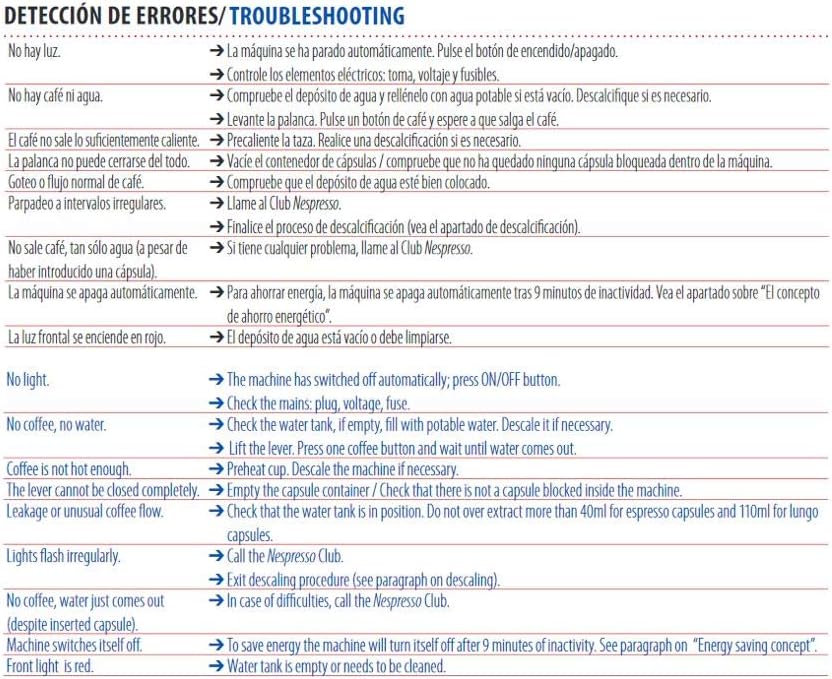
Figure 7: Troubleshooting guide for common machine issues.
| Issue | Solution |
|---|---|
| No light. | The machine has switched off automatically. Press ON/OFF button. Check the mains, plug, voltage, fuse. |
| No coffee, no water. | Check the water tank, if empty, fill with potable water. Descale it if necessary. Lift the lever. Press one coffee button and wait until water comes out. |
| Coffee is not hot enough. | Preheat cup. Descale the machine if necessary. |
| The lever cannot be closed completely. | Empty the capsule container. Check that there is not a capsule blocked inside the machine. |
| Leakage or unusual coffee flow. | Check that the water tank is in position. Do not over-extract more than 40ml for espresso capsules and 110ml for lungo capsules. |
| Lights flash irregularly. | Call the Nespresso Club. Exit descaling procedure (see paragraph on descaling). |
| No coffee, water just comes out (despite inserted capsule). | In case of difficulties, call the Nespresso Club. |
| Machine switches itself off. | To save energy, the machine will turn itself off after 9 minutes of inactivity. |
| Front light is red. | Water tank is empty or needs to be cleaned. |
Specifications
- Brand: Nespresso
- Model Name: EN125SAE
- Color: Aluminum
- Product Dimensions: 7.56"D x 18.19"W x 11.89"H
- Special Feature: Programmable
- Coffee Maker Type: Espresso Machine
- Included Components: Espresso machine, Milk Frother (Aeroccino 3)
- Operation Mode: Fully Automatic
- Voltage: 110 Volts
- Coffee Input Type: Capsule (Nespresso Original)
- Manufacturer: De'Longhi
- Item Weight: 8.28 pounds
- Capacity: 1.5 Pounds (Water Tank)
Warranty and Support
This Nespresso Pixie machine is backed by a manufacturer's one-year warranty. For detailed warranty information, product support, or to contact customer service, please refer to the official Nespresso website or the documentation included with your product.
You can also visit the Nespresso Store on Amazon for additional products and support.


