
Alen Flex-Pure
Alen BreatheSmart Flex HEPA Air Purifier User Manual
Model: Flex-Pure | Brand: Alen
Important Safety Instructions
Please read and understand all safety instructions before operating your Alen BreatheSmart Flex Air Purifier. Failure to follow these instructions may result in electric shock, fire, or serious injury.
- Always unplug the air purifier before moving, cleaning, or replacing the filter.
- Do not operate the unit with a damaged cord or plug. If the cord or plug is damaged, contact Alen customer support.
- Keep the power cord away from heated surfaces.
- Do not use the air purifier in wet or damp environments, such as bathrooms or laundry rooms.
- Do not insert fingers or foreign objects into any openings of the air purifier.
- This appliance has a polarized plug (one blade is wider than the other). To reduce the risk of electric shock, this plug is intended to fit into a polarized outlet only one way. If the plug does not fit fully into the outlet, reverse the plug. If it still does not fit, contact a qualified electrician. Do not attempt to defeat this safety feature.
- The product contains chemicals known to the State of California to cause cancer and birth defects or other reproductive harm.
Product Overview
The Alen BreatheSmart Flex is a compact and efficient HEPA air purifier designed to improve indoor air quality by capturing allergens, dust, mold, and pet odors. It is suitable for rooms up to 1400 sq. ft. and features a quiet operation.

Figure 1: Front view of the Alen BreatheSmart Flex Air Purifier. This image shows the sleek white design of the unit, highlighting its modern aesthetic.
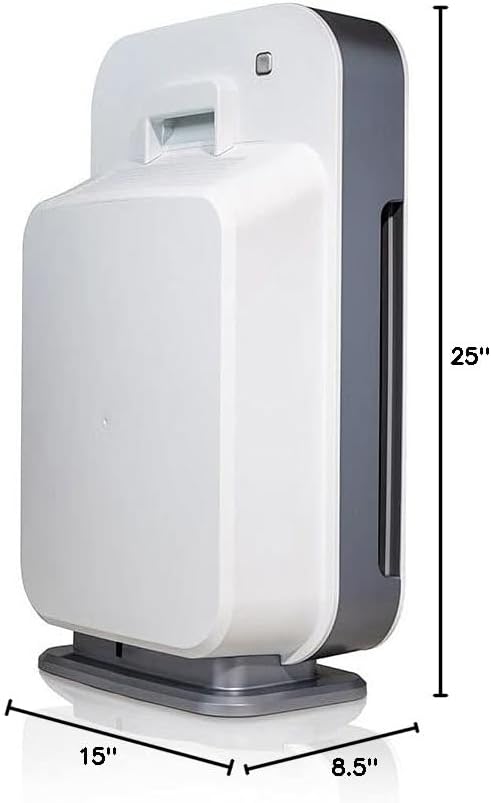
Figure 2: Dimensions of the Alen BreatheSmart Flex Air Purifier. The image indicates the unit's height of 25 inches, width of 15 inches, and depth of 8.5 inches, providing a clear understanding of its physical size.
Key Components:
- Control Panel: Touch-sensitive interface for operating the unit.
- Air Intake Vents: Located on the sides, where air enters the purifier.
- Air Outlet Grille: Located on the top, where purified air exits.
- HEPA Pure Filter: Internal filter system for capturing airborne particles.
- Power Cord: Connects the unit to an electrical outlet.
Setup
Follow these steps to set up your Alen BreatheSmart Flex Air Purifier:
- Unpack the Unit: Carefully remove the air purifier from its packaging. Retain the packaging for future storage or transport.
- Remove Filter Packaging: Open the back cover of the air purifier. The HEPA filter inside is typically wrapped in protective plastic. Remove this plastic packaging from the filter.

Figure 3: Close-up of the HEPA filter, illustrating its multi-layered construction designed to capture various airborne contaminants including viruses, dust, allergens, pet fur, bacteria, dander, mold, and fungi.
- Install the Filter: Place the unwrapped filter back into the unit, ensuring it is seated correctly. Close the back cover securely.
- Position the Air Purifier: Place the unit on a flat, stable surface. For optimal performance, ensure there is at least 6 inches of space around all sides of the air purifier to allow for proper airflow.

Figure 4: The Alen BreatheSmart Flex air purifier positioned in a bedroom, demonstrating its suitability for personal spaces and its ability to blend with home decor.
- Connect to Power: Plug the power cord into a standard 120V AC electrical outlet.
Operating Instructions
The Alen BreatheSmart Flex features a user-friendly touch control panel on its top surface.

Figure 5: Detailed view of the Alen BreatheSmart Flex control panel, showing the touch buttons for Filter, Timer, Power, Speed, and Lock, along with the filter indicator lights (Green, Yellow, Red).
Control Panel Functions:
- Power Button (⏻): Touch to turn the unit ON or OFF.
- Speed Button (⇆): Touch to cycle through fan speeds (1, 2, 3, Turbo). Higher speeds provide faster air purification but may produce more noise.
- Timer Button (⏱): Touch to set the operating timer for 2, 4, or 12 hours. The unit will automatically turn off after the selected time.
- Lock Button (🔒): Press and hold for 3 seconds to lock or unlock the control panel. This prevents accidental changes to settings.
- Filter Indicator (🏭):
- Green Light: Filter is in good condition.
- Yellow Light: Filter is nearing the end of its life and should be replaced soon.
- Red Light: Filter needs immediate replacement.
For optimal air quality, it is recommended to operate the air purifier continuously, especially in areas with high levels of pollutants or allergens.
Maintenance
Regular maintenance ensures the longevity and efficiency of your Alen BreatheSmart Flex Air Purifier.
Filter Replacement:
The HEPA Pure filter typically lasts 9-12 months depending on usage and air quality. Replace the filter when the Filter Indicator light turns red.
- Unplug the Unit: Always unplug the air purifier from the power outlet before performing any maintenance.
- Open Back Cover: Gently press the latch on the top of the back cover and pull it open.
- Remove Old Filter: Grasp the tabs on the old filter and pull it out of the unit. Dispose of the used filter responsibly.
- Insert New Filter: Remove the new filter from its protective packaging. Insert the new filter into the unit, ensuring the airflow arrows on the filter align with the arrows on the unit.

Figure 6: A close-up image showing the Alen BreatheSmart Flex filter being inserted into the air purifier, illustrating the proper orientation and fit for filter replacement.
- Close Cover: Close the back cover until it clicks securely into place.
- Reset Filter Life Indicator: Plug the unit back in. With the unit powered ON, press and hold the Filter button for 5 seconds until the red light turns green. This resets the filter life monitor.
Cleaning the Unit:
- Wipe the exterior of the air purifier with a soft, dry cloth as needed.
- Do not use abrasive cleaners, solvents, or harsh chemicals, as these may damage the surface.
- Do not wash the filter. The filter is not washable and must be replaced.
Troubleshooting
Refer to the table below for common issues and their solutions.
| Problem | Possible Cause | Solution |
|---|---|---|
| Unit does not turn on. | Not plugged in; power outage; damaged cord/plug; control panel locked. | Ensure unit is securely plugged into a working outlet. Check circuit breaker. Inspect cord/plug for damage (do not use if damaged). Unlock control panel by holding the Lock button for 3 seconds. |
| Airflow is weak or no air comes out. | Filter is clogged; filter packaging not removed; air intake/outlet blocked. | Check filter indicator light and replace filter if red. Ensure all plastic packaging is removed from the filter. Clear any obstructions from air intake vents and outlet grille. |
| Unusual noise. | Filter not seated correctly; foreign object inside; unit on uneven surface. | Unplug and re-seat the filter. Check for any foreign objects inside the unit (do not insert hands). Place the unit on a flat, stable surface. |
| Filter indicator light remains red after filter replacement. | Filter life indicator not reset. | With the unit ON, press and hold the Filter button for 5 seconds until the light turns green. |
| Air quality does not seem to improve. | Incorrect filter type; room size too large; excessive pollutants; unit not running continuously. | Ensure you are using the correct Alen Flex filter type for your needs. Verify the room size is within the unit's capacity (1400 sq. ft. per hour). Run the unit continuously or at a higher fan speed. Address source of pollutants if possible. |
Specifications
| Feature | Detail |
|---|---|
| Brand | Alen |
| Model Number | Flex-Pure |
| Color | White (ecomm packaging) |
| Product Dimensions | 8.5"D x 15"W x 25"H |
| Item Weight | 15 pounds |
| Floor Area Coverage | 700 Square Feet (per hour, up to 1400 sq. ft.) |
| Noise Level | 39 dB |
| Particle Retention Size | 0.1 Micrometer |
| Controller Type | Touch |
| Wattage | 36 watts |
| UPC | 810587023084 |
| Included Components | Air purifier and filter |
| Assembly Required | No |
| Finish Type | Plastic |
Warranty and Support
Alen provides comprehensive support for its products.
- Warranty Information: All Alen's air purifiers include a warranty if used in the contiguous United States only. For specific warranty terms and conditions, please refer to the official Alen website or contact customer support. When you enroll in a filter subscription, your Alen air purifier is guaranteed for life.
- Official User Manual (PDF): For a downloadable version of the user manual, please visit: Alen BreatheSmart Flex User Manual PDF
- Alen Brand Store: Explore other Alen products and resources at the official brand store: Alen Store on Amazon
- Customer Support: For further assistance, troubleshooting, or to purchase replacement filters, please contact Alen customer support through their official website.
Related documentsFlex-Pure


Ask a question about this manual
Ask about setup, troubleshooting, compatibility, parts, safety, or missing instructions. Manuals+ will review the question and use this page’s manual context to help answer it.