
BORUIT B10
BORUIT B10 Rechargeable Headlamp User Manual
Model: B10 | Brand: BORUIT
1. Introduction
The BORUIT B10 Rechargeable Headlamp is designed for various activities including hunting, fishing, camping, hiking, and general outdoor or industrial use. This manual provides essential information for the safe and effective operation, setup, and maintenance of your headlamp.

Image 1.1: The BORUIT B10 Rechargeable Headlamp, showcasing its primary light source.
2. Safety Warnings
Please read all safety warnings carefully before using the product.
- Battery Film: Please tear off the battery protective film before initial use.
- Battery Polarity: Ensure batteries are inserted correctly according to the "+" and "-" polarity markings.
- Battery Over-discharge: Remove batteries when they are at low power to prevent over-discharge, which can damage the batteries.
- Charging: Disconnect the power source once batteries are fully charged to prevent overcharging.
- Direct Light Exposure: Do not look directly at the light source or stare into the beam, as this may cause eye damage.

Image 2.1: Product packaging displaying important safety warnings and product details.
3. Package Contents
Verify that all items are present in the package:
- BORUIT B10 Rechargeable Headlamp
- USB-C Charging Cable
- 2 x Lithium Ion Batteries (pre-installed or separate)
4. Product Features
The BORUIT B10 Headlamp offers a range of features designed for optimal performance and user convenience:
- High-Output LED: Professional-grade LEDs provide powerful illumination for various environments.
- 4 Lighting Modes: High, Low, Strobe, and SOS modes for versatile use.
- 90° Adjustable Head: Allows for precise beam positioning.
- IPX4 Waterproof Rating: Resistant to splashes and rain, suitable for outdoor use.
- Integrated SOS Whistle: A 120dB emergency whistle for signaling in critical situations.
- Adjustable Elastic Headband: Ensures a stable and comfortable fit.
- USB-C Rechargeable: Convenient charging via USB-C.
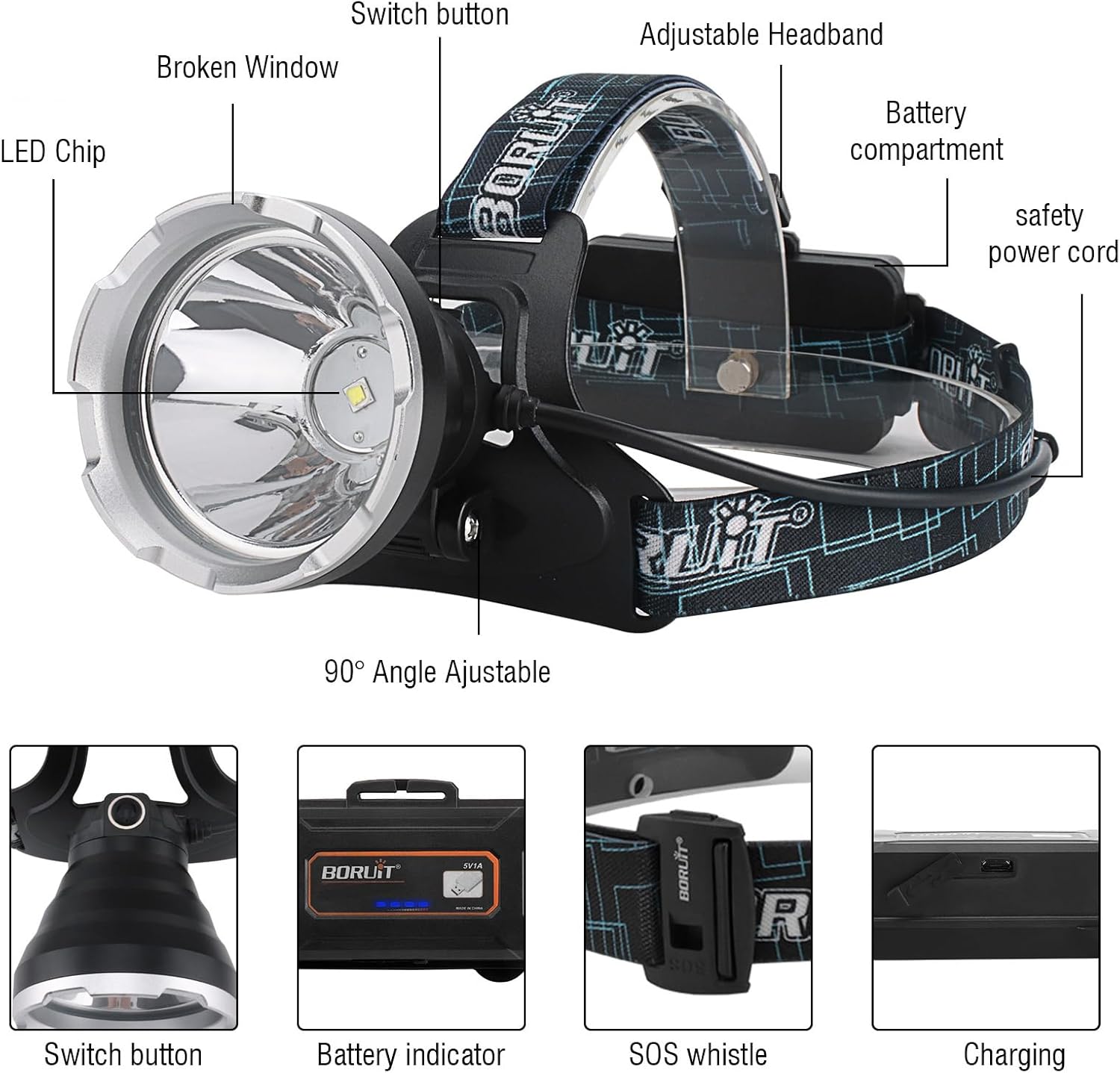
Image 4.1: Detailed view of the headlamp's components and features.

Image 4.2: Key features of the headlamp, including USB rechargeability and waterproof design.
5. Setup
5.1 Battery Installation and Initial Charge
- Open the battery compartment located at the rear of the headlamp.
- If present, remove any protective film from the included Lithium Ion batteries.
- Insert the two Lithium Ion batteries, ensuring correct polarity (+ and -) as indicated inside the compartment.
- Close the battery compartment securely.
- Connect the provided USB-C charging cable to the headlamp's charging port and to a suitable USB power source (e.g., wall adapter, power bank, computer USB port).
- Allow the headlamp to charge fully. The battery indicator will show charging status and full charge. Disconnect once fully charged.
5.2 Adjusting the Headband
The elastic headband is adjustable to fit various head sizes and can be worn over helmets or hats. Adjust the straps until the headlamp feels secure and comfortable on your head.
6. Operating Instructions
6.1 Power On/Off and Mode Selection
The headlamp features a single button control for power and mode selection.
- Power On: Press the power button once to turn on the headlamp in High mode.
- Cycle Modes: With the headlamp on, press the power button repeatedly to cycle through the modes: High (approx. 6H runtime) → Low (approx. 12H runtime) → Strobe (approx. 8H runtime) → SOS.
- Power Off: Press the power button after the SOS mode to turn off the headlamp. Alternatively, press and hold the button for 2-3 seconds to turn off from any mode.

Image 6.1: Visual representation of the four available lighting modes.
6.2 Angle Adjustment
The headlamp's light unit can be tilted up to 90 degrees. Gently adjust the angle of the light head to direct the beam precisely where needed, allowing for hands-free illumination of your desired area.

Image 6.2: Illustration of the 90-degree adjustable headlamp angle.
6.3 SOS Whistle Function
The headlamp includes a built-in SOS whistle for emergency signaling. In situations requiring attention, such as during natural disasters or when lost, activate the 120dB whistle to alert others to your location.
7. Maintenance
- Cleaning: Wipe the headlamp with a soft, damp cloth. Do not use abrasive cleaners or solvents.
- Water Exposure: While IPX4 rated for splashes, avoid submerging the headlamp in water. Ensure the charging port cover is securely closed when not charging to maintain water resistance.
- Battery Care: For long-term storage, remove the batteries from the headlamp and store them in a cool, dry place. Recharge batteries periodically if not in use to maintain their lifespan.
- Storage: Store the headlamp in a dry environment away from direct sunlight and extreme temperatures.
8. Troubleshooting
- Headlamp not turning on:
- Check if the batteries are inserted with correct polarity.
- Ensure the battery protective film has been removed.
- Charge the batteries fully.
- Light is dim or flickering:
- Recharge the batteries.
- Ensure battery contacts are clean and free of debris.
- Charging not working:
- Verify the USB-C cable is properly connected to both the headlamp and the power source.
- Try a different USB-C cable or power adapter.
9. Specifications

Image 9.1: Product Information Sheet detailing specifications.

Image 9.2: EU Energy Label for the BORUIT GT30 (similar model), indicating energy efficiency. For more details, visit EPREL Database.
10. Warranty and Support
For warranty information and customer support, please refer to the documentation included with your purchase or contact BORUIT customer service through their official channels. Keep your proof of purchase for warranty claims.
You can visit the official BORUIT store on Amazon for additional product information and support: BORUIT Amazon Store.
Related documentsB10


Ask a question about this manual
Ask about setup, troubleshooting, compatibility, parts, safety, or missing instructions. Manuals+ will review the question and use this page’s manual context to help answer it.