
Introduction
Thank you for choosing the KINGONE K5 Portable Wireless Bluetooth Speaker. This manual provides essential information for the proper setup, operation, and maintenance of your device. Please read it thoroughly before use to ensure optimal performance and longevity of your speaker.
Safety Information
- Do not expose the speaker to extreme temperatures, direct sunlight, or high humidity.
- Avoid dropping or subjecting the speaker to strong impacts.
- Do not disassemble or attempt to repair the speaker yourself. This will void the warranty.
- Keep the speaker away from water and liquids. While it is waterproof, prolonged submersion or exposure to high-pressure water jets should be avoided.
- Use only the specified charging voltage (DC 5V).
Package Contents
- KINGONE K5 Portable Wireless Bluetooth Speaker
- USB Charging Cable
- User Manual
Product Overview
Familiarize yourself with the speaker's controls and ports.
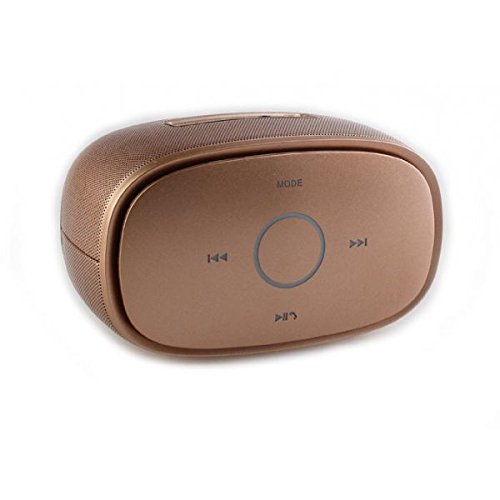
Image: Top view of the KINGONE K5 Portable Wireless Bluetooth Speaker. The image displays the speaker's top panel, which features a central circular play/pause button, surrounded by four other buttons: 'MODE' at the top, 'previous track' (left), 'next track' (right), and 'volume down/call answer' (bottom). The speaker has a metallic brown finish with a textured grille on the sides.
Control Buttons:
- MODE: Press to switch between Bluetooth, AUX, and other available modes.
- Previous Track (<<): Short press to go to the previous track.
- Next Track (>>): Short press to go to the next track.
- Play/Pause (►▮▮): Press to play or pause music. Long press for power on/off.
- Volume Down/Call Answer (▼): Short press to decrease volume. During an incoming call, press to answer.
- Volume Up/Call End (▲): Short press to increase volume. During a call, press to end. (Note: Volume Up button is not explicitly visible in the provided image but is a standard function for such devices, assuming it's paired with Volume Down or integrated.)
Ports:
- Micro USB Charging Port: For charging the speaker.
- AUX-in Port: For wired audio connection.
Setup
1. Charging the Speaker
- Connect the small end of the USB charging cable to the Micro USB port on the speaker.
- Connect the larger end of the USB cable to a USB power adapter (DC 5V, not included) or a computer's USB port.
- The charging indicator light will illuminate. It will turn off or change color once fully charged.
- A full charge typically takes approximately 3-4 hours and provides up to 7 hours of playback.
2. Powering On/Off
- To Power On: Long press the Play/Pause button until you hear an audible prompt or see an indicator light.
- To Power Off: Long press the Play/Pause button again until you hear an audible prompt or the indicator light turns off.
3. Bluetooth Pairing
- Ensure the speaker is powered on and in Bluetooth mode. If not, press the 'MODE' button to switch to Bluetooth mode. The indicator light will flash, indicating it's ready for pairing.
- Enable Bluetooth on your smartphone, tablet, or other Bluetooth-enabled device.
- Search for available Bluetooth devices. You should see "KINGONE K5" in the list.
- Select "KINGONE K5" to connect. Once paired, you will hear a confirmation sound, and the indicator light will stop flashing and remain solid.
- The speaker will automatically attempt to reconnect to the last paired device when powered on.
4. Connecting via AUX (Audio Input)
- Connect one end of a 3.5mm audio cable (not included) to the AUX-in port on the speaker.
- Connect the other end of the audio cable to the headphone jack of your audio device.
- The speaker will automatically switch to AUX mode, or you may need to press the 'MODE' button to select AUX.
Operating
Playing Music
- Play/Pause: Press the Play/Pause button to start or pause playback.
- Next Track: Press the Next Track (>>) button to skip to the next song.
- Previous Track: Press the Previous Track (<<) button to go back to the beginning of the current song or to the previous song.
- Volume Control: Use the Volume Down (▼) and Volume Up (▲) buttons on the speaker to adjust the volume. You can also control the volume from your connected device.
Hands-Free Calling
When connected via Bluetooth, the speaker can be used for hands-free calls.
- Answer Call: Press the Volume Down (▼) button once to answer an incoming call.
- End Call: Press the Volume Up (▲) button once to end an ongoing call.
- Reject Call: Long press the Volume Down (▼) button to reject an incoming call.
Maintenance
Cleaning
- Wipe the speaker with a soft, dry, or slightly damp cloth.
- Do not use abrasive cleaners, alcohol, or chemical solvents.
Storage
- Store the speaker in a cool, dry place away from direct sunlight and extreme temperatures.
- If storing for an extended period, charge the battery periodically (e.g., every 3 months) to maintain battery health.
Battery Care
- Avoid fully discharging the battery frequently.
- Do not leave the speaker connected to a charger for excessively long periods after it is fully charged.
Troubleshooting
| Problem | Possible Cause | Solution |
|---|---|---|
| Speaker does not power on. | Battery is low or depleted. | Charge the speaker for at least 30 minutes. |
| Cannot pair with Bluetooth device. | Speaker is not in pairing mode. Bluetooth is off on your device. Speaker is already connected to another device. | Ensure speaker is in Bluetooth pairing mode (flashing indicator). Turn on Bluetooth on your device. Disconnect from other devices or restart the speaker. |
| No sound or low volume. | Volume is too low on speaker or device. Incorrect mode selected. | Increase volume on both the speaker and your connected device. Press the 'MODE' button to select the correct input (Bluetooth/AUX). |
| Sound distortion. | Volume too high. Device too far from speaker. | Reduce volume on speaker and/or device. Move the device closer to the speaker (within 10 meters). |
Specifications
- Model Name: KINGONE K5
- Item Model Number: KNG006
- Wireless Communication Technology: Bluetooth
- Bluetooth Version: V2.0 (as per product title)
- Speaker Type: Bookshelf (Portable)
- Speaker Size: 2 inches
- Audio Output Mode: Stereo (2.0 Channel)
- Power Source: Battery Powered (Built-in Li-ion battery)
- Rated Voltage: DC 5V
- Frequency Response: 3dB
- Frequency Scope: 170-15KHz
- Control Method: Touch
- Waterproof: Yes
- Battery Life: Up to 7 hours (approx.)
- Compatible Devices: Smartphone, Tablet
Warranty and Support
For warranty information or technical support, please refer to the documentation provided at the time of purchase or contact your retailer. Keep your proof of purchase for warranty claims.