
cellularline BTMOSQUITOK
Cellularline BTMOSQUITOK MOTION In-Ear Bluetooth Stereo Earphone User Manual
Model: BTMOSQUITOK
1. Introduction
Thank you for choosing the Cellularline BTMOSQUITOK MOTION In-Ear Bluetooth Stereo Earphone. This manual provides essential information for the safe and efficient use of your new earphones. Please read it thoroughly before use and keep it for future reference.
These in-ear Bluetooth earphones feature perfect fit technology, a built-in microphone with an answer button, and remote control, making them ideal for listening to music and managing calls. They also include a simple magnetic closure for convenient portability.
2. Package Contents
Please verify that all items are present in the package:
- Cellularline BTMOSQUITOK MOTION In-Ear Bluetooth Stereo Earphone
- USB charging cable
- 3 sets of earbuds (various sizes)
- User Manual
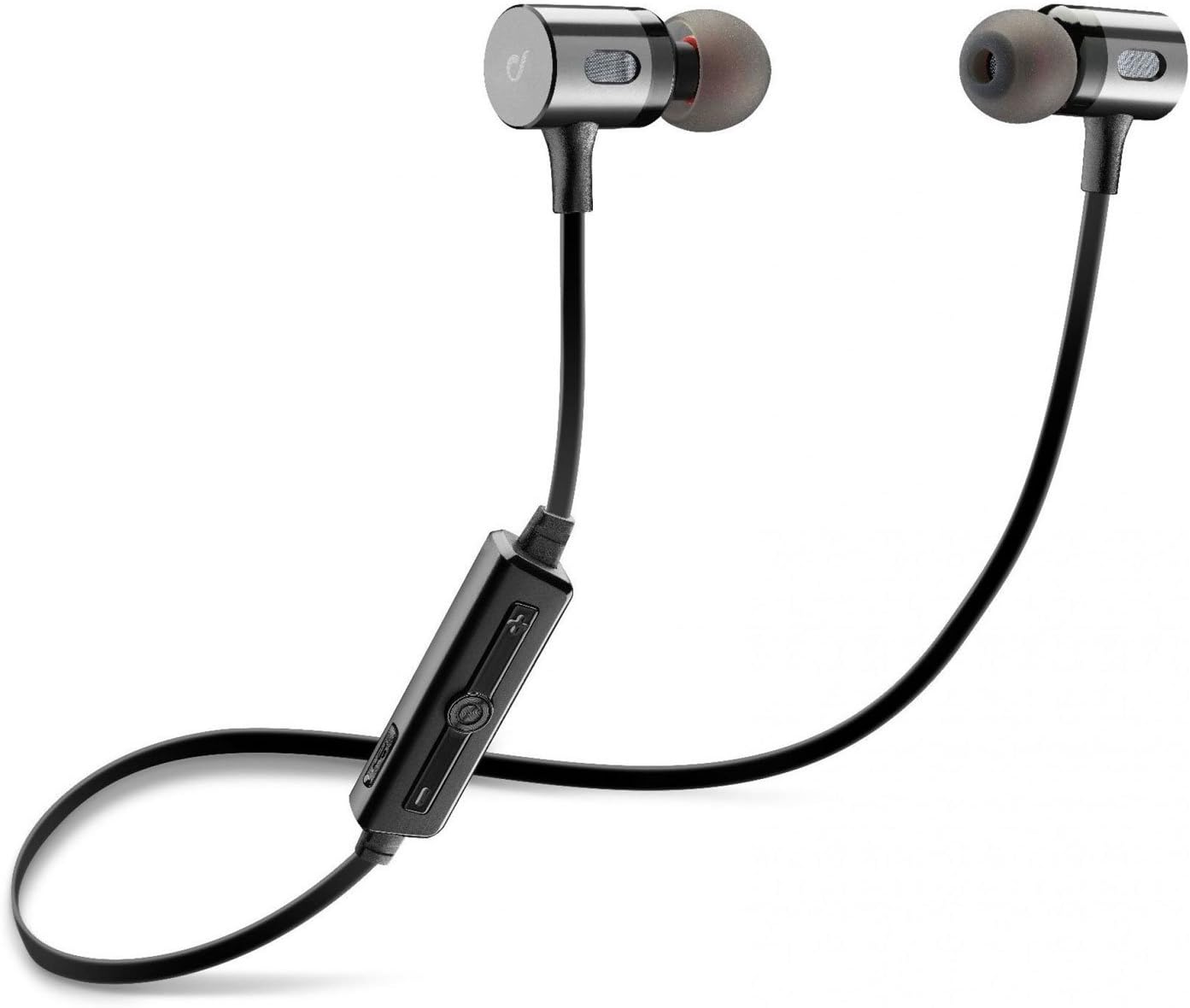
Image: The Cellularline BTMOSQUITOK MOTION In-Ear Bluetooth Stereo Earphone, showing the earbuds, cable, and inline remote.
3. Safety Information
- Do not expose the earphones to extreme temperatures, humidity, or liquids.
- Avoid dropping or subjecting the earphones to strong impacts.
- Do not attempt to disassemble or repair the earphones yourself. Refer to qualified service personnel.
- Prolonged exposure to loud sounds may cause hearing damage. Adjust volume to a moderate level.
- Keep out of reach of children.
4. Setup and First Use
4.1. Charging the Earphones
Before first use, fully charge the earphones. Connect the supplied USB charging cable to the charging port on the inline remote control and the other end to a USB power source (e.g., computer USB port or USB wall adapter).
- A red indicator light will typically show during charging.
- The light will turn blue or off when charging is complete.

Image: Close-up of the inline remote control on the Cellularline BTMOSQUITOK earphones, showing buttons and charging port location.
4.2. Pairing with a Bluetooth Device
- Ensure the earphones are charged and turned off.
- Press and hold the multi-function button (usually the center button on the remote) until the indicator light flashes red and blue alternately, indicating pairing mode.
- On your Bluetooth device (smartphone, tablet, etc.), enable Bluetooth and search for new devices.
- Select "BTMOSQUITOK" or similar name from the list of available devices.
- Once paired, the indicator light on the earphones will typically flash blue slowly or turn off, and you may hear a confirmation tone.
Note: If a passcode is required, enter "0000".
5. Operating Instructions
5.1. Power On/Off
- Power On: Press and hold the multi-function button for approximately 3 seconds until the blue indicator light flashes.
- Power Off: Press and hold the multi-function button for approximately 5 seconds until the red indicator light flashes and then turns off.
5.2. Music Playback
- Play/Pause: Press the multi-function button once.
- Next Track: Press and hold the "+" volume button.
- Previous Track: Press and hold the "-" volume button.
- Volume Up: Short press the "+" volume button.
- Volume Down: Short press the "-" volume button.
5.3. Call Management
- Answer/End Call: Press the multi-function button once.
- Reject Call: Press and hold the multi-function button for approximately 2 seconds.
- Redial Last Number: Double-press the multi-function button.

Image: The magnetic closure feature of the Cellularline BTMOSQUITOK earbuds, allowing them to snap together for secure carrying.
6. Maintenance and Care
- Clean the earphones regularly with a soft, dry cloth.
- Do not use abrasive cleaners or solvents.
- Remove and clean the ear tips periodically to prevent wax buildup.
- Store the earphones in a cool, dry place when not in use. The magnetic closure helps keep them tangle-free.
7. Troubleshooting
| Problem | Possible Cause | Solution |
|---|---|---|
| Earphones do not turn on. | Low battery. | Charge the earphones fully. |
| Cannot pair with device. | Earphones not in pairing mode; Bluetooth off on device; device too far. | Ensure earphones are in pairing mode (flashing red/blue). Turn on Bluetooth on your device. Move device closer to earphones. |
| No sound or low volume. | Volume too low; earphones not connected; incorrect audio output selected on device. | Increase volume on earphones and device. Re-pair earphones. Check audio output settings on your device. |
| Intermittent connection. | Interference; device too far; low battery. | Move away from sources of interference (Wi-Fi routers, other Bluetooth devices). Keep device within range. Charge earphones. |
8. Specifications
| Model Name | BTMOSQUITOK MOTION |
| Brand | Cellularline |
| Type | In-Ear Bluetooth Stereo Earphone |
| Color | Black |
| Microphone | Built-in with answer button and remote control |
| Battery Type | Lithium Ion (1 required) |
| Product Dimensions | 9.2 x 2 x 17.5 cm |
| Weight | 65 g |
| Noise Control | Sound Isolation |
9. Warranty and Support
For warranty information and technical support, please refer to the warranty card included with your product or visit the official Cellularline website. Keep your proof of purchase for warranty claims.
Manufacturer: Cellularline
Related documentsBTMOSQUITOK


Ask a question about this manual
Ask about setup, troubleshooting, compatibility, parts, safety, or missing instructions. Manuals+ will review the question and use this page’s manual context to help answer it.