
1. Introduction
Thank you for choosing the Remax RB-T7 Bluetooth Wireless Headset. This device is designed to provide a high-quality, hands-free audio experience with its Bluetooth V4.1 technology and noise reduction features. This manual will guide you through the setup, operation, and maintenance of your headset to ensure optimal performance.

Image 1.1: The Remax RB-T7 Bluetooth Wireless Headset, available in white and black variants, featuring an ear clip design.
2. Product Overview
The Remax RB-T7 is a lightweight and compact wireless headset designed for comfort and clear communication. It features Bluetooth V4.1 for stable connectivity, an integrated microphone for calls, and noise reduction technology for improved audio quality.
Key Features:
- Bluetooth V4.1 for high-definition audio and stable connection.
- Integrated microphone for hands-free calling.
- Voice alerts and multi-point connectivity.
- Noise reduction feature for clearer sound.
- Wireless communication for convenience.
- Compatible with all Bluetooth-enabled devices.
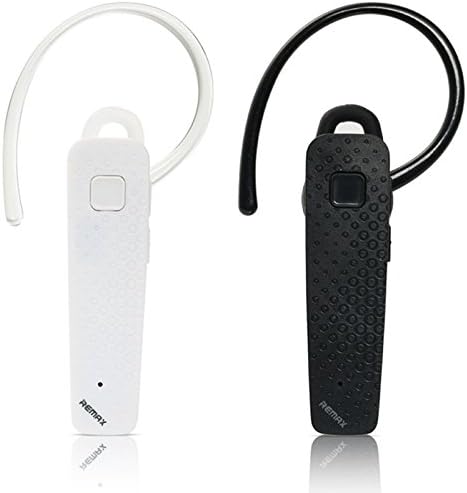
Image 2.1: Side view of the Remax RB-T7 Bluetooth Headset, highlighting its compact design and ear clip.
3. Setup
3.1 Charging the Headset
Before first use, fully charge your Remax RB-T7 headset. Connect the charging cable to the headset's charging port and a USB power source. The indicator light will show the charging status and turn off or change color when fully charged.
- Charging Time: Approximately 2 hours.
- Indicator: Refer to the specific light behavior in the quick start guide for your model.
3.2 Pairing with a Device
To use your headset, you must first pair it with your Bluetooth-enabled device (e.g., smartphone, tablet).
- Ensure the headset is fully charged and turned off.
- Press and hold the multi-function button on the headset until the indicator light flashes red and blue alternately. This indicates pairing mode.
- On your device, enable Bluetooth and search for available devices.
- Select "RB-T7" from the list of found devices.
- Once paired, the indicator light on the headset will flash blue slowly, and you may hear a confirmation tone.
If prompted for a password, enter "0000".
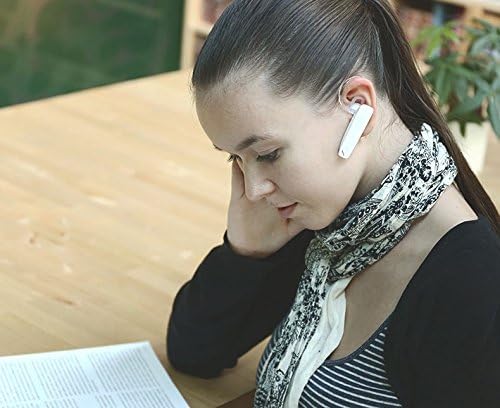
Image 3.1: A user wearing the white Remax RB-T7 headset, demonstrating its comfortable fit for extended use.
4. Operating Instructions
4.1 Power On/Off
- Power On: Press and hold the multi-function button for approximately 3 seconds until the blue indicator light flashes.
- Power Off: Press and hold the multi-function button for approximately 5 seconds until the red indicator light flashes and then turns off.
4.2 Call Management
- Answer Call: Press the multi-function button once when a call comes in.
- End Call: Press the multi-function button once during a call.
- Reject Call: Press and hold the multi-function button for approximately 2 seconds when a call comes in.
- Redial Last Number: Double-press the multi-function button.
4.3 Music Playback
After pairing, you can stream audio from your device to the headset.
- Play/Pause: Press the multi-function button once.
- Next Track: (If supported, usually a long press on volume up or specific button, refer to quick start guide).
- Previous Track: (If supported, usually a long press on volume down or specific button, refer to quick start guide).
4.4 Voice Control
The headset supports voice control. Activate your device's voice assistant (e.g., Siri, Google Assistant) by pressing and holding the multi-function button for approximately 2 seconds (when not on a call).

Image 4.1: A user utilizing the white Remax RB-T7 headset for communication while engaged with a laptop, showcasing its hands-free functionality.
5. Maintenance
Proper care will extend the life of your Remax RB-T7 headset.
- Cleaning: Wipe the headset with a soft, dry cloth. Do not use abrasive cleaners or solvents.
- Storage: Store the headset in a cool, dry place away from extreme temperatures and direct sunlight.
- Battery Care: To preserve battery life, avoid fully discharging the battery frequently. Charge the headset regularly, even if not in use for extended periods.
- Water Exposure: The headset is not waterproof. Avoid exposure to water or excessive moisture.
6. Troubleshooting
If you encounter issues with your Remax RB-T7 headset, refer to the following common solutions:
| Problem | Possible Solution |
|---|---|
| Headset does not power on. | Ensure the headset is fully charged. Connect it to a power source and allow it to charge for at least 30 minutes before attempting to power on again. |
| Cannot pair with device. |
|
| No sound or low volume. |
|
| Sound cutting out intermittently. |
|
7. Specifications
Technical specifications for the Remax RB-T7 Bluetooth Wireless Headset:

Image 7.1: Diagram showing the dimensions of the Remax RB-T7 headset (70mm length, 25mm width, 15.4mm earbud width) and a table of key specifications.
| Feature | Detail |
|---|---|
| Model Name | RB T7 |
| Connectivity Technology | Wireless (Bluetooth V4.1) |
| Wireless Communication Technology | Bluetooth |
| Compatible Devices | All devices |
| Control Type | Voice Control, Touch Control |
| Cable Feature | Without Cable |
| Number of Items | 1 |
| Color | Black (also available in White) |
| Headphones Form Factor | On Ear (Ear Clip) |
| Noise Control | Active Noise Cancellation |
| Headphone Jack | 3.5 mm Jack (Note: This might refer to a charging port or an adapter, as the device is wireless. Please verify with product packaging.) |
| Age Range Description | Adult |
| Material | Plastic |
| Talking Time | 4 Hours |
| Standby Time | 96 Hours |
| Charging Time | 2 Hours |
| Range | 10 Meters |
| Weight | 8 Grams |
| Dimensions (L x W x H) | 14.4 x 7.4 x 3.6 cm (Shipping Dimensions) |
8. Warranty and Support
Remax products are manufactured to high-quality standards. For specific warranty information, please refer to the warranty card included with your product packaging or contact your local Remax distributor or retailer.
For technical support or further assistance, please contact the customer service provided by your point of purchase.


