
1. Introduction
This instruction manual provides essential information for the safe and effective installation, operation, and maintenance of your Baomain DPDT ON/Off/ON Toggle Switch, model RT1322. Please read this manual thoroughly before use and retain it for future reference.
2. Product Overview
The Baomain RT1322 is a Double Pole Double Throw (DPDT) toggle switch with three positions: ON, OFF, and ON. It is designed for controlling two separate circuits or reversing polarity in a single circuit. This switch features 6 screw terminals for secure electrical connections.
Key Features:
- Type: DPDT (ON/OFF/ON)
- Electrical Rating: 15A/250V AC, 20A/125V AC
- Mounting Hole Size: 12mm (1/2 inch)
- Body Size: 31 x 19 x 20mm (1.2 x 0.7 x 0.8 inches) (L*W*H)
- Terminals: 6 Screw Terminals
- Material: Metal
Product Images:
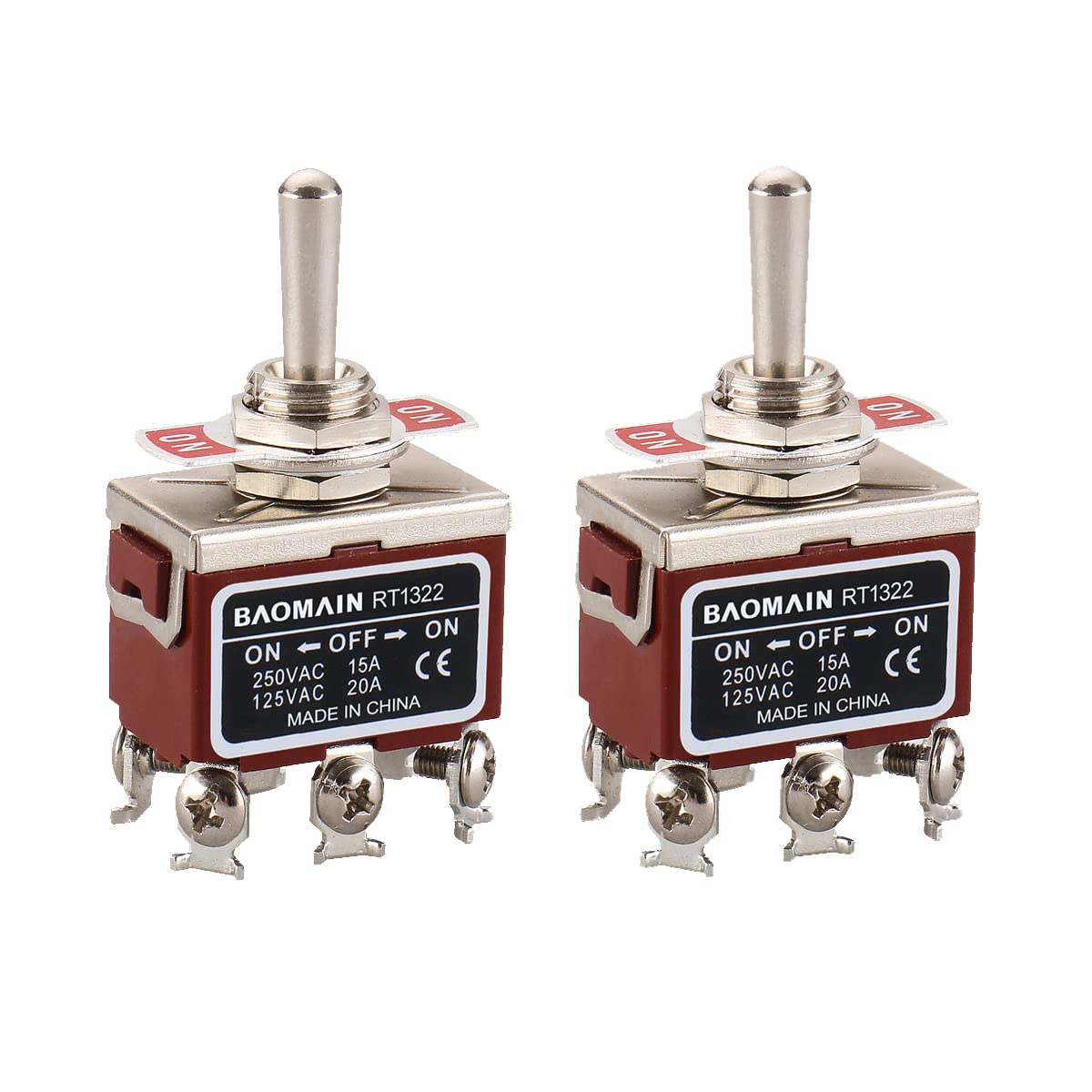


3. Safety Information
Always observe the following safety precautions to prevent personal injury or damage to the product and connected equipment:
- Disconnect all power sources before installing or servicing the switch.
- Ensure the switch's electrical ratings (voltage and amperage) are compatible with your application.
- All wiring should be performed by a qualified electrician or knowledgeable individual in accordance with local electrical codes.
- Do not exceed the specified current or voltage ratings.
- Protect the switch from moisture, dust, and extreme temperatures unless specifically rated for such environments.
- Ensure all terminal connections are tight and secure to prevent arcing or overheating.
4. Setup and Installation
Mounting the Switch:
- Drill a 12mm (1/2 inch) diameter hole in the desired mounting surface.
- Insert the toggle switch through the hole.
- Secure the switch using the provided nut and washer on the front side of the panel. Tighten firmly but do not overtighten.
Wiring Instructions (DPDT ON/Off/ON):
The RT1322 is a DPDT (Double Pole Double Throw) switch with 6 screw terminals. These terminals are typically arranged in three pairs:
- Center Terminals (Common): These two terminals are the input points for your power source.
- Outer Terminals (Load 1 & Load 2): The two pairs of outer terminals are connected to the common terminals depending on the switch position. One pair corresponds to the 'ON' position in one direction, and the other pair corresponds to the 'ON' position in the opposite direction.
General Wiring Principle:
- Connect your power input (e.g., positive and negative from a DC source, or Line and Neutral from an AC source) to the two center terminals.
- Connect the first load or circuit to one pair of outer terminals.
- Connect the second load or circuit (or the reverse polarity connections for a single load) to the other pair of outer terminals.
Example Application: Reversing a DC Motor
For reversing a DC motor, the DPDT ON/Off/ON switch can be wired to change the polarity of the voltage supplied to the motor. This typically involves connecting the motor leads to the outer terminals and crossing the connections for one of the 'ON' positions relative to the other.
Always consult a specific wiring diagram for your intended application to ensure correct and safe connections.
Related Video Demonstrations:
DPDT Mini Toggle Switch Wiring Example
This video demonstrates the wiring and operation of a 6-pin DPDT ON/ON mini toggle switch, showing how it can control multiple devices. While the product is an ON/OFF/ON switch, this video illustrates general DPDT wiring principles and can be helpful for understanding terminal connections.
Momentary Toggle Switch Application
This video demonstrates a momentary SPDT (ON)-Off-(ON) toggle switch controlling two different light strips. It illustrates the concept of switching between two circuits, though the product is a maintained DPDT ON/OFF/ON switch. The video provides a visual example of how a toggle switch can be used to select between different outputs.
5. Operating Instructions
The Baomain RT1322 toggle switch has three distinct positions:
- Center Position (OFF): In this position, the common terminals are disconnected from both sets of outer terminals. No power is supplied to either connected circuit.
- First ON Position: Pushing the toggle lever to one side (e.g., 'UP') connects the common terminals to one specific pair of outer terminals. This activates the circuit or load connected to that pair.
- Second ON Position: Pushing the toggle lever to the opposite side (e.g., 'DOWN') connects the common terminals to the other specific pair of outer terminals. This activates the second circuit or load, or reverses the polarity for a single load.
To switch between circuits or states, simply move the toggle lever to the desired ON position. To turn off all connected circuits, move the lever to the center OFF position.
6. Maintenance
The Baomain RT1322 toggle switch is designed for durability and requires minimal maintenance. Follow these guidelines to ensure long-term performance:
- Regular Inspection: Periodically check the switch for any signs of physical damage, loose connections, or corrosion.
- Cleaning: If necessary, gently clean the exterior of the switch with a dry, soft cloth. Do not use abrasive cleaners or solvents. Ensure no liquids enter the switch mechanism.
- Terminal Tightness: Over time, vibrations can loosen screw terminals. Periodically check and tighten all terminal screws to ensure good electrical contact.
- Environmental Protection: If the switch is installed in a harsh environment, consider adding protective enclosures to shield it from excessive dust, moisture, or corrosive elements.
7. Troubleshooting
If you encounter issues with your toggle switch, consider the following common troubleshooting steps:
- No Power to Load:
- Check if the main power supply to the switch is active.
- Ensure the switch is in an 'ON' position.
- Verify all wiring connections are secure and correct, especially at the terminals.
- Inspect for any blown fuses or tripped circuit breakers in the circuit.
- Intermittent Operation:
- Loose wiring connections are a common cause. Re-tighten all terminal screws.
- Check for damaged wires or insulation.
- Ensure the switch is not exposed to excessive vibration.
- Switch Feels Stiff or Loose:
- A new switch may feel stiff initially. If it remains excessively stiff or becomes very loose, it might indicate internal wear or damage.
- Do not attempt to lubricate the internal mechanism unless specifically instructed by the manufacturer.
If troubleshooting steps do not resolve the issue, it may indicate a faulty switch or a more complex electrical problem. In such cases, it is recommended to replace the switch or consult a qualified electrician.
8. Specifications
| Attribute | Value |
|---|---|
| Manufacturer | Baomain Electric INC |
| Part Number | RT1322 |
| Item Model Number | RT1322 |
| Switch Type | DPDT (ON/OFF/ON), Toggle Switch |
| Voltage Rating | 125V AC / 250V AC |
| Amperage Capacity | 20 Amps (125V AC), 15 Amps (250V AC) |
| Number of Terminals | 6 Screw Terminals |
| Mounting Hole Size | 12mm (1/2 inch) |
| Body Dimensions (L x W x H) | 31 x 19 x 20mm (1.2 x 0.7 x 0.8 inches) |
| Item Weight | 18 g |
| Material | Metal |
| Certifications | CE |
9. Warranty and Support
For information regarding warranty coverage, technical support, or replacement parts for your Baomain RT1322 Toggle Switch, please contact Baomain Electric INC directly or refer to their official website. Keep your purchase receipt as proof of purchase.