
1. Introduction
Thank you for choosing the Koblenz ER-2800 Voltage Regulator. This device is designed to protect your electronic equipment from voltage fluctuations, surges, and spikes, ensuring stable power delivery. Please read this manual carefully before operating the unit to ensure proper use and to maximize its lifespan.
1.1 Product Overview
The Koblenz ER-2800 is a 2800VA/2000W voltage regulator equipped with 6 outlets, providing reliable power conditioning for a variety of electronic devices. It automatically adjusts output voltage to a safe level, protecting sensitive electronics from damage caused by unstable power sources.
1.2 Safety Instructions
- Read all instructions: Before using the product, read all safety and operating instructions.
- Indoor use only: This product is intended for indoor use in a dry environment. Do not expose to rain, moisture, or extreme temperatures.
- Proper grounding: Always connect the regulator to a properly grounded three-prong wall outlet. Do not remove the grounding prong.
- Avoid overloading: Do not exceed the maximum power rating of 2800VA/2000W. Overloading can cause damage to the unit and connected devices, and may pose a fire hazard.
- Ventilation: Ensure adequate ventilation around the unit. Do not block ventilation openings.
- No user-serviceable parts: Do not attempt to open or repair the unit. Refer all servicing to qualified service personnel.
- Keep away from children: Store the unit in a safe place out of reach of children.
- Liquid contact: Never allow liquids to come into contact with the unit.
2. Package Contents
Verify that all items are present in the package:
- 1 x Koblenz ER-2800 Voltage Regulator
- 1 x User Manual (this document)
3. Setup
3.1 Placement
Place the Koblenz ER-2800 on a stable, flat surface in a dry, well-ventilated area. Avoid placing it near heat sources, direct sunlight, or areas with excessive dust or moisture.
3.2 Connecting the Regulator
- Ensure the Koblenz ER-2800 is switched off (if applicable) before connecting it to a power source.
- Plug the power cord of the Koblenz ER-2800 directly into a standard, grounded wall outlet. Do not use extension cords or power strips for the regulator's input.
3.3 Connecting Your Devices
- With the regulator still off, plug your electronic devices (e.g., computers, TVs, audio equipment) into the 6 available outlets on the Koblenz ER-2800.
- Ensure that the total power consumption of all connected devices does not exceed 2000W or 2800VA.
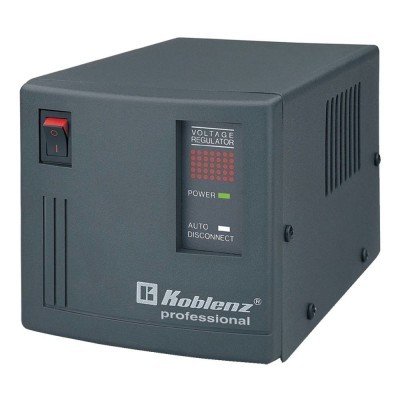
Image: The Koblenz ER-2800 Voltage Regulator, showing its compact design and multiple outlets for connecting electronic devices. The front panel typically includes indicator lights for operational status.
4. Operating Instructions
4.1 Powering On
Once all devices are connected, turn on the Koblenz ER-2800. The power indicator light (usually green) should illuminate, indicating that the unit is receiving power and operating correctly. Then, power on your connected electronic devices.
4.2 Automatic Voltage Regulation
The Koblenz ER-2800 continuously monitors the incoming AC power. If the voltage deviates from the safe operating range, the regulator will automatically adjust the output voltage to a stable level, protecting your connected equipment.
4.3 Overload Protection
The unit is equipped with an overload protection circuit breaker. If the total power consumption of connected devices exceeds the regulator's capacity (2000W/2800VA), the circuit breaker will trip, cutting power to the outlets to prevent damage. To reset the circuit breaker:
- Disconnect some devices to reduce the load.
- Press the circuit breaker button (usually located on the back or side of the unit) to reset it.
- Reconnect devices one by one, ensuring not to exceed the maximum capacity.
5. Maintenance
5.1 Cleaning
To clean the exterior of the unit, use a soft, dry cloth. Do not use liquid cleaners, aerosols, or solvents, as these can damage the casing or internal components. Ensure the unit is unplugged before cleaning.
5.2 Storage
If storing the unit for an extended period, unplug it from the wall outlet and store it in a cool, dry place, away from direct sunlight and extreme temperatures.
5.3 User Servicing
The Koblenz ER-2800 contains no user-serviceable parts. Opening the casing will void the warranty and may expose you to dangerous electrical components. For any issues requiring service, contact qualified personnel.
6. Troubleshooting
If you experience problems with your Koblenz ER-2800, refer to the following troubleshooting guide:
| Problem | Possible Cause | Solution |
|---|---|---|
| No power to connected devices / Regulator indicator lights are off. |
|
|
| Devices lose power intermittently. |
|
|
| Unusual noise from the regulator. |
|
|
7. Specifications
- Brand: Koblenz
- Model: ER-2800
- Capacity: 2800VA / 2000W
- Outlets: 6
- Input Voltage: Standard AC (Voltage range not specified, typically 127V AC for Mexico)
- Output Voltage: Regulated AC (e.g., 120V AC +/- 10%)
- Material: Plastic and Metal
- Form Factor: Stationary
- UPC: 099053015857
- ASIN: B01M3Q5EXR
8. Warranty and Support
For warranty information, please refer to the warranty card included with your product or visit the official Koblenz website. Keep your purchase receipt as proof of purchase for warranty claims.
If you require technical assistance or have questions not covered in this manual, please contact Koblenz customer support. Contact details can typically be found on the manufacturer's website or on the product packaging.

