
Introduction
This manual provides instructions for the Redi-Remote replacement remote control, model RTAXD1126. This remote is designed to be compatible with specific Pioneer audio/video receiver models, including AXD1126, SX2700-3, SX17003, SX2700, and CU-SX012. It requires no programming and is ready for use upon battery installation.
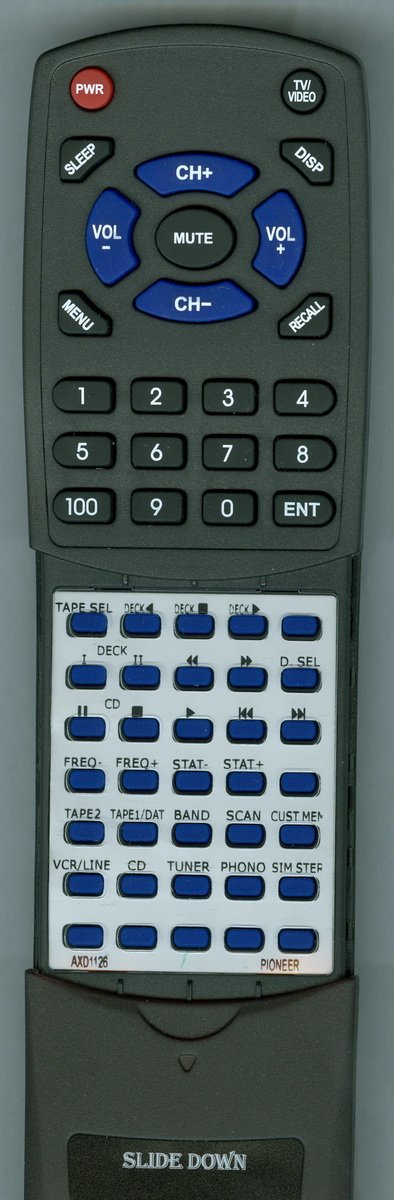
Image: The Redi-Remote replacement remote control, showing its ergonomic design and button layout. This remote is specifically designed for Pioneer models AXD1126, SX2700-3, SX17003, SX2700, and CU-SX012.
Setup
Battery Installation
- Locate the battery compartment on the back of the remote control.
- Slide open the battery compartment cover.
- Insert four (4) AAA batteries, ensuring the positive (+) and negative (-) terminals align correctly with the markings inside the compartment. Four AAA batteries are included with the remote.
- Close the battery compartment cover securely.
The remote control does not require any programming. Once batteries are installed, it is ready for immediate use with your compatible Pioneer unit.
Operating Instructions
This Redi-Remote is designed to replicate the functions of your original Pioneer remote control for the specified models.
- Point and Operate: Point the remote control directly at your Pioneer receiver. The maximum effective range is approximately 20 feet (6 meters).
- Button Functions: Each button on the remote corresponds to a specific function on your Pioneer unit. Refer to your Pioneer receiver's manual for detailed information on each function.
- Sliding Cover: A cover is present over the lower half of the remote. Slide this cover down to reveal additional buttons for advanced functions.
- Auxiliary Devices: Please note that Redi-Remotes cannot be programmed to control any auxiliary devices. They are designed exclusively for the specific Pioneer unit they are intended to replace.
Maintenance
Cleaning
To clean the remote control, gently wipe it with a soft, dry cloth. Do not use abrasive cleaners, solvents, or wet cloths, as these may damage the remote's surface or internal components.
Battery Replacement
If the remote control's performance degrades or it stops responding, replace all four AAA batteries with new ones. Always replace all batteries at the same time and ensure correct polarity. Remove batteries if the remote will not be used for an extended period to prevent leakage.
Troubleshooting
- Remote not responding:
- Check if the batteries are inserted correctly with the correct polarity.
- Replace old batteries with new ones.
- Ensure there are no obstructions between the remote and the Pioneer receiver.
- Confirm you are within the maximum operating range of 20 feet.
- Specific buttons not working:
- Ensure the sliding cover is positioned correctly to access the desired buttons.
- Verify that the function you are trying to use is supported by your specific Pioneer receiver model.
- Remote controls other devices:
- This remote is designed only for the specified Pioneer models and cannot be programmed for other devices. If it appears to control another device, it may be due to incidental infrared signal overlap, which is rare.
Specifications
| Brand | Redi-Remote |
| Model Number | RTAXD1126 |
| Special Feature | No Programming Required |
| Max Number of Supported Devices | 1 |
| Compatible Devices | Pioneer Receivers (AXD1126, SX2700-3, SX17003, SX2700, CU-SX012) |
| Connectivity Technology | Infrared |
| Button Quantity | 58 |
| Controller Type | Infrared |
| Maximum Range | 20 Feet |
| Number of Batteries | 4 AAA batteries (included) |
| Item Weight | 5 Ounces |
| UPC | 791090954921 |
Warranty and Support
For any concerns or issues with your Redi-Remote replacement remote control after purchase, please contact the seller directly for support.