
Introduction
The EZCAP 218 is a portable cassette player designed to convert your old cassette tapes into digital MP3 format. This device allows you to preserve your audio recordings by transferring them to a computer, where they can be stored, transferred to an MP3 player, or burned onto a CD. It also functions as a standalone cassette player for listening to your tapes on the go.
Package Contents
Please verify that all items listed below are included in your package:
- EZCAP 218 Cassette to MP3 Converter
- USB Data Cable
- Earphones
- Software CD (containing recording software and user guide)
- User Guide (physical copy)

Image: Contents of the EZCAP 218 package, showing the cassette player, USB cable, earphones, and software CD.
Product Overview
Familiarize yourself with the components and controls of your EZCAP 218 device.
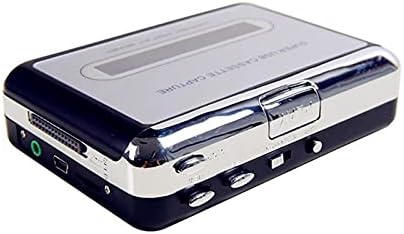
Image: Top view of the EZCAP 218 device, highlighting the playback controls and cassette window.

Image: Side view of the EZCAP 218, showing the USB port for PC connection and the 3.5mm earphone jack.

Image: Angled view of the EZCAP 218, showing the "OPEN" slider for accessing the cassette compartment.
System Requirements
To ensure proper operation and MP3 conversion, your computer must meet the following minimum specifications:
- Operating System: Windows 2000, XP, Vista, 7, 8, 10
- Processor: Pentium 4 CPU or above
- RAM: 512MB or above
- Hard Disk Space: 1GB Free HDD Space
- USB Port: One available USB 2.0 Port
- Optical Drive: CD-ROM for software installation
Setup
Powering the Device
The EZCAP 218 can be powered in two ways:
- USB Power: Connect the supplied USB cable to the device and to an available USB port on your computer or a USB power adapter.
- Battery Power: Insert two (2) AA batteries (not included) into the battery compartment.
Software Installation
Before connecting the device to your computer for conversion, install the recording software from the included CD.
- Insert the software CD into your computer's CD-ROM drive.
- Follow the on-screen instructions to install the recording software.
- Once installed, you may need to restart your computer.

Image: The EZCAP 218 device with the USB cable connected, ready for PC connection.
Operating Instructions
Loading a Cassette Tape
- Slide the "OPEN" button/slider to open the cassette compartment.
- Insert your cassette tape with the open side facing up.
- Close the cassette compartment firmly until it clicks.
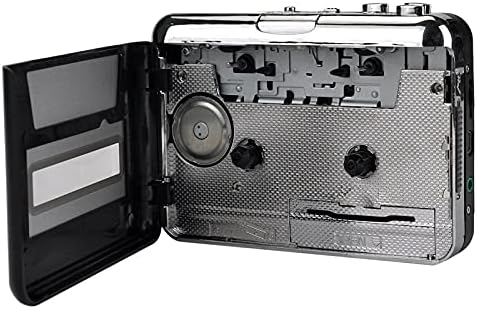
Image: The EZCAP 218 with its cassette compartment open, ready for a tape to be inserted.
Playing Cassette Tapes
To listen to your cassette tapes:
- Ensure a cassette tape is loaded.
- Connect the supplied earphones to the 3.5mm earphone jack on the side of the device.
- Press the PLAY button.
- Adjust the volume using the volume control dial.
- Use the FF (Fast Forward) and REW (Rewind) buttons for navigation.
- Press the STOP button to stop playback.
- The device supports auto-reverse and bi-directional playback.
Converting Cassette Tapes to MP3
Follow these steps to convert your cassette audio to MP3 format on your computer:
- Ensure the recording software is installed on your computer.
- Connect the EZCAP 218 to your computer using the USB cable.
- Load the cassette tape you wish to convert into the device.
- Open the recording software on your computer.
- Configure the software settings (e.g., recording level, output format to MP3, save location) as per the software's instructions.
- Press the PLAY button on the EZCAP 218.
- Initiate recording within the software.
- Allow the tape to play through completely for accurate conversion.
- Once the tape finishes, stop the recording in the software.
- Save the recorded audio file as an MP3.
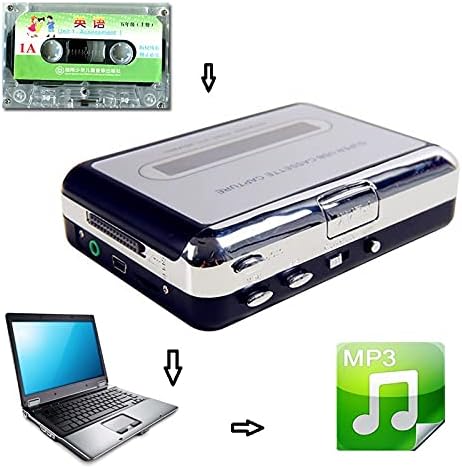
Image: A visual representation of the conversion process: a cassette tape is inserted into the converter, which connects to a laptop, resulting in an MP3 digital file.
Note: The supplied software may offer features like automatic track separation. Refer to the software's specific user guide for detailed instructions on advanced recording options.
Troubleshooting
| Problem | Possible Cause / Solution |
|---|---|
| Device does not power on. |
|
| No sound during playback. |
|
| Cannot convert to MP3 / Software not detecting device. |
|
| Poor audio quality during conversion. |
|
Maintenance
To ensure the longevity and optimal performance of your EZCAP 218, follow these maintenance guidelines:
- Cleaning: Periodically clean the tape heads and pinch rollers using a cotton swab lightly dampened with isopropyl alcohol. Ensure the device is powered off and dry before use.
- Storage: Store the device in a cool, dry place away from direct sunlight and extreme temperatures.
- Batteries: Remove batteries if the device will not be used for an extended period to prevent leakage.
Specifications
| Feature | Detail |
|---|---|
| Model Name | Ezcap218 |
| Connectivity Technology | Auxiliary, USB |
| Supported Audio Format | MP3 |
| Connector Type | 3.5mm Jack (for earphones) |
| Media Format Type | Cassette |
| Power Source | USB or 2 x AA Batteries (not included) |
| Dimensions (L x W x H) | 4.33" x 3.15" x 1.18" (approximately 11 x 8 x 3 cm) |
| Features | Auto Reverse, Bi-directional Playback, Fast Forward, Rewind |
Warranty and Support
For warranty information and technical support, please refer to the documentation provided with your purchase or contact the manufacturer directly. Keep your proof of purchase for any warranty claims.


