
Weighmax W-HD SERIES
WEIGHMAX DIGITAL POCKET SCALE W-HD SERIES Instruction Manual
Model: W-HD Series | Brand: Weighmax
1. Introduction
Thank you for purchasing the WEIGHMAX W-HD Series Digital Pocket Scale. This precision instrument is designed for accurate weighing of small items with a high degree of sensitivity. Please read this manual carefully before operating the scale to ensure proper use and to prolong its lifespan.
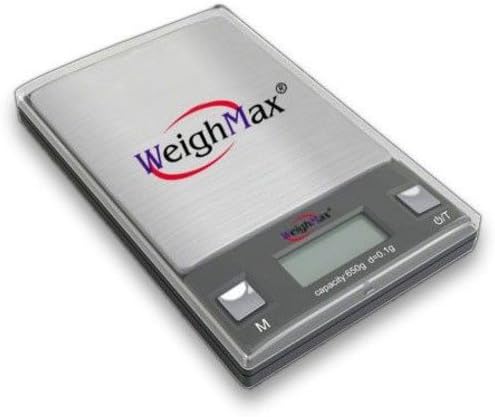
Image 1: Weighmax W-HD Series Digital Pocket Scale. This image shows the compact, silver digital pocket scale with its clear protective cover, digital display, and two control buttons (M for Mode/Unit and O/T for On/Off/Tare). The Weighmax logo is visible on the cover.
2. Product Features
- High Precision: 0.01g accuracy for precise measurements.
- Compact Design: Pocket-sized for portability and convenience.
- Digital Display: Clear, easy-to-read LCD screen.
- Multiple Weighing Units: Supports various units (e.g., grams, ounces, carats, grains, pennyweights, troy ounces).
- Tare Function: Allows you to subtract the weight of a container.
- Auto-Off Function: Conserves battery power.
- Protective Cover: Doubles as a weighing tray.
3. Setup
3.1. Battery Installation
The scale typically uses AAA batteries (not specified, assuming common type). To install or replace batteries:
- Open the battery compartment cover located on the bottom of the scale.
- Insert the batteries, ensuring correct polarity (+/-).
- Close the battery compartment cover securely.
3.2. Placement
Place the scale on a hard, flat, and stable surface. Avoid placing it on soft or uneven surfaces, or near sources of vibration, drafts, or extreme temperature changes, as these can affect accuracy.
4. Operating Instructions
4.1. Turning On/Off
- To turn on the scale, press the O/T button. The display will show "88888" and then "0.00g" (or the last used unit).
- To turn off the scale, press and hold the O/T button for a few seconds, or it will automatically shut off after a period of inactivity (typically 60-180 seconds) to save battery life.
4.2. Unit Conversion
To change the weighing unit, press the M (Mode) button repeatedly while the scale is on. The available units typically include grams (g), ounces (oz), carats (ct), grains (gn), pennyweights (dwt), and troy ounces (ozt). The selected unit will be displayed on the LCD.
4.3. Tare Function
The tare function allows you to weigh items in a container by subtracting the container's weight.
- Place the empty container on the weighing platform.
- Wait for the display to stabilize and show the container's weight.
- Press the O/T button. The display will reset to "0.00g" (or the current unit).
- Place the item(s) to be weighed into the container. The display will show the net weight of the item(s).
4.4. Weighing Procedure
- Turn on the scale and ensure it displays "0.00g".
- Gently place the item(s) to be weighed onto the center of the weighing platform.
- Wait for the display to stabilize. The stable weight will be shown.
- Remove the item(s) from the platform.
5. Calibration
Calibration ensures the accuracy of your scale. It is recommended to calibrate the scale periodically or if you suspect inaccurate readings. A calibration weight (e.g., 100g) is usually required and sold separately.
Note: Specific calibration steps may vary slightly by model. Refer to the exact instructions provided with your scale if different from below. For the W-HD Series 100g capacity scale, a 100g calibration weight is typically used.
- Turn the scale ON and wait for it to display "0.00g".
- Press and hold the M (Mode) button until the display shows "CAL".
- Release the M button. The display will then flash the required calibration weight (e.g., "100.00g").
- Place the exact calibration weight (e.g., 100g) onto the center of the weighing platform.
- Wait for the display to show "PASS" or "END" and then return to normal weighing mode ("0.00g"). This indicates successful calibration.
- Remove the calibration weight. The scale is now calibrated and ready for use.
6. Maintenance and Care
- Cleaning: Wipe the scale with a slightly damp cloth. Do not immerse the scale in water or use abrasive cleaners.
- Storage: Store the scale in a clean, dry place at room temperature. Avoid extreme temperatures and humidity.
- Handling: Handle the scale gently. Avoid dropping it or subjecting it to strong shocks, as this can damage the internal sensor.
- Batteries: Remove batteries if the scale will not be used for an extended period to prevent leakage and damage.
7. Troubleshooting
| Problem | Possible Cause | Solution |
|---|---|---|
| "Lo" or "UnSE" displayed | Low battery power or unstable surface. | Replace batteries. Place scale on a stable, flat surface. |
| "OUE2" or "EEEE" displayed | Overload. Weight exceeds maximum capacity. | Remove excess weight immediately. Do not exceed 100g capacity. |
| Inaccurate readings | Needs calibration, unstable surface, drafts, or temperature changes. | Calibrate the scale. Ensure stable surface and environment. |
| Scale does not turn on | Dead batteries or incorrect battery installation. | Check battery polarity or replace batteries. |
8. Specifications
| Feature | Detail |
|---|---|
| Brand | Weighmax |
| Model | W-HD Series |
| Capacity | 100 Grams |
| Accuracy | 0.01 grams |
| Display Type | Digital LCD |
| Material | Plastic |
| Color | Silver |
| Form Factor | Mini, Handheld |
| Power Source | Batteries (type not specified, typically AAA or button cell) |
| Auto-Off | Yes (to conserve battery) |
| UPC | 734505651053 |
| ASIN | B01M255DR0 |
9. Warranty and Support
For warranty information or technical support, please refer to the documentation included with your purchase or contact Weighmax customer service directly. Keep your purchase receipt as proof of purchase.
This manual is subject to change without notice.
Ask a question about this manual
Ask about setup, troubleshooting, compatibility, parts, safety, or missing instructions. Manuals+ will review the question and use this page’s manual context to help answer it.