
1. Introduction and Overview
This manual provides instructions for the Golden Tech Lift Chair Hand Control, model ZK756HCL. This six-button hand control is designed for use with Golden Technologies Infinite Position Lift Chairs, enabling precise adjustment of the chair's backrest and footrest, as well as the overall lift function.

Image 1.1: Golden Tech Lift Chair Hand Control ZK756HCL
The hand control features a durable black housing and a straight quick disconnect plug with five (5) pins for easy and secure connection to your lift chair's motor system.
2. Product Features
- Designed for Golden Tech Infinite Position Lift Chairs.
- Six intuitive buttons for comprehensive chair control.
- Includes an extension cable for connection to the chair's motor.
- Straight quick disconnect plug with five (5) pins for reliable connection.
3. Safety Information
Important Safety Warnings:
- Do not exceed the maximum weight capacity of 300 pounds for the lift chair.
- Ensure the lift chair is used on a hard, level floor to prevent tipping or instability.
- Keep the hand control and its cables away from moving parts of the chair to prevent pinching or damage.
- Do not attempt to modify the hand control or its wiring. Refer all repairs to qualified service personnel.
4. Setup and Installation
The Golden Tech Lift Chair Hand Control is designed for simple plug-and-play installation.
- Locate the Connection Port: Identify the corresponding connection port on your Golden Technologies lift chair's motor or control box. This port is typically a round receptacle designed to accept a 5-pin plug.
- Connect the Hand Control: Align the straight quick disconnect plug of the hand control with the connection port. Gently push the plug into the port until it is fully seated and secure. Ensure the pins are correctly aligned to avoid bending or damaging them.
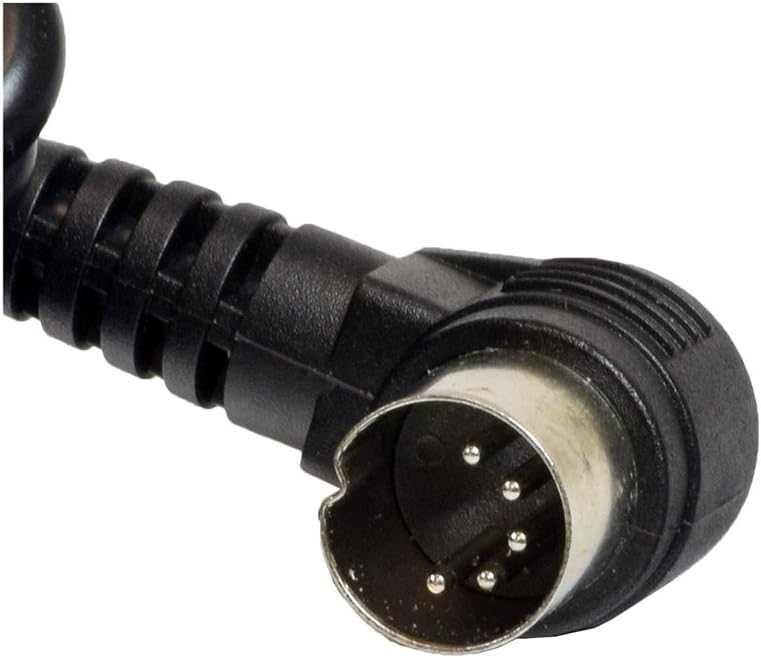
Image 4.1: Detail of the 5-pin quick disconnect plug
- Route the Cable: Carefully route the extension cable to prevent it from becoming tangled, pinched, or damaged by the chair's moving mechanisms.
- Test Functionality: Once connected, ensure the chair is plugged into a power outlet and test all functions of the hand control to confirm proper operation.
5. Operating Instructions
The hand control features six distinct buttons for various chair adjustments:
| Button Pair | Function |
|---|---|
| Top Two Buttons | Control the backrest of the chair, allowing it to move up and down independently. |
| Middle Two Buttons | Control the footrest of the chair, allowing it to move up and down independently. |
| Bottom Two Buttons | Control the overall lift and recline of the entire chair, moving it up and down. |
Press and hold the desired button to activate the corresponding chair movement. Release the button to stop the movement.
6. Maintenance
To ensure the longevity and proper function of your hand control:
- Cleaning: Wipe clean with a soft, damp cloth. Do not use abrasive cleaners or solvents.
- Cable Inspection: Periodically inspect the cable for any signs of wear, fraying, or damage. If damage is observed, discontinue use and contact customer support for a replacement.
- Storage: When not in use, store the hand control in a safe place where it will not be stepped on or damaged.
7. Troubleshooting
If your hand control is not functioning as expected, consider the following:
- No Response from Chair:
- Ensure the lift chair is properly plugged into a working electrical outlet.
- Check that the 5-pin quick disconnect plug is securely connected to the chair's motor or control box.
- Inspect the hand control cable for any visible damage.
- Intermittent Function:
- Verify all connections are tight. Loose connections can cause intermittent operation.
- Avoid pulling or tugging on the cable, which can damage internal wiring.
- Stuck Buttons: If a button feels stuck or does not return to its original position, gently try to free it. If the issue persists, the control may need replacement.
If troubleshooting steps do not resolve the issue, contact Golden Technologies customer support for further assistance.
8. Specifications
| Specification | Detail |
|---|---|
| Brand | Golden Technologies |
| Model Number | ZK756HCL (also 8541832017) |
| Color | Black |
| Product Dimensions | 9.9"D x 4.5"W x 3.4"H |
| Item Weight | 1.15 pounds |
| Material | Plastic |
| Connector Type | 5-pin Quick Disconnect |
| UPC | 817931021031 |
9. Warranty and Support
For warranty information, product support, or to purchase replacement parts, please contact Golden Technologies directly. Refer to your original lift chair documentation for specific warranty terms and contact details.
You can typically find support contact information on the manufacturer's official website or within the documentation that came with your lift chair.


