
1. Product Overview
The deleyCON Universal VESA Adapter MK-W-44 is designed to extend the VESA mounting standard of your TV or monitor, allowing compatibility with larger VESA wall mounts. This adapter enables you to adapt existing VESA 200x200 mounts to support VESA 300x300 and 400x400 standards. It is suitable for a wide range of TVs and monitors, including LCD, LED, OLED, plasma, and flat screens, with a maximum load capacity of 30 kg.
Key Features:
- Extends VESA 200x200 to VESA 300x300 and 400x400.
- Maximum load capacity: up to 30 kg.
- Constructed from robust and durable steel alloy.
- Ensures optimal and secure attachment for your TV or monitor.
- Includes illustrated mounting instructions and installation hardware.

Image: The deleyCON Universal VESA Adapter MK-W-44 components.
2. Package Contents
Please check that all parts are present and undamaged before proceeding with installation. The package includes:
- VESA adapter plates (4 pieces)
- Mounting screws
- Spacers
- Illustrated mounting instructions
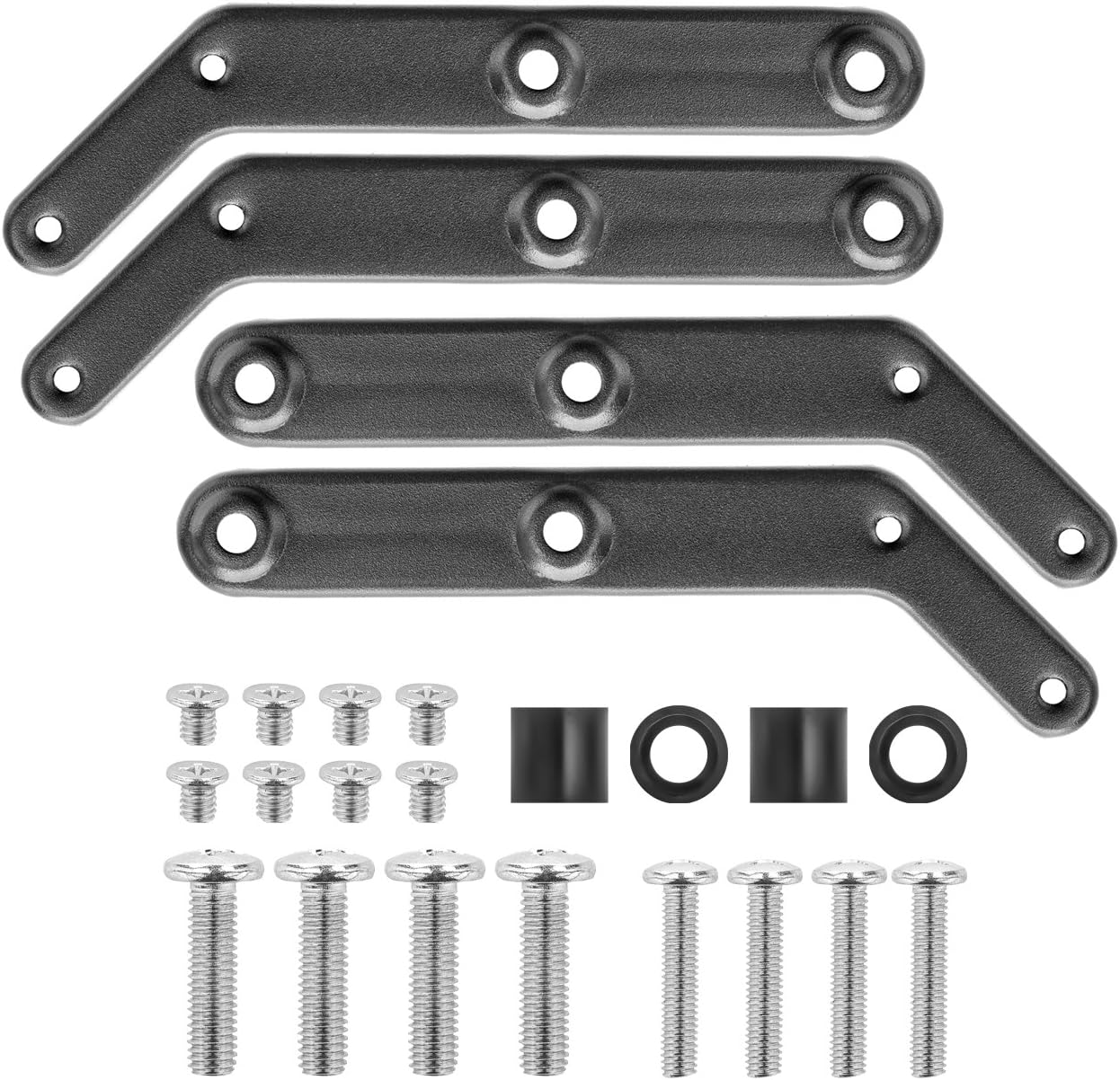
Image: All components included in the deleyCON VESA adapter package, including the four adapter plates, various screws, and spacers.
3. Safety Information
- Read all instructions carefully before installation. Incorrect assembly can lead to product damage or personal injury.
- Verify the maximum load capacity of your existing wall mount. The adapter supports up to 30 kg, but your wall mount's capacity must not be exceeded.
- Ensure VESA compatibility: This adapter is only compatible with VESA 200x200, 300x300, and 400x400 standards. It is NOT compatible with other VESA sizes.
- Use appropriate tools for installation.
- Do not overtighten screws to avoid damaging the adapter or your display.
- Keep small parts away from children to prevent choking hazards.
- If you are unsure about any part of the installation, seek professional assistance.
4. Setup and Installation
This section guides you through the installation of the deleyCON Universal VESA Adapter to extend your existing VESA 200x200 wall mount to support larger VESA patterns (300x300 or 400x400).
4.1 VESA Compatibility Check
Before installation, confirm that your TV or monitor has a VESA 200x200 mounting pattern and that your existing wall mount supports this standard. This adapter is designed to expand a VESA 200x200 pattern to VESA 300x300 or VESA 400x400. Refer to the diagram below for visual confirmation of VESA dimensions.

Image: Diagram illustrating VESA 400x400 and 300x300 dimensions, showing how the adapter plates extend the mounting points from a central 200x200 pattern.
4.2 Installation Steps
Follow these steps to install the VESA adapter plates:
- Attach Adapter Plates to Wall Mount: Secure the four adapter plates to your existing VESA 200x200 wall mount using the provided screws and spacers. Ensure the plates are oriented correctly to achieve the desired VESA 300x300 or 400x400 pattern. The longer ends of the plates should extend outwards.
- Attach TV/Monitor to Adapter Plates: Carefully align your TV or monitor with the extended VESA holes on the adapter plates. Use the appropriate screws (provided) to securely fasten your display to the adapter plates. Ensure all connections are tight and stable.
- Final Check: Before releasing the TV/monitor, double-check all screws and connections to ensure the display is securely mounted and stable.

Image: Step-by-step diagram showing how to attach the adapter plates to an existing VESA mount (1) and then how to attach the TV/monitor to the adapter plates (2).

Image: A deleyCON VESA adapter successfully mounted on the back of a television, demonstrating the extended VESA pattern.
Important Note: Always ensure that the total weight of your TV/monitor and the adapter does not exceed the maximum load capacity of your existing wall mount.
5. Operation
Once installed, the deleyCON Universal VESA Adapter functions as a passive extension for your TV or monitor's VESA mounting pattern. It allows your display to be securely attached to a wall mount that previously only supported a smaller VESA 200x200 standard, now accommodating VESA 300x300 or 400x400. No further operational steps are required for the adapter itself.
6. Maintenance
The deleyCON Universal VESA Adapter requires minimal maintenance. To ensure its longevity and continued secure performance:
- Regularly check all screws for tightness, especially after initial installation and periodically thereafter. Vibrations or movements can sometimes loosen connections over time.
- Clean the adapter plates with a soft, dry cloth if necessary. Avoid using abrasive cleaners or solvents, as these may damage the finish.
- Inspect for damage: Periodically check the adapter plates for any signs of wear, corrosion, or damage. If any damage is observed, discontinue use and replace the adapter.
7. Troubleshooting
If you encounter issues during or after installation, refer to the following common problems and solutions:
| Problem | Possible Cause | Solution |
|---|---|---|
| Adapter does not fit the TV/monitor. | Incorrect VESA size on TV/monitor. | Verify your TV/monitor's VESA pattern. This adapter is only compatible with VESA 200x200, 300x300, and 400x400. |
| Adapter does not fit the wall mount. | Wall mount does not support VESA 200x200 as a base. | Ensure your existing wall mount has a VESA 200x200 pattern to which the adapter can attach. |
| TV/monitor feels unstable after installation. | Screws are not tightened sufficiently, or wall mount's load capacity is exceeded. | Retighten all screws. Check the maximum load capacity of your wall mount and ensure the total weight of your display and adapter is within limits. |
| Missing parts. | Packaging error. | Refer to the "Package Contents" section. If parts are missing, contact deleyCON customer support. |
8. Specifications
- Model: MK-W-44
- Brand: deleyCON
- Material: Steel Alloy
- Compatible VESA Standards (Input): 200x200 mm
- Compatible VESA Standards (Output): 300x300 mm, 400x400 mm
- Maximum Load Capacity: 30 kg (66 lbs)
- Product Dimensions: Approximately 24.4 x 6.7 x 4.7 cm (package dimensions)
- Item Weight: 460 g
- Compatible Devices: Monitors, Televisions
- Installation Type: Wall Mount (adapter for existing wall mounts)
9. Warranty and Support
For warranty information or technical support regarding your deleyCON Universal VESA Adapter MK-W-44, please contact deleyCON customer service.
Contact Information:
- Email: info@deleycon.de
- Please refer to the official deleyCON website for the most up-to-date support contact details and warranty terms.
