
1. Introduction
This manual provides essential information for the safe and effective use of your VAULTEK VT20 Bluetooth Smart Handgun Safe. The VT20 is designed to provide secure storage and rapid access to your firearm, featuring multiple entry methods and smart technology for enhanced control and monitoring.
Please read this manual thoroughly before operating your safe to ensure proper setup, functionality, and longevity of the product.

Image: The VAULTEK VT20 Bluetooth Smart Handgun Safe in its closed state, showcasing its sleek, covert black design.
2. Product Features
The VAULTEK VT20 safe incorporates advanced features for security, convenience, and accessibility:
- Bluetooth Smart Technology: Connects to your smartphone for remote management, battery status, and activity logs.
- Auto-Open Lid: Provides quick, spring-assisted access upon successful entry.
- Rechargeable Lithium-Ion Battery: Offers long-lasting power for months on a single charge.
- Multiple Access Points: Access via manual key, backlit numeric keypad, or the VAULTEK Bluetooth App.
- Robust Construction: Built with 16-gauge steel unibody construction, dual anti-impact latches, and anti-pry bars for enhanced security.
- Interior LED Light: Adjustable brightness for visibility in low-light conditions.
- Padded Foam Interior: Protects contents from scratches and impacts.
- Quick Release Cable Mount: Allows for secure tethering to fixed objects.
- Mountable Design: Pre-drilled holes and hardware included for permanent installation.

Image: Detailed diagram highlighting key features such as dual anti-impact latches, anti-pry bars, interior mounted hinges, quick release cable mount, 16-gauge steel, padded foam interior, rechargeable battery, interior LED light, backlit keypad, and back up key access.
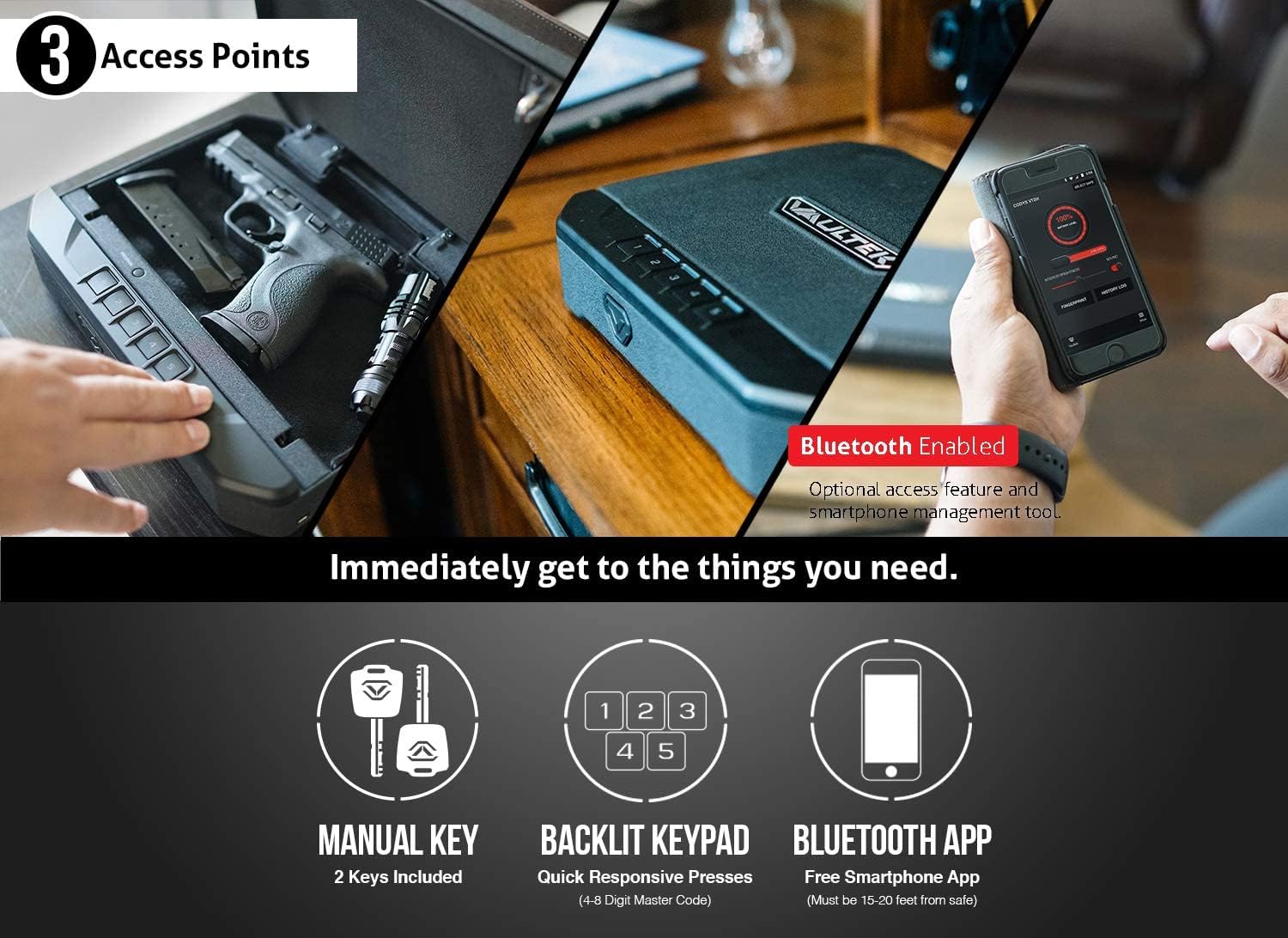
Image: Visual representation of the three primary access methods: manual keys (two included), the backlit keypad (4-8 digit master code), and the Bluetooth smartphone app (effective within 15-20 feet).
3. Setup
3.1 Initial Battery Charge
Before first use, fully charge the safe's Lithium-Ion battery. Connect the provided charging kit (USB cable and adapter) to the safe's charging port. A full charge typically takes approximately 2.5 hours. The battery level can be monitored via the VAULTEK Bluetooth App.
3.2 Setting Your Master Code
- Open the safe using one of the provided manual keys.
- Locate the programming button inside the safe (refer to the quick start guide for exact location).
- Press and release the programming button. The keypad lights will illuminate.
- Enter your desired 4-8 digit master code using the backlit keypad (numbers 1-5).
- Press and release the programming button again to confirm. The keypad lights will flash to indicate successful programming.
It is recommended to test your new code several times with the safe open before closing it.
3.3 Bluetooth App Pairing
The VAULTEK Bluetooth App allows for advanced control and monitoring of your safe.
- Download the VAULTEK app from the Google Play Store or Apple App Store.
- Ensure Bluetooth is enabled on your smartphone.
- Open the VAULTEK app and follow the on-screen instructions to add your VT20 safe. You may need to enter your master code during the pairing process.
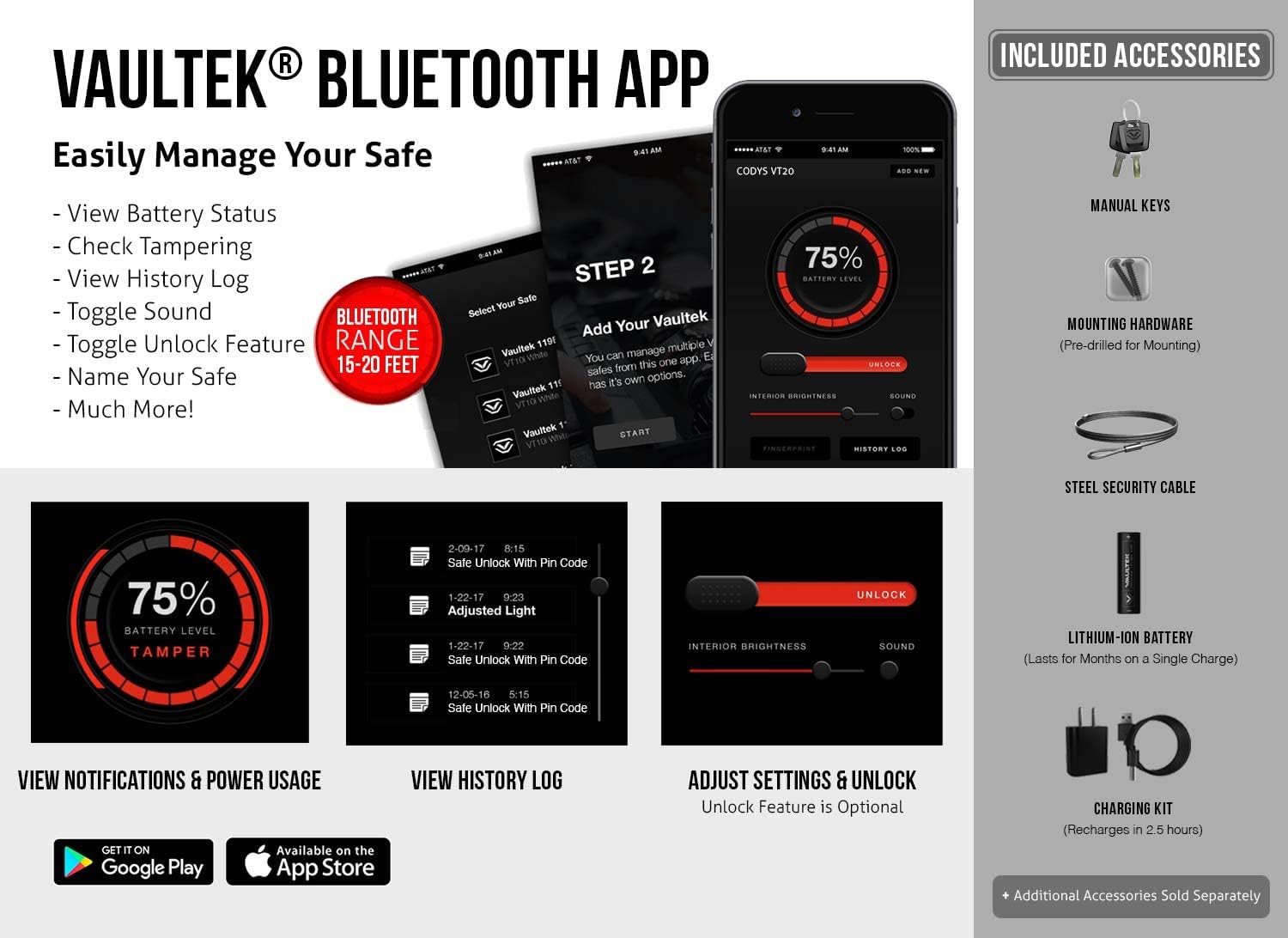
Image: Screenshots demonstrating the VAULTEK Bluetooth App's capabilities, including viewing battery status, checking for tampering, viewing history logs, toggling sound, adjusting interior brightness, and unlocking the safe.
3.4 Mounting and Security Cable Installation
The VT20 can be mounted using the pre-drilled holes and included hardware, or secured with the provided steel security cable.
- Mounting: Choose a secure location. Use appropriate screws and anchors for your surface. Ensure the safe is firmly attached.
- Security Cable: Loop the steel security cable around a fixed, immovable object. Insert the cable end into the quick release cable mount slot on the safe. Ensure it is securely latched.
4. Operating the Safe
4.1 Opening with Manual Key
Insert the manual key into the keyhole and turn it to unlock the safe. The lid will automatically open.
4.2 Opening with Backlit Keypad
Place your hand near the keypad to activate the proximity sensor, illuminating the keys. Enter your master code. Upon correct entry, the lid will automatically open.
4.3 Opening with Bluetooth App
Ensure your smartphone is within 15-20 feet of the safe and Bluetooth is enabled. Open the VAULTEK app, select your safe, and use the unlock feature within the app. The lid will automatically open.
4.4 Adjusting Interior LED Light
The brightness of the interior LED light can be adjusted via the VAULTEK Bluetooth App settings.
5. Maintenance
5.1 Battery Management
The safe's battery life can last for months depending on usage. Monitor the battery level through the VAULTEK app. Recharge the battery when the level is low to ensure continuous operation.
5.2 Cleaning
Wipe the exterior of the safe with a soft, damp cloth. Do not use abrasive cleaners or solvents. Keep the keypad and internal mechanisms free of dust and debris.
5.3 Checking for Tampering
The VAULTEK app provides a history log that can indicate attempts to tamper with the safe, such as incorrect code entries. Regularly review this log for security monitoring.
6. Troubleshooting
6.1 Safe Not Opening
- Keypad: Ensure you are entering the correct master code. Check battery level; a low battery can affect keypad responsiveness.
- Bluetooth App: Verify Bluetooth is enabled on your device and the app is connected to the safe. Ensure your device is within range.
- Manual Key: If other methods fail, use the manual key as a backup.
6.2 Battery Draining Quickly
- Frequent use of the interior LED light or constant app connection can reduce battery life.
- Ensure the safe is fully charged after each low battery indication.
6.3 App Connectivity Issues
- Restart the VAULTEK app.
- Toggle your phone's Bluetooth off and on.
- Ensure your phone's operating system is up to date.
For persistent issues, please refer to the VAULTEK support website or contact customer service.
7. Specifications
| Brand | VAULTEK |
| Model | VT20 |
| Lock Type | Key, Keypad, Bluetooth App |
| Color | Black |
| Material | Alloy Steel |
| Special Features | Bluetooth Smart, Auto-Open Lid |
| Mounting Type | Freestanding, Mountable |
| Control Type | Key Control, Electronic Keypad, App Control |
| Item Weight | 7.1 Pounds |
| Water Resistance Level | Not Water Resistant |
| Exterior Dimensions (L x W x H) | 11.5" x 9" x 2.625" |
| Interior Dimensions (L x W x H) | 11" x 5.75" x 2" |
| Battery Type | Rechargeable Lithium-Ion |
| UPC | 851245007213 |
8. Warranty and Support
VAULTEK stands behind the quality of its products. For detailed warranty information, please visit the official VAULTEK website. If you encounter any issues or require assistance, the VAULTEK support team is available to help.
Contact Support:
- Visit vaulteksafe.com
- Navigate to the 'Support' or 'Help Center' section.
- Submit a warranty request or contact their 5-star support team directly.


