
1. Introduction
Thank you for choosing the Baseus Encok W07 True Wireless Earphones. This manual provides essential information for the proper use, setup, and maintenance of your earphones. Please read it carefully before use to ensure optimal performance and longevity of your device.
2. Package Contents
Please check the package contents upon unboxing. If any items are missing or damaged, contact your retailer.
- 1 pair of Baseus Encok W07 True Wireless Earphones
- 1 Charging Case
- 1 USB-C Charging Cable
- User Manual
3. Product Overview
Familiarize yourself with the components of your Baseus Encok W07 earphones.

Image 3.1: Baseus Encok W07 True Wireless Earphones inside their open charging case, showing the earphones ready for use or charging. The Baseus logo is visible on the front of the case.

Image 3.2: A top-down view of the Baseus Encok W07 earphones nestled within their charging case. The 'L' and 'R' indicators for left and right earphones are visible.
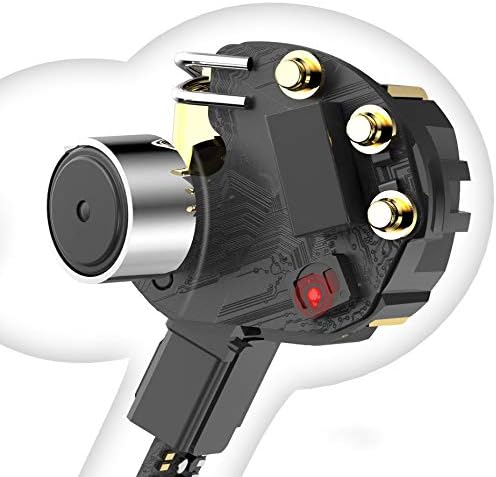
Image 3.3: The Baseus Encok W07 charging case in a closed position, displaying the sleek, compact design and the Baseus brand logo on the lid.
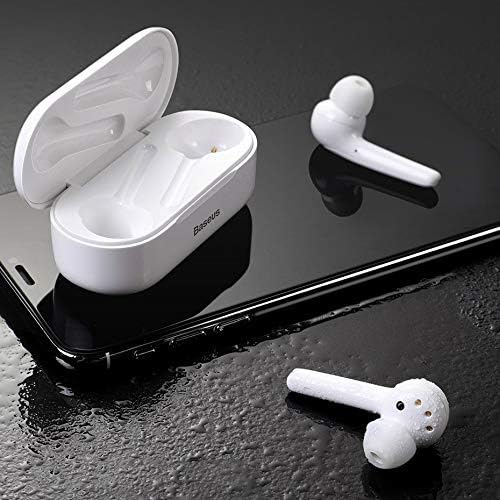
Image 3.4: An illustrative cutaway view showing the internal electronic components of one Baseus Encok W07 earphone, including the speaker and circuit board.
4. Setup
4.1 Charging the Earphones and Case
Before first use, fully charge the earphones and the charging case.
- Charge the Case: Connect the provided USB-C charging cable to the charging port on the case and to a USB power source (e.g., wall adapter, computer USB port). The indicator light on the case will show charging status.
- Charge the Earphones: Place the earphones into their respective slots in the charging case. Ensure they are correctly seated. The earphones will begin charging automatically. The indicator lights on the earphones (if present) or the case will confirm charging.
A full charge typically takes approximately 1.5 hours for the earphones and 2 hours for the charging case.
4.2 Bluetooth Pairing
To connect your earphones to a device (smartphone, tablet, etc.):
- Power On: Open the charging case. The earphones will automatically power on and enter pairing mode. The indicator light on one earphone will flash, indicating it's ready to pair.
- Activate Bluetooth: On your device, go to the Bluetooth settings and enable Bluetooth.
- Select Device: Look for "Baseus Encok W07" (or similar) in the list of available devices and select it to connect.
- Confirmation: Once connected, the earphone indicator light will stop flashing, and your device will confirm the connection.
Note: The earphones will automatically reconnect to the last paired device when taken out of the case, if Bluetooth is enabled on the device.
5. Operating Instructions
The Baseus Encok W07 earphones feature touch controls for various functions.
5.1 Basic Controls
- Power On: Open the charging case or long-press the touch area on both earphones for 3 seconds.
- Power Off: Place earphones back into the charging case and close the lid, or long-press the touch area on both earphones for 5 seconds.
5.2 Music Playback
- Play/Pause: Double-tap the touch area on either earphone.
- Next Track: Triple-tap the touch area on the right earphone.
- Previous Track: Triple-tap the touch area on the left earphone.
5.3 Call Management
- Answer/End Call: Double-tap the touch area on either earphone.
- Reject Call: Long-press the touch area on either earphone for 2 seconds.
5.4 Voice Assistant
- Activate Voice Assistant: Long-press the touch area on the left earphone for 2 seconds.

Image 5.1: A person wearing a Baseus Encok W07 earphone, demonstrating its in-ear fit and discreet design during use.
6. Maintenance
Proper maintenance ensures the longevity and performance of your earphones.
- Cleaning: Use a soft, dry, lint-free cloth to clean the earphones and charging case. Do not use harsh chemicals or abrasive materials.
- Storage: When not in use, store the earphones in their charging case to protect them from dust and damage. Store in a cool, dry place.
- Avoid Water: While the earphones may have some water resistance (refer to specifications), avoid prolonged exposure to water or submerging them. Dry thoroughly if they get wet.

Image 6.1: Baseus Encok W07 earphones and their open charging case resting on a wet surface, illustrating potential water resistance features. Ensure to dry them if exposed to moisture.
7. Troubleshooting
If you encounter issues with your Baseus Encok W07 earphones, try the following solutions:
- Earphones not pairing/connecting:
- Ensure both earphones are charged.
- Turn off and on your device's Bluetooth.
- Delete "Baseus Encok W07" from your device's Bluetooth list and try pairing again.
- Reset the earphones (refer to manufacturer's website for specific reset instructions if needed).
- No sound from one earphone:
- Ensure both earphones are charged and properly connected.
- Place both earphones back into the charging case, close the lid, wait a few seconds, then take them out again.
- Charging issues:
- Check the charging cable and adapter for damage.
- Ensure the charging port on the case is clean and free of debris.
- Verify the earphones are correctly seated in the charging case.
- Low volume or poor sound quality:
- Adjust the volume on your connected device.
- Ensure the earphones are clean and free of earwax buildup.
- Try different ear tips (if applicable) for a better seal.
If the problem persists, please contact Baseus customer support.
8. Specifications
| Model Number | NGW07-02 |
| Brand | Baseus |
| Connectivity Technology | Wireless (Bluetooth) |
| Form Factor | In Ear |
| Control Type | Voice Control |
| Cable Feature | Without Cable |
| Item Weight | 0.18 Kilograms (6.3 ounces) |
| Product Dimensions | 5.75 x 4.49 x 1.57 inches |
9. Safety Information
Please observe the following safety guidelines:
- Do not disassemble, repair, or modify the product.
- Keep the product away from extreme temperatures, direct sunlight, and open flames.
- Avoid exposing the product to water or other liquids for extended periods.
- Do not use the earphones at high volume for prolonged periods to prevent hearing damage.
- Keep out of reach of children and pets.
10. Warranty and Support
Baseus products are covered by a limited warranty. For detailed warranty information, technical support, or service inquiries, please visit the official Baseus website or contact your local retailer. Please retain your proof of purchase for warranty claims.


