
iSpring FC15B
iSpring FC15B High Capacity Activated CTO Carbon Block Filter Instruction Manual
Model: FC15B
1. Introduction
The iSpring FC15B is a high-capacity activated CTO (Chlorine, Taste, and Odor) carbon block filter designed for use in under-sink and whole-house water filtration systems. This filter effectively reduces free chlorine, unpleasant tastes, odors, THMs, organic compounds, and other hazardous chemicals from your water supply. It is constructed from high-quality coconut shell carbon using compact fabrication technology to ensure maximum filtration efficiency and extended filter life.
This manual provides essential information for the proper installation, operation, and maintenance of your FC15B filter to ensure optimal performance and longevity.
2. Safety Information
- Always shut off the main water supply before installing or servicing the filter.
- Release any residual water pressure in the system before opening filter housings.
- Wear appropriate personal protective equipment, such as safety glasses and gloves, during installation and maintenance.
- Do not overtighten fittings or filter housings, as this can cause cracks or leaks.
- Ensure all connections are secure and leak-free before restoring water pressure.
- Keep the filter and its components away from direct sunlight and extreme temperatures.
3. Product Features
- Premium Quality Material: Made with high-quality coconut shell carbon and compact fabrication technology for maximum filtration efficiency. Free of surfactants, binders, and adhesives.
- Exceptional Filtration Performance: Reduces up to 99% of chlorine, bad tastes, odors, cloudiness, and is effective against organic compounds like herbicides, industrial solvents, and trihalomethanes.
- Long Filter Life: Filters up to 50,000 gallons or lasts approximately 6 months, depending on water quality and usage.
- Great Compatibility: Official replacement filter for iSpring Under Sink Water Filter System US21B and Whole House water filtration systems (WGB21B, WGB21BM, and WGB21B-PB). Fits other standard 10" x 4.5" undersink and whole house water filtration systems.
- Individually Sealed: Each filter is individually sealed to maintain freshness and ensure product integrity.
4. Package Contents
The iSpring FC15B filter package includes:
- 1 x iSpring FC15B High Capacity Activated CTO Carbon Block Filter

Image 1: iSpring FC15B CTO Carbon Block Filter
5. Compatibility
The FC15B filter is designed for broad compatibility with various iSpring and other standard filtration systems. It is specifically recommended as the second stage filter for:
- iSpring Direct Connect under sink water filter system US21B
- iSpring whole house filtration system WGB21B
- iSpring whole house filtration systems WGB21BM
- iSpring whole house filtration systems WGB21B-PB
It also fits other standard 10" x 4.5" undersink and whole house water filtration systems.

Image 2: iSpring FC15B Filter Compatibility Overview
6. Setup and Installation
This section outlines the general steps for installing a whole house water filtration system, which includes the FC15B filter. For detailed instructions specific to your system model, please refer to your system's user manual.
6.1. Preparation
- Gather Tools: Ensure you have all necessary tools, including a pipe cutter, adjustable wrench, plumber's tape (thread seal tape), and a bucket.
- Shut Off Water Supply: Locate and shut off the main water supply to your house.
- Drain Water Lines: Open the nearest faucet to drain water from the pipes and release any pressure.
- Prepare Fittings: Apply plumber's tape to the threads of any fittings in a clockwise direction. Do not overtighten when securing them to the system's inlet and outlet ports.
6.2. Filter Insertion
- Unwrap the FC15B carbon block filter from its protective packaging.
- Ensure the filter's center hole slips over the center knob at the bottom of the housing.
- Verify that the housing O-rings are properly seated to prevent leaks.
- Hand-tighten the housing counter-clockwise onto the housing cap.
- Using a housing wrench, tighten the housing an additional quarter to half a turn. Do not overtighten, as this can cause cracks or make future replacements difficult.
6.3. System Installation (General Whole House System)
The following video demonstrates the installation process for iSpring Whole House Water Filtration Systems. The FC15B filter is a component within these systems.
Video 1: iSpring Whole House Water Filtration System Installation Guide. This video demonstrates the general installation process for iSpring whole house systems, including preparation, mounting, and connecting to the pipeline. It also covers initial flushing and leak checks.
- Mount the System: Find a suitable location for the system and mount the bracket securely on the wall.
- Connect to Pipeline: Measure and cut the water inlet pipe. Connect the filtration system to your main water line, ensuring the water flow direction arrow on the machine head matches the direction of water flow within the pipeline.
- Restore Water Supply: Slowly turn on the main water supply.
- Check for Leaks: Carefully inspect all connections for any leaks.
- Flush the System: Let the water run from a nearby faucet for approximately 10 minutes to flush out any debris or loose filter media. Turn off the faucet when the water runs clear.
7. Operating Instructions
Once installed and flushed, your iSpring FC15B filter operates continuously as part of your water filtration system. No special operational steps are required beyond ensuring proper installation and regular maintenance.
- The filter provides clean, filtered water to all connected outlets in your home (for whole house systems) or to your designated faucet (for under-sink systems).
- Monitor water flow and quality. A noticeable drop in water pressure or a return of unpleasant tastes/odors indicates that the filter may need replacement.
8. Maintenance and Filter Replacement
Regular maintenance and timely filter replacement are crucial for the optimal performance and longevity of your iSpring filtration system.
8.1. Filter Replacement Schedule
The FC15B filter should be replaced every 6 months or after filtering approximately 50,000 gallons of water, whichever comes first. Actual filter life may vary based on your source water quality and usage.

Image 3: FC15B Filter Capacity (50,000 Gallons)
8.2. Replacement Procedure
The following video demonstrates the maintenance and filter replacement process for iSpring Whole House Water Filtration Systems. The FC15B filter is replaced using these general steps.
Video 2: iSpring Whole House Water Filtration System Maintenance and Filter Replacement. This video guides through bypassing the system, releasing pressure, unscrewing housings, cleaning, replacing filters, and restoring service.
- Bypass System: Shut off the main water supply and bypass the filtration system (if a bypass valve is installed).
- Release Pressure: Open a nearby faucet to release pressure. If applicable, use the pressure release button on the filter housing.
- Unscrew Housings: Place a bucket underneath the filter housings to catch any water. Unscrew the filter housing clockwise using the included housing wrench.
- Remove Old Filter: Remove and dispose of the expired FC15B filter cartridge.
- Clean Housings: Wearing rubber gloves and safety goggles, clean the inside of the housing and the housing cap with lukewarm water mixed with two tablespoons of household bleach, using a sponge or soft cloth. Rinse thoroughly.
- Install New Filter: Insert the new FC15B filter into the housing, ensuring it seats correctly over the center knob. Apply lubricant to the O-rings and ensure they are properly seated.
- Reinstall Housings: Hand-tighten the housing counter-clockwise onto the housing cap, then tighten an additional quarter to half a turn with the wrench. Do not overtighten.
- Restore Water Supply: Slowly turn on the main water supply and return the system to service.
- Flush System: Let water run from a nearby faucet for about 10 minutes to flush out any air and carbon fines.
9. Troubleshooting
| Problem | Possible Cause | Solution |
|---|---|---|
| Water Leakage | Loose connections, damaged O-rings, overtightened housing. | Check all connections and tighten if necessary. Inspect O-rings for damage and replace if needed. Ensure housings are tightened correctly, not excessively. |
| Low Water Pressure | Clogged filter, air in the system, partially closed shut-off valve. | Replace the filter if it's past its service life. Flush the system to remove air. Ensure all valves are fully open. |
| Bad Taste/Odor Returns | Expired filter, high contaminant levels. | Replace the FC15B filter. If the problem persists, consider additional filtration stages or consult iSpring support. |
| Cloudy Water After Filter Change | Carbon fines from new filter. | Flush the system for an extended period (10-15 minutes) until water runs clear. This is normal for new carbon filters. |
10. Specifications
| Attribute | Detail |
|---|---|
| Brand | iSpring |
| Model Name | FC15B High Capacity Activated CTO Carbon Block Water Filter |
| Part Number | FC15B |
| Material | Carbon Block |
| Filter Size | 10" x 4.5" |
| Micron Rating | 5-Micron |
| Capacity | 50,000 Gallons |
| Recommended Replacement | Every 6 months or 50,000 gallons |
| Item Weight | 2.7 Pounds |
| Product Dimensions | 4.5 x 4.5 x 10 inches |
| Installation Type | Under Sink / Whole House |
| Purification Method | Activated Carbon, Carbon Block |
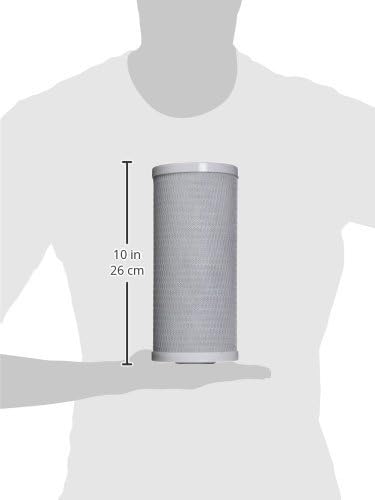
Image 4: iSpring FC15B Filter Dimensions (10 inches tall)
11. Warranty and Support
11.1. Warranty Information
Your iSpring FC15B filter is backed by a 30-day money-back guarantee. For specific warranty details regarding your complete iSpring filtration system, please refer to the documentation provided with your system.
11.2. Customer Support
iSpring offers lifetime technical support from their team in Alpharetta, GA. If you encounter any issues or have questions regarding your FC15B filter or iSpring filtration system, please contact customer support.

Image 5: iSpring Customer Support Process
Related documentsFC15B


Ask a question about this manual
Ask about setup, troubleshooting, compatibility, parts, safety, or missing instructions. Manuals+ will review the question and use this page’s manual context to help answer it.