
1. Introduction
This manual provides comprehensive instructions for the installation, operation, and maintenance of your Baseus HDMI Switcher. This device is designed to manage HDMI signals bidirectionally, allowing for flexible connection configurations between multiple source devices and display units. Please read this manual thoroughly before using the product to ensure optimal performance and longevity.
2. Product Features
- Bidirectional HDMI Switching: Supports either one HDMI input to two HDMI outputs, or two HDMI inputs to one HDMI output.
- 4K HD Resolution Support: Capable of transmitting video resolutions up to 4K@60Hz (with HDMI cables less than 3 meters), 4K@30Hz (with HDMI cables less than 10 meters), and 1080P (with HDMI cables over 10 meters).
- Synchronous Audio and Video Transmission: Ensures high-quality audio and video output without degradation.
- Plug and Play: No external power supply is required for operation, simplifying setup.
- Durable Design: Features concave buttons for easy identification and nickel-plated interfaces for enhanced contact and anti-jamming capabilities.
3. Product Overview
Familiarize yourself with the components and ports of your Baseus HDMI Switcher.
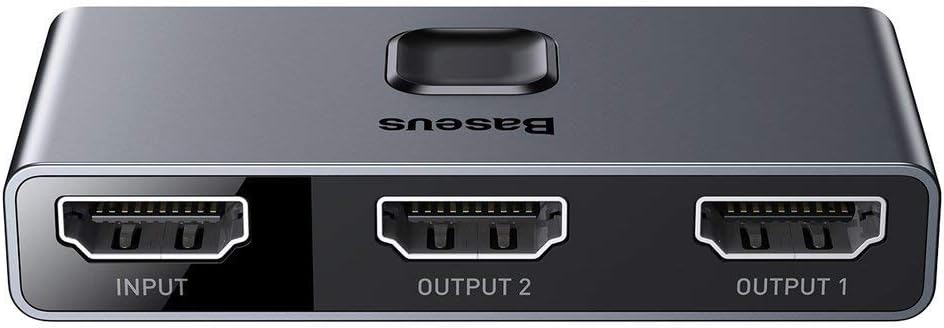
Figure 3.1: Top view of the Baseus HDMI Switcher with clearly labeled INPUT, OUTPUT 1, and OUTPUT 2 ports.

Figure 3.2: Angled view of the Baseus HDMI Switcher, showcasing its sleek design and the central button for switching.

Figure 3.3: Detailed view of the concave switching button and the durable nickel-plated HDMI interfaces.
4. Setup Instructions
The Baseus HDMI Switcher offers two primary connection modes:
4.1. One Input to Two Outputs (1-in-2-out)
This mode allows a single source device to display content on two different screens. Only one output screen can be active at a time.
- Connect your HDMI source device (e.g., computer, game console) to the port labeled INPUT on the switcher.
- Connect your two HDMI display devices (e.g., TV, monitor, projector) to the ports labeled OUTPUT 1 and OUTPUT 2.
- Use the button on the switcher to select which display receives the signal.
4.2. Two Inputs to One Output (2-in-1-out)
This mode allows two different source devices to share a single display. Only one input source can be active at a time.
- Connect your first HDMI source device (e.g., set-top box) to the port labeled OUTPUT 1.
- Connect your second HDMI source device (e.g., PS4) to the port labeled OUTPUT 2.
- Connect your HDMI display device (e.g., TV) to the port labeled INPUT.
- Use the button on the switcher to select which source device's signal is sent to the display.

Figure 4.1: Connection diagrams for 1-in-2-out and 2-in-1-out modes.

Figure 4.2: The switcher is compatible with a wide range of devices including computers, set-top boxes, monitors, game consoles, TVs, and projectors.
5. Operating Instructions
Once all devices are connected according to your desired configuration (1-in-2-out or 2-in-1-out), operating the switcher is straightforward:
- Ensure all connected devices are powered on.
- Press the large, central concave button on the top of the Baseus HDMI Switcher to toggle between the active HDMI channels.
- An indicator light will illuminate next to the currently selected channel (1 or 2), confirming your selection.

Figure 5.1: The switcher supports synchronous audio and video transmission for a complete multimedia experience.
6. Maintenance
To ensure the longevity and proper functioning of your Baseus HDMI Switcher, follow these simple maintenance guidelines:
- Keep the device in a dry environment, away from moisture and extreme temperatures.
- Clean the exterior of the switcher with a soft, dry cloth. Avoid using liquid cleaners or abrasive materials.
- Do not attempt to disassemble or repair the device yourself. Refer to qualified service personnel if issues arise.
- Avoid placing heavy objects on top of the switcher or subjecting it to physical shock.
7. Troubleshooting
If you encounter problems with your Baseus HDMI Switcher, please refer to the following common issues and solutions:
- No Signal / Flickering Screen:
- Ensure all HDMI cables are securely connected to both the switcher and your devices.
- Try using different HDMI cables, as faulty cables can cause signal issues.
- Verify that the correct input/output channel is selected on the switcher by pressing the button.
- Check the resolution compatibility. For optimal performance, especially with 4K, ensure HDMI cable lengths are within recommended limits (see Specifications).
- Restart all connected devices (source and display).
- Poor Picture Quality / Incorrect Resolution:
- Confirm that your source device is outputting the desired resolution and that your display device supports it.
- Refer to the resolution table below regarding cable length and supported resolutions.
- No Audio:
- Ensure audio settings on your source device and display are correctly configured.
- Check HDMI cable connections.

Figure 7.1: Resolution capabilities based on HDMI cable length.
8. Specifications
| Feature | Description |
|---|---|
| Brand | Baseus |
| Model | CAHUB-BC0G |
| Color | Gray |
| Connector Type | HDMI |
| Compatible Devices | Television, Computer, Set-top box, Monitor, Game Consoles (e.g., Switch/PS4), Projector |
| Cable Type | HDMI |
| Number of Ports | 3 (Configurable as 1 Input / 2 Outputs OR 2 Inputs / 1 Output) |
| Resolution Support | Up to 4K@60Hz (cable <3m), 4K@30Hz (cable <10m), 1080P (cable >10m) |
| Bidirectional | Yes |
| External Power Required | No |
9. Warranty and Support
Baseus products are designed for reliability and performance. For specific warranty information, please refer to the warranty card included with your purchase or visit the official Baseus website. If you encounter any issues that cannot be resolved using the troubleshooting guide, please contact Baseus customer support for assistance.
