
Introduction
This manual provides detailed instructions for the installation, operation, and maintenance of your LEDGlow 8-Piece Bluetooth Advanced Million Color LED Motorcycle Lighting Kit. This kit is designed to enhance your motorcycle's appearance with customizable, ultra-bright multi-color accent lighting controlled via a smartphone app or wireless remotes.
What's Included
Your LEDGlow 8-Piece Bluetooth Advanced Million Color LED Motorcycle Lighting Kit includes the following components:
- 2 x 10-inch Flexible Million Color LED Lighting Strips
- 2 x 8-inch Flexible Million Color LED Lighting Strips
- 2 x 6-inch Flexible Million Color LED Lighting Strips
- 2 x 4-inch Flexible Million Color LED Lighting Strips
- 1 x Bluetooth Control Box with Power, Ground, and Brake Control Wires
- 2 x 2-foot 6-piece Power Harnesses
- 2 x Wireless Remotes
- 2 x Crimp-on Ring Terminals
- Double-sided Tape for Control Box Mounting
- Zip Ties for Cable Management
- Installation Guide

Image: All components of the LEDGlow 8-Piece Bluetooth Advanced Million Color LED Motorcycle Lighting Kit as packaged.

Image: All components of the LEDGlow 8-Piece Bluetooth Advanced Million Color LED Motorcycle Lighting Kit laid out for inspection.
Video: An unboxing video demonstrating the contents of the LEDGlow 8-Piece Bluetooth Motorcycle Lighting Kit.
Setup and Installation
Proper installation is crucial for optimal performance and longevity of your lighting kit. Please follow these general guidelines and refer to the included detailed installation guide for specific steps.
Preparation
- Ensure the motorcycle's surface is clean and dry before applying LED strips.
- Plan the placement of each LED strip and the control box to ensure wires can be routed discreetly and securely.
- Disconnect the motorcycle's battery before beginning any electrical work.
Wiring Diagram
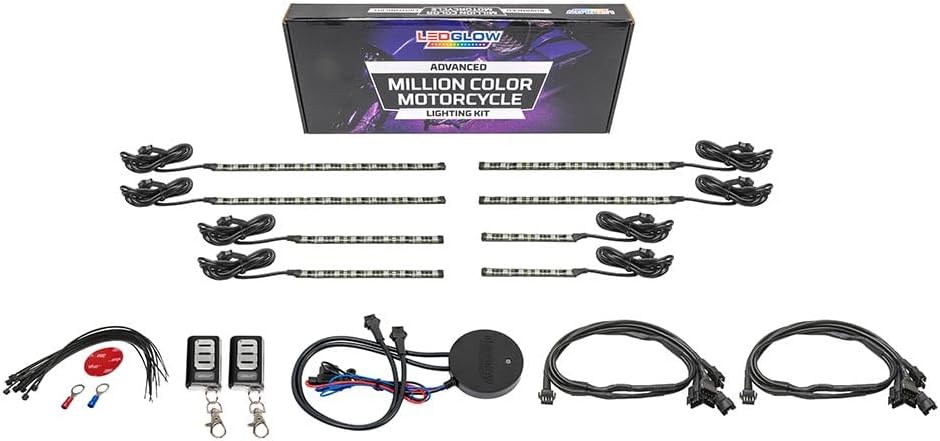
Image: Detailed wiring diagram for the LEDGlow 8-Piece Bluetooth Advanced Million Color LED Motorcycle Lighting Kit, showing connections for the control box, power harnesses, and LED strips.
Installation Steps
- Mount LED Strips: Use the pre-applied adhesive backing to attach the flexible LED strips to desired locations on your motorcycle. Ensure surfaces are clean and free of debris for a secure bond.
- Connect Power Harnesses: Connect the LED strips to the two 6-piece power harnesses. Each strip has 3 feet of power wire for flexible routing.
- Install Control Box: Mount the waterproof Bluetooth control box in a secure, hidden location using the provided double-sided tape.
- Connect Power and Ground: Connect the control box's power and ground wires to your motorcycle's 12V power source (e.g., battery terminals) using the crimp-on ring terminals.
- Connect Brake Light Wire: Connect the brake control wire from the control box to your motorcycle's brake light circuit for the automatic brake light feature.
- Secure Wiring: Use zip ties to neatly route and secure all wiring, preventing interference with moving parts and protecting against damage.
- Reconnect Battery: Once all connections are secure and verified, reconnect the motorcycle's battery.
Operating Instructions
Your LEDGlow lighting kit can be controlled via the dedicated smartphone app or the included wireless remotes.
Smartphone App Control
The LEDGlow Motorcycle Control App is available for iOS and Android devices. Download it from the App Store or Google Play Store.
- Pairing: Enable Bluetooth on your smartphone and open the LEDGlow app. The app will automatically connect to the control box.
- Color Selection: Use the color wheel within the app to select any solid color.
- Brightness & Speed: Adjust the brightness and speed of lighting effects using the dedicated sliders.
- Lighting Modes: Choose from 10 unique lighting modes, including various fades, strobes, and color cycles.
- Presets: Save up to 5 of your favorite color and pattern combinations for quick access.
- Dual Zone Control: Customize colors and patterns independently for two separate sections of your motorcycle.
- Automatic Brake Lights: When enabled in the app settings, the entire bike will illuminate red in unison with your motorcycle's brake lights.
- Hazard Lights: Activate the hazard lights feature from the app settings.
- Low Voltage Shut Off: This safety feature automatically turns off the kit if the battery voltage drops below 10V for more than 60 seconds, preventing battery drain.

Image: The main interface of the LEDGlow Motorcycle Control App, featuring the color wheel, brightness, speed, and mode selection.

Image: The settings screen of the LEDGlow Motorcycle Control App, showing options for Dual Zone Control, Brake Light Feature, Brake Pulse Feature, Hazard Lights, and Low Voltage Shut Off.

Image: A motorcycle demonstrating the automatic brake light feature, where the LED accent lights turn red when the brakes are applied.
Video: A demonstration of the LEDGlow Smartphone Controlled Motorcycle LED Light Kit, showcasing various colors, modes, dual zone control, and brake light features.
Wireless Remotes
Two wireless remotes are included for convenient control of basic functions, such as power on/off and cycling through colors/modes, without needing your smartphone.
Maintenance
To ensure the longevity and optimal performance of your LEDGlow lighting kit, follow these maintenance tips:
- Cleaning: Gently wipe LED strips and the control box with a damp cloth to remove dirt and debris. Avoid harsh chemicals or abrasive cleaners.
- Connection Checks: Periodically inspect all wiring connections to ensure they are secure and free from corrosion.
- Strip Integrity: Check LED strips for any signs of damage or wear. While waterproof, extreme physical impact can compromise their integrity.
Troubleshooting
If you encounter issues with your LEDGlow lighting kit, refer to the following common troubleshooting steps:
- Lights Not Turning On:
- Check all power and ground connections to ensure they are secure.
- Verify the motorcycle battery has sufficient charge.
- Inspect the fuse on the power wire for the control box; replace if blown.
- App Not Connecting:
- Ensure Bluetooth is enabled on your smartphone.
- Restart the LEDGlow app.
- Ensure the control box is powered on.
- Try restarting your smartphone.
- Inconsistent Lighting:
- Check connections to individual LED strips for looseness.
- Ensure no wires are pinched or damaged.
- Brake Lights Not Activating:
- Verify the brake control wire is correctly connected to the motorcycle's brake light circuit.
- Ensure the 'Automatic Brake Lights' feature is enabled in the app settings.
For further assistance, please contact LEDGlow Technical Support.
Specifications
| Brand | LEDGlow |
| Model Number | LU-MC-ADV-M-BC_8pc |
| Number of Pieces | 8 |
| Color | Multi-Color |
| Material | Polyvinyl Chloride (PVC), Silicone |
| Water Resistance Level | Waterproof |
| Voltage | 5 Volts |
| Light Source Type | LED |
| Form Factor | Strip |
| Automotive Fit Type | Universal Fit |
| Item Weight | 1.34 pounds |
| Package Dimensions | 15.55 x 6.02 x 2.28 inches |
| Batteries | 3 CR2 batteries required (included for remotes) |
Warranty and Support
LEDGlow provides a One Year Limited Warranty for this product. Additionally, free lifetime technical support is available to assist you with any questions or issues you may encounter.
For technical support or warranty claims, please refer to the contact information provided in your product packaging or visit the official LEDGlow website.
